RedNectar's Blog
Home | Pages | Archives
GNS3 WorkBench v8.6 is finally out
2014/04/07 12:46
Executive Overview
The next version of GNS3 WorkBench is out. You can download it several forms:
- An entire Virtual Machine as a single blob (although split into two files 2.5G-3G in size)
- The same Virtual Machine as individual files (in case you can’t get the big files)
- A “self-serve” script to allow you to install everything you need to create your own Appliance on whatever flavour of Linux you like (so long it is Mint 16.0)
- Just the WorkBench labs and exercises along with their instruction files. These can be added to your existing Windows or OS X install of GNS3 to give you the essential elements of the WorkBench in the comfort of your own favourite Operating System. This version is only possible because of the great work Jeremy did in fixing the Snapshot function and Instructions features in GNS3 v8.6
The Features in a Nutshell
- Labs are now based on GNS3 Snapshots – so you don’t need to run a script to load the appropriate exercise, you can open exercises/labs from within GNS3
- The help system is now html based, and is integrated into the Help | Instructions feature that was introduced into GNS3 v0.8.5
- Since GNS3 now has VPCS incorporated into the Tools | VPCS menu, there is no need to load VPCS via a startup script to run labs/exercises.
- The above three features have removed now make it possible to deliver a Windows/OS X version of GNS3 WorkBench.
- Labs have been updated to more closely reflect the September 2013 changes to the CCNA exams.
- Over 20 new labs/extensions to labs. Mostly troubleshooting exercises added to tried and true labs.
- Total of 50 different Labs/Scenarios
- Total of approx 140 different exercises/solutions (Snapshots) shared between these labs.
- Ability to add your own exercises – just save your own snapshots and add your own instructions.
More Details for the Nerd at Heart
When I first published GNS3 WorkBench, I had four objectives in mind:
- To produce a set of exercises/labs that could be loaded into GNS3
- To be able to present a page of instructions to accompany each exercise/lab
- To be able to reset the exercise/labs after use
- To integrate VPCS into the process
Thanks to the changes made to the Snapshot function, the Tools | VPCS option and the and Instructions features in GNS3 v0.8.6, my objectives 2-4 above have been pretty much integrated into GNS3 (at last – thanks Jeremy). So I’ve had to completely re-focus on what I want GNS3 WorkBench to be.
So the new GNS3 WorkBench is mostly about supplying the instructions in a much nicer web-based format, and re-working every lab to create snapshots, more instructions and VPCS startup files to fit the new format. And while creating these, keeping in mind that I’d like to make the set of exercises/labs device independent – in other words to be able to produce a set of exercises/labs that could work on Windows or OS X. I also wanted to add some automation to the addition of ASA and Juniper routers, so scripts to help in this regard are part of the package. And finally, I wanted some of the Open Source extensions built into GNS3 WorkBench – like Linux running under Qemu and Vyatta routers running under Oracle VirtualBox.
And the results don’t look too bad either! (Even if I do say so myself).
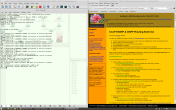
I’ve created three flavours of GNS3 WorkBench comes this time, including an all-time-first Windows/OS X version.
Flavour #1 – The VM Appliance.
Everyone’s favourite. I built the Appliance on Linux Mint 15.0. You can download it as a monolithic 5.6G file (in two parts because SourceForge won’t allow files larger than 5G) or as the individual VM files. If you want a ready-made VM appliance then choose either method, the end result is exactly the same.
I built the appliance on Linux Mint v15.0 – because Mint just had the feel and features that I expect from Linux. Like being able to right-click in a file-browser and choose “Open in Terminal” and “Open as Root“. That’s my kind of environment.
Flavour #2 – Self-serve script. The Bespoke Linux install.
When I was building the master copy of the Appliance I built a GNS3 environment which had copies of several routers, including Juniper, ASA and Vyatta routers as well as Microcore Linux running under Qemu. To achieve this I had to install many applications on my copy of Linux Mint. By to keep a record of what I had installed, I built a script that could reproduce the environment again from a fresh Linux install – so that script became the second way to install GNS3 WorkBench. And I used it over and over to test fresh copies of GNS3 WB. In fact, I created the master copy of the Appliance by running my script on a fresh install of Linux Mint 15.0.
The self-serve script allows you to choose various features that you might want to add to GNS3, like installing Qemu, Wireshark and even downloading some prepared Qemu and VirtualBox Images. Originally it was designed and tested on Linux Mint 15.0 but unfortunately, Mint 15.0 is based on Ubuntu Raring…. “unfortunately support for raring has been dropped from Launchpad (the peril of a 3rd party system!), as support ended in January.” (http://forum.gns3.net/topic6426-28.html) Which means that my self-serve install suddenly stopped working about March 28 – the day after I had finalised my script! However, the good news is that it seems that the script works OK on Linux Mint 16.0 (32 bit), and that there might be some changes afoot to give the GNS3 repository a more permanent home which will make the script work agin on Mint 15 (and probably Ubuntu Raring as well).
The install script carries out the following tasks:
- Updates your Linux OS with the latest patches and adds the repository where GNS3 resides.
- Downloads and installs the scripts to enable support for ASA and Juniper
- If you have downloaded the ASA image, it will be prepared for use in GNS3
- Downloads and installs the following:
-
- NIO tap adapter
- Qemu
- open-ssh server
- CPU Limit utility
- Oracle VirtualBox emulator
- Wireshark
- terminal applications Xterm, PuTTY and Konsole
- dynamips
- GNS3
- the Virtual PC Simulator (VPCS)
- a specially prepared Qemu freeBSD image for use with Juniper routers
- if you have Juniper image available, the script then takes you through the tedious Juniper install process.
- Downloads a collection of Virtual Box VMs that are used in the GNS3 WorkBench
- Downloads the GNS3 WorkBench exercises and sets up the default settings in GNS3 and your desktop
- Fixes file permissions so you can run the labs smoothly
The script is pretty rough – very little error checking, and if you end up with a wrong version of something or some application fails to install, then… well… you are welcome to re-write the script!
Flavour #3 – Windows/OS X Install.
Not exactly the full GNS3 WorkBench (it will not put pretty icons on your desktop) but so long as you have GNS3 installed along with Qemu and Virtual Box, you will get all the exercises/labs – except you are on your own to make the Juniper/ASA labs work.
So good luck. Let me know if you have any problems – rednectar.chris is my gmail account.
RedNectar
Chris Welsh
Posted by RedNectar Chris Welsh
Categories: CCNA, Certifications, Cisco, dynamips, GNS3, GNS3 WorkBench, ICND1, ICND2, Labs, Mac OS X, Microsoft, Routing, Wireshark
Tags: Linux Mint, WorkBench
« Older Newer »
Leave a Reply
Mobile Site | Full Site
Get a free blog at WordPress.com Theme: WordPress Mobile Edition by Alex King.
Hi again, regards the previous comment about the archive, I used WINRAR again and even though it did say again that the archive is corrupt, it did uncompress all files successfully.
However, VMWare Tools is not installed so I am not able to access shared drives which is where my IOS files are located. So I need a root password to be able to do this, are you able to give it please.?
many thanks.
By Dave on 2014/06/21 at 23:24
Glad you got the zip file issue sorted out. And although I had VMware Tools installed, I also noticed that it decided to download VMware Tools again when I copied it to a Windows PC.
The root password is password
By RedNectar Chris Welsh on 2014/06/22 at 15:39
Hi, Definitely a problem with this archive. When using PKZip the response is that it cannot open the file as an archive. WINRAR actually does see the archived folder but says that the archive is corrupt and bombs out.
By Dave on 2014/06/21 at 22:38
I am having the same problem described above. It seems to have downloaded ok but all the windows unzip apps I try seem to have problems unzipping the spanned zip files.
By Lloyd on 2014/06/11 at 08:04
PKzip seems to work OK. I have no idea why Windows can’t make their zip code work for multiple files.
By RedNectar Chris Welsh on 2014/06/12 at 11:49
I downloaded the 2 big files in the appliance folder, however every time I tried to extract them the program ask me for a password for the files. I’m using peazip in windows 7, but just to make sure I downloaded 7zip and Tried to extract it and I get a different error. can you please help me or give me a workaround for this.
thank you.
By B Jesus on 2014/04/22 at 07:17
There is no password on the zip files. Did you check the md5 checksums of the files you downloaded to see that they match the checksums shown in the readme file? And of course for a workaround, the whole reason there is a directory called smaller files is to help people overcome downloading problems with big files.
By RedNectar Chris Welsh on 2014/04/22 at 14:28