
Previously I’ve espoused the greatness of using jq with icurl, calling jq icurl’s best friend in the first post in this series, and in the second post, I concentrated more on honing the icurl API query to extract just the data you need from ACI.
This post is nothing more than a bunch of practical examples that you might find useful to extract information from ACI. For explanations of how they work, refer back to the first two posts, or check out the Cisco APIC REST API Configuration Guide.
At the end of the day, these examples are meant to give you models on which you can explore icurl and jq to meet your own needs. Hopefully there is enough examples here to give you a scaffolding on which to build your own solutions.
Before you start, make sure you have
You’ll find queries to:
- Work with EPGs and Contracts
- Work with EPGs, BDs and Subnets
- List all EPGs with linked BD – egrep
- List all EPGs with linked BD – jq
- List all BDs, BD Subnets and linked EPGs
- List all BDs, their Tenant, Subnets and linked EPGs
- List all BD Subnets grouped by Tenant and BD
- List all BDs and BD Subnets grouped by Tenant
- List Tenants with VRFs with BDs with Subnets
- List all EPG and BD Subnets grouped by Tenant
- Find the SVI and Routed Interface Subnets on a L3Out
- Find missing EPG configuration
- Find stuff
- Find endpoint related information
- Examine Physical Interfaces etc
Prepare yourself
Before reading this post, get yourself logged into an APIC, and got to a bash shell. It’s also a good idea to stop the bash shell from timing out by setting TMOUT=0. Here’s me logging in into my lab APIC as user T17 from my Mac.
➜ ~ ssh T17@apic1.fab2.hl.dns -oHostKeyAlgorithms=+ssh-rsa
Housley Fabric#2 ACI Lab
T17@apic1.fab2.hl.dns's password: *mypassword*
apic1# bash
T17@apic1:~> TMOUT=0
T17@apic1:~>
Note: |
In the examples that follow, I used http:// to invoke icurl – if you want to use https:// – then add a -k flag to the icurl command:icurl -k https://localhost/api/... etcI’ll also use a -s flag to the icurl command to suppress the output of the status information that would otherwise clutter up the output |
All the examples that follow will pipe the output into jq. I’ll use orange text for the icurl portion of any example, and purple text for the jq portion. If there is a part of the command I want to draw attention to, I’ll use red or green.
Interpreting my results
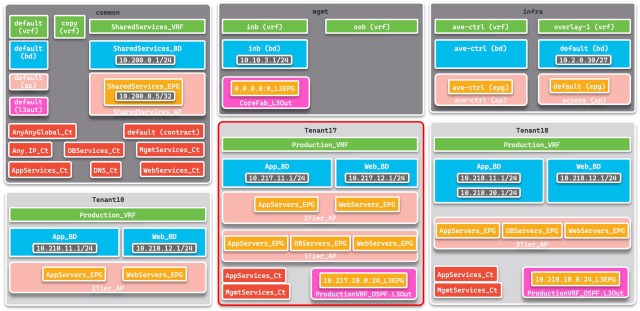
If you understand the logical model of my lab it will help you interpret the results. Open this diagram in a separate window while you examine the results of the examples below. The common Tenant holds a collection of shared services, including a collection of Contracts that are used by multiple Tenants, and there are three very similar user-defined Tenants, creatively called Tenant10, Tenant17 (the Tenant used in most examples) and Tenant18.
Working with EPGs and Contracts
List all EPGs showing Contracts
The following will give a list of all EPGs in the system along with the Contracts they provide and consume.
T17@apic1:~> icurl -s "http://localhost/api/node/class/\
fvAEPg.json?\
rsp-prop-include=naming-only\
&order-by=fvAEPg.dn\
&rsp-subtree=children\
&rsp-subtree-class=fvRsCons,fvRsProv" | jq
Show result
{
  "totalCount" : "13",
  "imdata" : [
    {
      "fvAEPg" : {
        "attributes" : {
          "dn" : "uni/tn-Tenant10/ap-2Tier_AP/epg-AppServers_EPG",
          "name" : "AppServers_EPG"
        },
        "children" : [
          {
            "fvRsProv" : {
              "attributes" : {
                "tnVzBrCPName" : "AppServices_Ct"
              }
            }
          }
        ]
      }
    },
    {
      "fvAEPg" : {
        "attributes" : {
          "dn" : "uni/tn-Tenant10/ap-2Tier_AP/epg-WebServers_EPG",
          "name" : "WebServers_EPG"
        },
        "children" : [
          {
            "fvRsCons" : {
              "attributes" : {
                "tnVzBrCPName" : "AppServices_Ct"
              }
            }
          }
        ]
      }
    },
    {
      "fvAEPg" : {
        "attributes" : {
          "dn" : "uni/tn-Tenant17/ap-2Tier_AP/epg-AppServers_EPG",
          "name" : "AppServers_EPG"
        },
        "children" : [
          {
            "fvRsCons" : {
              "attributes" : {
                "tnVzBrCPName" : "Any.IP_Ct"
              }
            }
          }
        ]
      }
    },
    {
      "fvAEPg" : {
        "attributes" : {
          "dn" : "uni/tn-Tenant17/ap-2Tier_AP/epg-WebServers_EPG",
          "name" : "WebServers_EPG"
        }
      }
    },
    {
      "fvAEPg" : {
        "attributes" : {
          "dn" : "uni/tn-Tenant17/ap-3Tier_AP/epg-AppServers_EPG",
          "name" : "AppServers_EPG"
        },
        "children" : [
          {
            "fvRsProv" : {
              "attributes" : {
                "tnVzBrCPName" : "AppServices_Ct"
              }
            }
          },
          {
            "fvRsProv" : {
              "attributes" : {
                "tnVzBrCPName" : "MgmtServices_Ct"
              }
            }
          },
          {
            "fvRsCons" : {
              "attributes" : {
                "tnVzBrCPName" : "DBServices_Ct"
              }
            }
          },
          {
            "fvRsCons" : {
              "attributes" : {
                "tnVzBrCPName" : "MgmtServices_Ct"
              }
            }
          }
        ]
      }
    },
    {
      "fvAEPg" : {
        "attributes" : {
          "dn" : "uni/tn-Tenant17/ap-3Tier_AP/epg-DBServers_EPG",
          "name" : "DBServers_EPG"
        },
        "children" : [
          {
            "fvRsProv" : {
              "attributes" : {
                "tnVzBrCPName" : "DBServices_Ct"
              }
            }
          }
        ]
      }
    },
    {
      "fvAEPg" : {
        "attributes" : {
          "dn" : "uni/tn-Tenant17/ap-3Tier_AP/epg-WebServers_EPG",
          "name" : "WebServers_EPG"
        },
        "children" : [
          {
            "fvRsProv" : {
              "attributes" : {
                "tnVzBrCPName" : "MgmtServices_Ct"
              }
            }
          },
          {
            "fvRsCons" : {
              "attributes" : {
                "tnVzBrCPName" : "MgmtServices_Ct"
              }
            }
          },
          {
            "fvRsCons" : {
              "attributes" : {
                "tnVzBrCPName" : "AppServices_Ct"
              }
            }
          }
        ]
      }
    },
    {
      "fvAEPg" : {
        "attributes" : {
          "dn" : "uni/tn-Tenant18/ap-3Tier_AP/epg-AppServers_EPG",
          "name" : "AppServers_EPG"
        },
        "children" : [
          {
            "fvRsProv" : {
              "attributes" : {
                "tnVzBrCPName" : "AppServices_Ct"
              }
            }
          },
          {
            "fvRsProv" : {
              "attributes" : {
                "tnVzBrCPName" : "MgmtServices_Ct"
              }
            }
          },
          {
            "fvRsCons" : {
              "attributes" : {
                "tnVzBrCPName" : "MgmtServices_Ct"
              }
            }
          },
          {
            "fvRsCons" : {
              "attributes" : {
                "tnVzBrCPName" : "DBServices_Ct"
              }
            }
          }
        ]
      }
    },
    {
      "fvAEPg" : {
        "attributes" : {
          "dn" : "uni/tn-Tenant18/ap-3Tier_AP/epg-DBServers_EPG",
          "name" : "DBServers_EPG"
        }
      }
    },
    {
      "fvAEPg" : {
        "attributes" : {
          "dn" : "uni/tn-Tenant18/ap-3Tier_AP/epg-WebServers_EPG",
          "name" : "WebServers_EPG"
        },
        "children" : [
          {
            "fvRsProv" : {
              "attributes" : {
                "tnVzBrCPName" : "MgmtServices_Ct"
              }
            }
          },
          {
            "fvRsCons" : {
              "attributes" : {
                "tnVzBrCPName" : "MgmtServices_Ct"
              }
            }
          },
          {
            "fvRsCons" : {
              "attributes" : {
                "tnVzBrCPName" : "AppServices_Ct"
              }
            }
          }
        ]
      }
    },
    {
      "fvAEPg" : {
        "attributes" : {
          "dn" : "uni/tn-common/ap-SharedServices_AP/epg-SharedServices_EPG",
          "name" : "SharedServices_EPG"
        },
        "children" : [
          {
            "fvRsProv" : {
              "attributes" : {
                "tnVzBrCPName" : "DNS_Ct"
              }
            }
          }
        ]
      }
    },
    {
      "fvAEPg" : {
        "attributes" : {
          "dn" : "uni/tn-infra/ap-access/epg-default",
          "name" : "default"
        }
      }
    },
    {
      "fvAEPg" : {
        "attributes" : {
          "dn" : "uni/tn-infra/ap-ave-ctrl/epg-ave-ctrl",
          "name" : "ave-ctrl"
        }
      }
    }
  ]
}
List only EPGs with Contracts
Same query, excluding any EPG that does not provide or consume a Contract. I’ve noted the differences between the two examples in green. If you expand the result, you’ll see there are four fewer EPGs displayed because they don’t either provide or consume a Contract.
T17@apic1:~> icurl -s "http://localhost/api/node/class/\
fvAEPg.json?\
rsp-prop-include=naming-only\
&order-by=fvAEPg.dn\
&rsp-subtree=children\
&rsp-subtree-class=fvRsCons,fvRsProv\
&rsp-subtree-include=required" | jq
Show result
{
  "totalCount" : "9",
  "imdata" : [
    {
      "fvAEPg" : {
        "attributes" : {
          "dn" : "uni/tn-Tenant10/ap-2Tier_AP/epg-AppServers_EPG",
          "name" : "AppServers_EPG"
        },
        "children" : [
          {
            "fvRsProv" : {
              "attributes" : {
                "tnVzBrCPName" : "AppServices_Ct"
              }
            }
          }
        ]
      }
    },
    {
      "fvAEPg" : {
        "attributes" : {
          "dn" : "uni/tn-Tenant10/ap-2Tier_AP/epg-WebServers_EPG",
          "name" : "WebServers_EPG"
        },
        "children" : [
          {
            "fvRsCons" : {
              "attributes" : {
                "tnVzBrCPName" : "AppServices_Ct"
              }
            }
          }
        ]
      }
    },
    {
      "fvAEPg" : {
        "attributes" : {
          "dn" : "uni/tn-Tenant17/ap-2Tier_AP/epg-AppServers_EPG",
          "name" : "AppServers_EPG"
        },
        "children" : [
          {
            "fvRsCons" : {
              "attributes" : {
                "tnVzBrCPName" : "Any.IP_Ct"
              }
            }
          }
        ]
      }
    },
    {
      "fvAEPg" : {
        "attributes" : {
          "dn" : "uni/tn-Tenant17/ap-3Tier_AP/epg-AppServers_EPG",
          "name" : "AppServers_EPG"
        },
        "children" : [
          {
            "fvRsProv" : {
              "attributes" : {
                "tnVzBrCPName" : "AppServices_Ct"
              }
            }
          },
          {
            "fvRsProv" : {
              "attributes" : {
                "tnVzBrCPName" : "MgmtServices_Ct"
              }
            }
          },
          {
            "fvRsCons" : {
              "attributes" : {
                "tnVzBrCPName" : "DBServices_Ct"
              }
            }
          },
          {
            "fvRsCons" : {
              "attributes" : {
                "tnVzBrCPName" : "MgmtServices_Ct"
              }
            }
          }
        ]
      }
    },
    {
      "fvAEPg" : {
        "attributes" : {
          "dn" : "uni/tn-Tenant17/ap-3Tier_AP/epg-DBServers_EPG",
          "name" : "DBServers_EPG"
        },
        "children" : [
          {
            "fvRsProv" : {
              "attributes" : {
                "tnVzBrCPName" : "DBServices_Ct"
              }
            }
          }
        ]
      }
    },
    {
      "fvAEPg" : {
        "attributes" : {
          "dn" : "uni/tn-Tenant17/ap-3Tier_AP/epg-WebServers_EPG",
          "name" : "WebServers_EPG"
        },
        "children" : [
          {
            "fvRsProv" : {
              "attributes" : {
                "tnVzBrCPName" : "MgmtServices_Ct"
              }
            }
          },
          {
            "fvRsCons" : {
              "attributes" : {
                "tnVzBrCPName" : "MgmtServices_Ct"
              }
            }
          },
          {
            "fvRsCons" : {
              "attributes" : {
                "tnVzBrCPName" : "AppServices_Ct"
              }
            }
          }
        ]
      }
    },
    {
      "fvAEPg" : {
        "attributes" : {
          "dn" : "uni/tn-Tenant18/ap-3Tier_AP/epg-AppServers_EPG",
          "name" : "AppServers_EPG"
        },
        "children" : [
          {
            "fvRsProv" : {
              "attributes" : {
                "tnVzBrCPName" : "AppServices_Ct"
              }
            }
          },
          {
            "fvRsProv" : {
              "attributes" : {
                "tnVzBrCPName" : "MgmtServices_Ct"
              }
            }
          },
          {
            "fvRsCons" : {
              "attributes" : {
                "tnVzBrCPName" : "MgmtServices_Ct"
              }
            }
          },
          {
            "fvRsCons" : {
              "attributes" : {
                "tnVzBrCPName" : "DBServices_Ct"
              }
            }
          }
        ]
      }
    },
    {
      "fvAEPg" : {
        "attributes" : {
          "dn" : "uni/tn-Tenant18/ap-3Tier_AP/epg-WebServers_EPG",
          "name" : "WebServers_EPG"
        },
        "children" : [
          {
            "fvRsProv" : {
              "attributes" : {
                "tnVzBrCPName" : "MgmtServices_Ct"
              }
            }
          },
          {
            "fvRsCons" : {
              "attributes" : {
                "tnVzBrCPName" : "MgmtServices_Ct"
              }
            }
          },
          {
            "fvRsCons" : {
              "attributes" : {
                "tnVzBrCPName" : "AppServices_Ct"
              }
            }
          }
        ]
      }
    },
    {
      "fvAEPg" : {
        "attributes" : {
          "dn" : "uni/tn-common/ap-SharedServices_AP/epg-SharedServices_EPG",
          "name" : "SharedServices_EPG"
        },
        "children" : [
          {
            "fvRsProv" : {
              "attributes" : {
                "tnVzBrCPName" : "DNS_Ct"
              }
            }
          }
        ]
      }
    }
  ]
}
List only EPGs with Contracts – formatted with jq
Use jq to isolate the Tenant, Application Profile, EPG and Contract names and format them nicely.
T17@apic1:~> icurl -s "http://localhost/api/node/class/\
fvAEPg.json?\
rsp-prop-include=naming-only\
&order-by=fvAEPg.dn\
&rsp-subtree=children\
&rsp-subtree-class=fvRsCons,fvRsProv\
&rsp-subtree-include=required" |
jq '.imdata[].fvAEPg |
{Tenant: .attributes.dn|(capture("uni/tn-(?<T>.*)/ap-").T),
AP: .attributes.dn|(capture("ap-(?<A>.*)/epg-").A),
EPG: .attributes.name, Contracts: .children} |
{Tenant: .Tenant, AP: .AP, EPG: .EPG,
Consumed: [.Contracts[].fvRsCons.attributes.tnVzBrCPName|values],
Provided: [.Contracts[].fvRsProv.attributes.tnVzBrCPName|values]}'
Show result
{
  "Tenant": "Tenant10",
  "AP": "2Tier_AP",
  "EPG": "AppServers_EPG",
  "Consumed": [],
  "Provided": [
    "AppServices_Ct"
  ]
}
{
  "Tenant": "Tenant10",
  "AP": "2Tier_AP",
  "EPG": "WebServers_EPG",
  "Consumed": [
    "AppServices_Ct"
  ],
  "Provided": []
}
{
  "Tenant": "Tenant17",
  "AP": "2Tier_AP",
  "EPG": "AppServers_EPG",
  "Consumed": [
    "Any.IP_Ct"
  ],
  "Provided": []
}
{
  "Tenant": "Tenant17",
  "AP": "3Tier_AP",
  "EPG": "AppServers_EPG",
  "Consumed": [
    "DBServices_Ct",
    "MgmtServices_Ct"
  ],
  "Provided": [
    "MgmtServices_Ct",
    "AppServices_Ct"
  ]
}
{
  "Tenant": "Tenant17",
  "AP": "3Tier_AP",
  "EPG": "DBServers_EPG",
  "Consumed": [],
  "Provided": [
    "DBServices_Ct"
  ]
}
{
  "Tenant": "Tenant17",
  "AP": "3Tier_AP",
  "EPG": "WebServers_EPG",
  "Consumed": [
    "AppServices_Ct",
    "MgmtServices_Ct"
  ],
  "Provided": [
    "MgmtServices_Ct"
  ]
}
{
  "Tenant": "Tenant18",
  "AP": "3Tier_AP",
  "EPG": "AppServers_EPG",
  "Consumed": [
    "DBServices_Ct",
    "MgmtServices_Ct"
  ],
  "Provided": [
    "AppServices_Ct",
    "MgmtServices_Ct"
  ]
}
{
  "Tenant": "Tenant18",
  "AP": "3Tier_AP",
  "EPG": "WebServers_EPG",
  "Consumed": [
    "AppServices_Ct",
    "MgmtServices_Ct"
  ],
  "Provided": [
    "MgmtServices_Ct"
  ]
}
{
  "Tenant": "common",
  "AP": "SharedServices_AP",
  "EPG": "SharedServices_EPG",
  "Consumed": [],
  "Provided": [
    "DNS_Ct"
  ]
}
List EPGs with Contracts for a Tenant
If you only want the EPGs and Contracts for a particular Tenant, use a bash variable for the Tenant name, then you can just copy and paste my example. By now you know what the green text means.
T17@apic1:~> T=Tenant17 ;# Replace Tenant17 with your Tenant name
T17@apic1:~> icurl -s "http://localhost/api/node/class/\
fvAEPg.json?\
rsp-prop-include=naming-only\
&order-by=fvAEPg.dn\
&rsp-subtree=children\
&query-target-filter=wcard(fvAEPg.dn,\"uni/tn-${T}\")\
&rsp-subtree-class=fvRsCons,fvRsProv\
&rsp-subtree-include=required" |
jq '.imdata[].fvAEPg |
{EPG: .attributes.name, Contracts: .children} |
{EPG: .EPG,
Consumed: [.Contracts[].fvRsCons.attributes.tnVzBrCPName|values],
Provided: [.Contracts[].fvRsProv.attributes.tnVzBrCPName|values]}'
Show result
{
  "EPG": "AppServers_EPG",
  "Consumed": [
    "Any.IP_Ct"
  ],
  "Provided": []
}
{
  "EPG": "AppServers_EPG",
  "Consumed": [
    "DBServices_Ct",
    "MgmtServices_Ct"
  ],
  "Provided": [
    "AppServices_Ct",
    MgmtServices_Ct"
  ]
}
{
  "EPG": "DBServers_EPG",
  "Consumed": [],
  "Provided": [
    "DBServices_Ct"
  ]
}
{
  "EPG": "WebServers_EPG",
  "Consumed": [
    "MgmtServices_Ct",
    "AppServices_Ct"
  ],
  "Provided": [
    "MgmtServices_Ct"
  ]
}
List EPGs with Contracts for a Tenant grouped by Application Profile
If you have multiple Application Profiles in your Tenant, you may wish to change the above to:
T17@apic1:~> T=Tenant17 ;# Replace Tenant17 with your Tenant name
T17@apic1:~> icurl -s "http://localhost/api/node/mo/\
uni/tn-${T}.json?\
rsp-prop-include=naming-only\
&query-target=children\
&rsp-subtree=full\
&target-subtree-class=fvAp,fvAEPg\
&rsp-subtree-class=fvRsCons,fvRsProv\
&rsp-subtree-include=required" |
jq '.imdata[].fvAp |
[{AP: .attributes.name, EPG: [.children[]]} |
.AP, [.EPG[].fvAEPg |
{EPG: .attributes.name, Contracts: .children} |
{EPG: .EPG,
Consumed: [.Contracts[].fvRsCons.attributes.tnVzBrCPName|values],
Provided: [.Contracts[].fvRsProv.attributes.tnVzBrCPName|values]}]]'
Show result
[
"3Tier_AP",
  [
    {
       "EPG" : "DBServers_EPG",
       "Consumed" : [],
       "Provided" : [
         "DBServices_Ct"
      ]
    },
    {
       "EPG" : "AppServers_EPG",
       "Consumed" : [
         "DBServices_Ct",
         "MgmtServices_Ct"
      ],
       "Provided" : [
         "AppServices_Ct",
         "MgmtServices_Ct"
      ]
    },
    {
       "EPG" : "WebServers_EPG",
       "Consumed" : [
         "MgmtServices_Ct",
         "AppServices_Ct"
      ],
       "Provided" : [
         "MgmtServices_Ct"
      ]
    }
  ]
]
[
"2Tier_AP",
  [
    {
       "EPG" : "AppServers_EPG",
       "Consumed" : [
         "Any.IP_Ct"
      ],
       "Provided" : []
    }
  ]
]
| Note: |
Note the extra [] in the above used to create arrays for the APs and the EPGs, since there are multiples of each. I could have avoided the outer pair by piping the result through jq one more time, using the -s (slurp) flag. i.e.
|
Listing EPGs grouped by VRF
This is a little tricky, and requires multiple commands – or at least I haven’t figured out a way to display all the information in a single jq filter. This listing is an improvement on my answer to this question in the Cisco Community forum.
The problem is that there is no direct link between EPGs and VRFs. Each EPG is linked to a BD, and each BD is linked to a VRF. So the logic here is to get a list of the VRFs, then query each BD linked to that VRF to yield its linked EPGs.
T17@apic1:~> for VRF in $(icurl -s "http://localhost/api/\
node/class/fvCtx.json"|
jq -r .imdata[].fvCtx.attributes.dn)
do
  echo EPGs for VRF ${VRF}
  for BD in $(icurl -s "http://localhost/api/node/mo/\
${VRF}.json?query-target=children\
&target-subtree-class=fvRtCtx"|
  jq -r '.imdata[].fvRtCtx.attributes |
  (.dn|capture("rtctx-\\[(?<B>.*)]").B)')
  do
    icurl -s "http://localhost/api/node/mo/${BD}.json?\
query-target=children\
&target-subtree-class=fvRtBd"|
    jq '.imdata[].fvRtBd.attributes.tDn'
  done
done
Show result
EPGs for VRF uni/tn-common/ctx-copy
EPGs for VRF uni/tn-infra/ctx-overlay-1
"uni/tn-infra/ap-access/epg-default"
EPGs for VRF uni/tn-infra/ctx-ave-ctrl
"uni/tn-infra/ap-ave-ctrl/epg-ave-ctrl"
EPGs for VRF uni/tn-common/ctx-default
"uni/tn-Tenant18/ap-2Tier_AP/epg-WebServers_EPG"
"uni/tn-Tenant18/ap-2Tier_AP/epg-AppServers_EPG"
EPGs for VRF uni/tn-mgmt/ctx-oob
EPGs for VRF uni/tn-mgmt/ctx-inb
EPGs for VRF uni/tn-common/ctx-SharedServices_VRF
"uni/tn-common/ap-SharedServices_AP/epg-SharedServices_EPG"
EPGs for VRF uni/tn-Tenant10/ctx-Production_VRF
"uni/tn-Tenant10/ap-2Tier_AP/epg-AppServers_EPG"
"uni/tn-Tenant10/ap-2Tier_AP/epg-WebServers_EPG"
EPGs for VRF uni/tn-Tenant17/ctx-Production_VRF
"uni/tn-Tenant17/ap-3Tier_AP/epg-DBServers_EPG"
"uni/tn-Tenant17/ap-3Tier_AP/epg-AppServers_EPG"
"uni/tn-Tenant17/ap-2Tier_AP/epg-AppServers_EPG"
"uni/tn-Tenant17/ap-3Tier_AP/epg-WebServers_EPG"
"uni/tn-Tenant17/ap-2Tier_AP/epg-WebServers_EPG"
EPGs for VRF uni/tn-Tenant18/ctx-Production_VRF
"uni/tn-Tenant18/ap-3Tier_AP/epg-WebServers_EPG"
"uni/tn-Tenant18/ap-3Tier_AP/epg-AppServers_EPG"
"uni/tn-Tenant18/ap-3Tier_AP/epg-DBServers_EPG"
Same logic, just fancier output.
T17@apic1:~> for VRF in $(icurl -s "http://localhost/api/\
node/class/fvCtx.json"|
jq -r .imdata[].fvCtx.attributes.dn)
do
  echo EPGs for Tenant $(echo ${VRF}|cut -d'/' -f2 |
  cut -b 4-) VRF $(echo ${VRF}|cut -d'/' -f3|cut -b 5-)
  for BD in $(icurl -s "http://localhost/api/node/mo/\
${VRF}.json?query-target=children\
&target-subtree-class=fvRtCtx"|
  jq -r '.imdata[].fvRtCtx.attributes |
  (.dn|capture("rtctx-\\[(?<B>.*)]").B)')
  do
    icurl -s "http://localhost/api/node/mo/${BD}.json?\
query-target=children\
&target-subtree-class=fvRtBd"|
    jq '.imdata[].fvRtBd.attributes|
    ("AP/EPG: \(.tDn|
    capture("'"/ap-(?<A>.*)/epg-"'").A)\/\(.tDn|
    capture("'"/epg-(?<E>.*)"'").E)")'
  done
done
Show result
EPGs for Tenant common VRF copy
EPGs for Tenant infra VRF overlay-1
"AP/EPG: access/default"
EPGs for Tenant infra VRF ave-ctrl
"AP/EPG: ave-ctrl/ave-ctrl"
EPGs for Tenant common VRF default
"AP/EPG: 2Tier_AP/WebServers_EPG"
"AP/EPG: 2Tier_AP/AppServers_EPG"
EPGs for Tenant mgmt VRF oob
EPGs for Tenant mgmt VRF inb
EPGs for Tenant common VRF SharedServices_VRF
"AP/EPG: SharedServices_AP/SharedServices_EPG"
EPGs for Tenant Tenant10 VRF Production_VRF
"AP/EPG: 2Tier_AP/AppServers_EPG"
"AP/EPG: 2Tier_AP/WebServers_EPG"
EPGs for Tenant Tenant17 VRF Production_VRF
"AP/EPG: 3Tier_AP/DBServers_EPG"
"AP/EPG: 3Tier_AP/AppServers_EPG"
"AP/EPG: 2Tier_AP/AppServers_EPG"
"AP/EPG: 3Tier_AP/WebServers_EPG"
"AP/EPG: 2Tier_AP/WebServers_EPG"
EPGs for Tenant Tenant18 VRF Production_VRF
"AP/EPG: 3Tier_AP/WebServers_EPG"
"AP/EPG: 3Tier_AP/AppServers_EPG"
"AP/EPG: 3Tier_AP/DBServers_EPG"
Working with EPGs, BDs and Subnets
The following will give a list of all EPGs and the Bridge Domain each is linked to. The rsp-prop-include=naming-only option won’t show the tnFvBDName field, so another method of managing the copious output is required. Here are two methods:
List all EPGs with linked BD – egrep
First using egrep
T17@apic1:~> T=Tenant17 ;# Replace Tenant17 with your Tenant name
T17@apic1:~> icurl -s "http://localhost/api/node/class/\
fvAEPg.json?\
rsp-subtree=children\
&rsp-subtree-class=fvRsBd" | jq |
egrep "{|}|: \[|\]$|totalCount\":|dn\":|name\":|tnFvBDName\":"
Show result
{
  "totalCount": "13",
  "imdata": [
    {
      "fvAEPg": {
        "attributes": {
          "dn": "uni/tn-Tenant10/ap-2Tier_AP/epg-WebServers_EPG",
          "name": "WebServers_EPG",
        },
        "children": [
          {
            "fvRsBd": {
              "attributes": {
                "tnFvBDName": "Web_BD",
              }
            }
          }
        ]
      }
    },
    {
      "fvAEPg": {
        "attributes": {
          "dn": "uni/tn-Tenant10/ap-2Tier_AP/epg-AppServers_EPG",
          "name": "AppServers_EPG",
        },
        "children": [
          {
            "fvRsBd": {
              "attributes": {
                "tnFvBDName": "App_BD",
              }
            }
          }
        ]
      }
    },
    {
      "fvAEPg": {
        "attributes": {
          "dn": "uni/tn-Tenant18/ap-3Tier_AP/epg-WebServers_EPG",
          "name": "WebServers_EPG",
        },
        "children": [
          {
            "fvRsBd": {
              "attributes": {
                "tnFvBDName": "Web_BD",
              }
            }
          }
        ]
      }
    },
    {
      "fvAEPg": {
        "attributes": {
          "dn": "uni/tn-Tenant18/ap-3Tier_AP/epg-DBServers_EPG",
          "name": "DBServers_EPG",
        },
        "children": [
          {
            "fvRsBd": {
              "attributes": {
                "tnFvBDName": "App_BD",
              }
            }
          }
        ]
      }
    },
    {
      "fvAEPg": {
        "attributes": {
          "dn": "uni/tn-Tenant18/ap-3Tier_AP/epg-AppServers_EPG",
          "name": "AppServers_EPG",
        },
        "children": [
          {
            "fvRsBd": {
              "attributes": {
                "tnFvBDName": "App_BD",
              }
            }
          }
        ]
      }
    },
    {
      "fvAEPg": {
        "attributes": {
          "dn": "uni/tn-Tenant17/ap-3Tier_AP/epg-WebServers_EPG",
          "name": "WebServers_EPG",
        },
        "children": [
          {
            "fvRsBd": {
              "attributes": {
                "tnFvBDName": "Web_BD",
              }
            }
          }
        ]
      }
    },
    {
      "fvAEPg": {
        "attributes": {
          "dn": "uni/tn-Tenant17/ap-3Tier_AP/epg-AppServers_EPG",
          "name": "AppServers_EPG",
        },
        "children": [
          {
            "fvRsBd": {
              "attributes": {
                "tnFvBDName": "App_BD",
              }
            }
          }
        ]
      }
    },
    {
      "fvAEPg": {
        "attributes": {
          "dn": "uni/tn-Tenant17/ap-3Tier_AP/epg-DBServers_EPG",
          "name": "DBServers_EPG",
        },
        "children": [
          {
            "fvRsBd": {
              "attributes": {
                "tnFvBDName": "App_BD",
              }
            }
          }
        ]
      }
    },
    {
      "fvAEPg": {
        "attributes": {
          "dn": "uni/tn-Tenant17/ap-2Tier_AP/epg-WebServers_EPG",
          "name": "WebServers_EPG",
        },
        "children": [
          {
            "fvRsBd": {
              "attributes": {
                "tnFvBDName": "Web_BD",
              }
            }
          }
        ]
      }
    },
    {
      "fvAEPg": {
        "attributes": {
          "dn": "uni/tn-Tenant17/ap-2Tier_AP/epg-AppServers_EPG",
          "name": "AppServers_EPG",
        },
        "children": [
          {
            "fvRsBd": {
              "attributes": {
                "tnFvBDName": "App_BD",
              }
            }
          }
        ]
      }
    },
    {
      "fvAEPg": {
        "attributes": {
          "dn": "uni/tn-infra/ap-access/epg-default",
          "name": "default",
        },
        "children": [
          {
            "fvRsBd": {
              "attributes": {
                "tnFvBDName": "default",
              }
            }
          }
        ]
      }
    },
    {
      "fvAEPg": {
        "attributes": {
          "dn": "uni/tn-infra/ap-ave-ctrl/epg-ave-ctrl",
          "name": "ave-ctrl",
        },
        "children": [
          {
            "fvRsBd": {
              "attributes": {
                "tnFvBDName": "ave-ctrl",
              }
            }
          }
        ]
      }
    },
    {
      "fvAEPg": {
        "attributes": {
          "dn": "uni/tn-common/ap-SharedServices_AP/epg-SharedServices_EPG",
          "name": "SharedServices_EPG",
        },
        "children": [
          {
            "fvRsBd": {
              "attributes": {
                "tnFvBDName": "SharedServices_BD",
              }
            }
          }
        ]
      }
    }
  ]
}
The same query can be formatted using jq for a more pleasing presentation.
List all EPGs with linked BD – jq
T17@apic1:~> T=Tenant17 ;# Replace Tenant17 with your Tenant name
T17@apic1:~> icurl -s "http://localhost/api/node/class/\
fvAEPg.json?\
rsp-subtree=children\
&rsp-subtree-class=fvRsBd" |
jq '.imdata[].fvAEPg |
{Tenant: .attributes.dn|(capture("uni/tn-(?<T>.*)/ap-").T),
AP: .attributes.dn|(capture("/ap-(?<A>.*)/epg-").A),
EPG: .attributes.name,
BD: .children[].fvRsBd.attributes.tnFvBDName}'
Show result
{
  "Tenant": "infra",
  "AP": "access",
  "EPG": "default",
  "BD": "default"
}
{
  "Tenant": "infra",
  "AP": "ave-ctrl",
  "EPG": "ave-ctrl",
  "BD": "ave-ctrl"
}
{
  "Tenant": "common",
  "AP": "SharedServices_AP",
  "EPG": "SharedServices_EPG",
  "BD": "SharedServices_BD"
}
{
  "Tenant": "Tenant17",
  "AP": "3Tier_AP",
  "EPG": "WebServers_EPG",
  "BD": "Web_BD"
}
{
  "Tenant": "Tenant17",
  "AP": "3Tier_AP",
  "EPG": "AppServers_EPG",
  "BD": "App_BD"
}
{
  "Tenant": "Tenant17",
  "AP": "2Tier_AP",
  "EPG": "WebServers_EPG",
  "BD": "Web_BD"
}
{
  "Tenant": "Tenant10",
  "AP": "2Tier_AP",
  "EPG": "AppServers_EPG",
  "BD": "App_BD"
}
{
  "Tenant": "Tenant17",
  "AP": "3Tier_AP",
  "EPG": "DBServers_EPG",
  "BD": "App_BD"
}
{
  "Tenant": "Tenant18",
  "AP": "3Tier_AP",
  "EPG": "WebServers_EPG",
  "BD": "Web_BD"
}
{
  "Tenant": "Tenant10",
  "AP": "2Tier_AP",
  "EPG": "WebServers_EPG",
  "BD": "Web_BD"
}
{
  "Tenant": "Tenant18",
  "AP": "3Tier_AP",
  "EPG": "AppServers_EPG",
  "BD": "App_BD"
}
{
  "Tenant": "Tenant17",
  "AP": "2Tier_AP",
  "EPG": "AppServers_EPG",
  "BD": "App_BD"
}
{
  "Tenant": "Tenant18",
  "AP": "3Tier_AP",
  "EPG": "DBServers_EPG",
  "BD": "App_BD"
}
List all BDs, BD Subnets and linked EPGs
Simple list that just queries the fvBD object class and extracts the fvBD , fvRtBd and fvSubnet branch of each BD that has a subnet. Then, the dn of the fvBDobject reveals the Tenant/BD name and the IP address is extracted from the fvSubnet branch. Finally, the fvRtBd branch reveals the dn of the EPG.
Note that if a BD has multiple IP addresses/and or multiple EPGs linked to it, like Tenant18’s App_BD, then that BD will appear once per IP/EPG – i.e. four times in the case of Tenant18’s App_BD.
T17@apic1:~> icurl -s "http://localhost/api/node/class/\
fvBD.json?\
&rsp-subtree=full" |
jq '.imdata[].fvBD |
{BD: .attributes.dn,
IP: .children[].fvSubnet.attributes.ip|values,
EPG: .children[].fvRtBd.attributes.tDn|values }'
Show result
{
  "BD": "uni/tn-common/BD-SharedServices_BD",
  "IP": "10.200.0.1/24",
  "EPG": "uni/tn-common/ap-SharedServices_AP/epg-SharedServices_EPG"
}
{
  "BD": "uni/tn-Tenant17/BD-Web_BD",
  "IP": "10.217.12.1/24",
  "EPG": "uni/tn-Tenant17/ap-2Tier_AP/epg-WebServers_EPG"
}
{
  "BD": "uni/tn-Tenant17/BD-Web_BD",
  "IP": "10.217.12.1/24",
  "EPG": "uni/tn-Tenant17/ap-3Tier_AP/epg-WebServers_EPG"
}
{
  "BD": "uni/tn-Tenant10/BD-App_BD",
  "IP": "10.210.11.1/24",
  "EPG": "uni/tn-Tenant10/ap-2Tier_AP/epg-AppServers_EPG"
}
{
  "BD": "uni/tn-Tenant18/BD-App_BD",
  "IP": "10.218.20.1/24",
  "EPG": "uni/tn-Tenant18/ap-3Tier_AP/epg-DBServers_EPG"
}
{
  "BD": "uni/tn-Tenant18/BD-App_BD",
  "IP": "10.218.20.1/24",
  "EPG": "uni/tn-Tenant18/ap-3Tier_AP/epg-AppServers_EPG"
}
{
  "BD": "uni/tn-Tenant18/BD-App_BD",
  "IP": "10.218.11.1/24",
  "EPG": "uni/tn-Tenant18/ap-3Tier_AP/epg-DBServers_EPG"
}
{
  "BD": "uni/tn-Tenant18/BD-App_BD",
  "IP": "10.218.11.1/24",
  "EPG": "uni/tn-Tenant18/ap-3Tier_AP/epg-AppServers_EPG"
}
{
  "BD": "uni/tn-Tenant10/BD-Web_BD",
  "IP": "10.210.12.1/24",
  "EPG": "uni/tn-Tenant10/ap-2Tier_AP/epg-WebServers_EPG"
}
{
  "BD": "uni/tn-Tenant17/BD-App_BD",
  "IP": "10.217.11.1/24",
  "EPG": "uni/tn-Tenant17/ap-2Tier_AP/epg-AppServers_EPG"
}
{
  "BD": "uni/tn-Tenant17/BD-App_BD",
  "IP": "10.217.11.1/24",
  "EPG": "uni/tn-Tenant17/ap-3Tier_AP/epg-AppServers_EPG"
}
{
  "BD": "uni/tn-Tenant17/BD-App_BD",
  "IP": "10.217.11.1/24",
  "EPG": "uni/tn-Tenant17/ap-3Tier_AP/epg-DBServers_EPG"
}
{
  "BD": "uni/tn-Tenant18/BD-Web_BD",
  "IP": "10.218.12.1/24",
  "EPG": "uni/tn-Tenant18/ap-3Tier_AP/epg-WebServers_EPG"
}
List all BDs, their Tenant, Subnets and linked EPGs
This is exactly the same as the previous example, except the jq output has been refined to remove the ugly parts of any distinguished name and put Tenants and Application Profile names in their own fields. This query has the same limitation as the previous one regarding multiple IP addresses/and or multiple EPGs linked to a BD.
T17@apic1:~> icurl -s "http://localhost/api/node/class/\
fvBD.json?\
&rsp-subtree=full" |
jq '.imdata[].fvBD |
{Tenant: .attributes.dn|(capture("uni/tn-(?<T>.*)/BD-").T),
BD: .attributes.dn|(capture("/BD-(?<B>.*)").B),
IP: .children[].fvSubnet.attributes.ip|values,
AP: .children[]?.fvRtBd.attributes.tDn|values|
(capture("/ap-(?<A>.*)/epg-").A),
EPG: .children[].fvRtBd.attributes.tDn|values|
(capture("/epg-(?<E>.*)").E)}'
Show result
{
  "Tenant": "common",
  "BD": "SharedServices_BD",
  "IP": "10.200.0.1/24",
  "AP": "SharedServices_AP",
  "EPG": "SharedServices_EPG"
}
{
  "Tenant": "Tenant17",
  "BD": "Web_BD",
  "IP": "10.217.12.1/24",
  "AP": "2Tier_AP",
  "EPG": "WebServers_EPG"
}
{
  "Tenant": "Tenant17",
  "BD": "Web_BD",
  "IP": "10.217.12.1/24",
  "AP": "2Tier_AP",
  "EPG": "WebServers_EPG"
}
{
  "Tenant": "Tenant17",
  "BD": "Web_BD",
  "IP": "10.217.12.1/24",
  "AP": "3Tier_AP",
  "EPG": "WebServers_EPG"
}
{
  "Tenant": "Tenant17",
  "BD": "Web_BD",
  "IP": "10.217.12.1/24",
  "AP": "3Tier_AP",
  "EPG": "WebServers_EPG"
}
{
  "Tenant": "Tenant10",
  "BD": "App_BD",
  "IP": "10.210.11.1/24",
  "AP": "2Tier_AP",
  "EPG": "AppServers_EPG"
}
{
  "Tenant": "Tenant18",
  "BD": "App_BD",
  "IP": "10.218.20.1/24",
  "AP": "3Tier_AP",
  "EPG": "DBServers_EPG"
}
{
  "Tenant": "Tenant18",
  "BD": "App_BD",
  "IP": "10.218.20.1/24",
  "AP": "3Tier_AP",
  "EPG": "AppServers_EPG"
}
{
  "Tenant": "Tenant18",
  "BD": "App_BD",
  "IP": "10.218.20.1/24",
  "AP": "3Tier_AP",
  "EPG": "DBServers_EPG"
}
{
  "Tenant": "Tenant18",
  "BD": "App_BD",
  "IP": "10.218.20.1/24",
  "AP": "3Tier_AP",
  "EPG": "AppServers_EPG"
}
{
  "Tenant": "Tenant18",
  "BD": "App_BD",
  "IP": "10.218.11.1/24",
  "AP": "3Tier_AP",
  "EPG": "DBServers_EPG"
}
{
  "Tenant": "Tenant18",
  "BD": "App_BD",
  "IP": "10.218.11.1/24",
  "AP": "3Tier_AP",
  "EPG": "AppServers_EPG"
}
{
  "Tenant": "Tenant18",
  "BD": "App_BD",
  "IP": "10.218.11.1/24",
  "AP": "3Tier_AP",
  "EPG": "DBServers_EPG"
}
{
  "Tenant": "Tenant18",
  "BD": "App_BD",
  "IP": "10.218.11.1/24",
  "AP": "3Tier_AP",
  "EPG": "AppServers_EPG"
}
{
  "Tenant": "Tenant10",
  "BD": "Web_BD",
  "IP": "10.210.12.1/24",
  "AP": "2Tier_AP",
  "EPG": "WebServers_EPG"
}
{
  "Tenant": "Tenant17",
  "BD": "App_BD",
  "IP": "10.217.11.1/24",
  "AP": "2Tier_AP",
  "EPG": "AppServers_EPG"
}
{
  "Tenant": "Tenant17",
  "BD": "App_BD",
  "IP": "10.217.11.1/24",
  "AP": "2Tier_AP",
  "EPG": "AppServers_EPG"
}
{
  "Tenant": "Tenant17",
  "BD": "App_BD",
  "IP": "10.217.11.1/24",
  "AP": "2Tier_AP",
  "EPG": "DBServers_EPG"
}
{
  "Tenant": "Tenant17",
  "BD": "App_BD",
  "IP": "10.217.11.1/24",
  "AP": "3Tier_AP",
  "EPG": "AppServers_EPG"
}
{
  "Tenant": "Tenant17",
  "BD": "App_BD",
  "IP": "10.217.11.1/24",
  "AP": "3Tier_AP",
  "EPG": "AppServers_EPG"
}
{
  "Tenant": "Tenant17",
  "BD": "App_BD",
  "IP": "10.217.11.1/24",
  "AP": "3Tier_AP",
  "EPG": "DBServers_EPG"
}
{
  "Tenant": "Tenant17",
  "BD": "App_BD",
  "IP": "10.217.11.1/24",
  "AP": "3Tier_AP",
  "EPG": "AppServers_EPG"
}
{
  "Tenant": "Tenant17",
  "BD": "App_BD",
  "IP": "10.217.11.1/24",
  "AP": "3Tier_AP",
  "EPG": "AppServers_EPG"
}
{
  "Tenant": "Tenant17",
  "BD": "App_BD",
  "IP": "10.217.11.1/24",
  "AP": "3Tier_AP",
  "EPG": "DBServers_EPG"
}
{
  "Tenant": "Tenant18",
  "BD": "Web_BD",
  "IP": "10.218.12.1/24",
  "AP": "3Tier_AP",
  "EPG": "WebServers_EPG"
}
Summary of all Tenants, BDs and BD Subnets
List all BD Subnets grouped by Tenant and BD
Here’s a list of subnets nested under the BD and Tenant to which they belong. Subnets under EPGs are returned by the icurl query, but filtered out by jq
Note that Tenant18’s App_BD has a subnet with 2 IP addresses, and that the infra Tenant is NOT listed because there is no BD with a Subnet in my lab’s infra Tenant.
T17@apic1:~> icurl -s "http://localhost/api/node/class/\
fvTenant.json?\
&rsp-subtree=full\
&rsp-subtree-class=fvTenant,fvSubnet\
&order-by=fvTenant.name\
&rsp-subtree-include=required" |
jq '.imdata | map(.fvTenant | {Tenant: .attributes.name,
BDs: (.children | map(.fvBD |{BD: .attributes.name|values,
Subnets: (.children | map (.fvSubnet |{IP: .attributes.ip|values
}))}))})'
Show result
[
  {
    "Tenant": "common",
    "BDs": [
      {
        "BD": "SharedServices_BD",
        "Subnets": [
          {
            "IP": "10.200.0.1/24"
          }
        ]
      }
    ]
  },
  {
    "Tenant": "mgmt",
    "BDs": [
      {
        "BD": "inb",
        "Subnets": [
          {
            "IP": "10.10.3.1/24"
          }
        ]
      }
    ]
  },
  {
    "Tenant": "Tenant10",
    "BDs": [
      {
        "BD": "Web_BD",
        "Subnets": [
          {
            "IP": "10.210.12.1/24"
          }
        ]
      },
      {
        "BD": "App_BD",
        "Subnets": [
          {
            "IP": "10.210.11.1/24"
          }
        ]
      }
    ]
  },
  {
    "Tenant": "Tenant17",
    "BDs": [
      {
        "BD": "App_BD",
        "Subnets": [
          {
            "IP": "10.217.11.1/24"
          }
        ]
      },
      {
        "BD": "Web_BD",
        "Subnets": [
          {
            "IP": "10.217.12.1/24"
          }
        ]
      }
    ]
  },
  {
    "Tenant": "Tenant18",
    "BDs": [
      {
        "BD": "Web_BD",
        "Subnets": [
          {
            "IP": "10.218.12.1/24"
          }
        ]
      },
      {
        "BD": "App_BD",
        "Subnets": [
          {
            "IP": "10.218.20.1/24"
          },
          {
            "IP": "10.218.11.1/24"
          }
        ]
      }
    ]
  }
]
List all BDs and BD Subnets grouped by Tenant
This time, BDs without any IP subnets are also included, so you’ll see the two BDs in my lab’s infra Tenant.
T17@apic1:~> icurl -s "http://localhost/api/node/class/\
fvTenant.json?\
&rsp-subtree=full\
&rsp-subtree-class=fvTenant,fvBD,fvSubnet\
&order-by=fvTenant.name\
&rsp-subtree-include=required" |
jq '.imdata | map(.fvTenant | {Tenant: .attributes.name,
BDs: (.children | map(.fvBD |{BD: .attributes.name|values,
Subnets: (.children | map (.fvSubnet |{IP: .attributes.ip|values
}))}))})'
Show result
[
  {
    "Tenant": "common",
    "BDs": [
      {
        "BD": "default",
        "Subnets": []
      },
      {
        "BD": "SharedServices_BD",
        "Subnets": [
          {
            "IP": "10.200.0.1/24"
          }
        ]
      }
    ]
  },
  {
    "Tenant": "infra",
    "BDs": [
      {
        "BD": "default",
        "Subnets": []
      },
      {
        "BD": "ave-ctrl",
        "Subnets": []
      }
    ]
  },
  {
    "Tenant": "mgmt",
    "BDs": [
      {
        "BD": "inb",
        "Subnets": [
          {
            "IP": "10.10.3.1/24"
          }
        ]
      }
    ]
  },
  {
    "Tenant": "Tenant10",
    "BDs": [
      {
        "BD": "Web_BD",
        "Subnets": [
          {
            "IP": "10.210.12.1/24"
          }
        ]
      },
      {
        "BD": "App_BD",
        "Subnets": [
          {
            "IP": "10.210.11.1/24"
          }
        ]
      }
    ]
  },
  {
    "Tenant": "Tenant17",
    "BDs": [
      {
        "BD": "App_BD",
        "Subnets": [
          {
            "IP": "10.217.11.1/24"
          }
        ]
      },
      {
        "BD": "Web_BD",
        "Subnets": [
          {
            "IP": "10.217.12.1/24"
          }
        ]
      }
    ]
  },
  {
    "Tenant": "Tenant18",
    "BDs": [
      {
        "BD": "Web_BD",
        "Subnets": [
          {
            "IP": "10.218.12.1/24"
          }
        ]
      },
      {
        "BD": "App_BD",
        "Subnets": [
          {
            "IP": "10.218.20.1/24"
          },
          {
            "IP": "10.218.11.1/24"
          }
        ]
      }
    ]
  }
]
List Tenants with VRFs with BDs with Subnets
To include the VRFs in the summary, make the following changes (in green). You’ll note that VRFs (fvCtx) and BDs (fvBD) are child objects of the fvTenant object, so there is no hierarchical nesting of BDs within VRFs. To get that information, you’d be wanting to dig into the fvRtCtx objects.
T17@apic1:~> icurl -s "http://localhost/api/node/class/\
fvTenant.json?\
&rsp-subtree=full\
&rsp-subtree-class=fvTenant,fvCtx,fvBD,fvSubnet\
&order-by=fvTenant.name\
&rsp-subtree-include=required" |
jq '.imdata | map(.fvTenant | {Tenant: .attributes.name,
VRFs: (.children | map(.fvCtx | {VRF: .attributes.name|values})),
BDs: (.children | map(.fvBD |{BD: .attributes.name|values,
Subnets: (.children | map (.fvSubnet |{IP: .attributes.ip|values
}))}))})'
Show result – or explore this jq filter on jqplay
[
  {
    "Tenant": "common",
    "VRFs": [
      {
        "VRF": "SharedServices_VRF"
      },
      {
        "VRF": "default"
      },
      {
        "VRF": "copy"
      }
    ],
    "BDs": [
      {
        "BD": "default",
        "Subnets": []
      },
      {
        "BD": "SharedServices_BD",
        "Subnets": [
          {
            "IP": "10.200.0.1/24"
          }
        ]
      }
    ]
  },
  {
    "Tenant": "infra",
    "VRFs": [
      {
        "VRF": "ave-ctrl"
      },
      {
        "VRF": "overlay-1"
      }
    ],
    "BDs": [
      {
        "BD": "default",
        "Subnets": []
      },
      {
        "BD": "ave-ctrl",
        "Subnets": []
      }
    ]
  },
  {
    "Tenant": "mgmt",
    "VRFs": [
      {
        "VRF": "inb"
      },
      {
        "VRF": "oob"
      }
    ],
    "BDs": [
      {
        "BD": "inb",
        "Subnets": [
          {
            "IP": "10.10.3.1/24"
          }
        ]
      }
    ]
  },
  {
    "Tenant": "Tenant10",
    "VRFs": [
      {
        "VRF": "Production_VRF"
      }
    ],
    "BDs": [
      {
        "BD": "Web_BD",
        "Subnets": [
          {
            "IP": "10.210.12.1/24"
          }
        ]
      },
      {
        "BD": "App_BD",
        "Subnets": [
          {
            "IP": "10.210.11.1/24"
          }
        ]
      }
    ]
  },
  {
    "Tenant": "Tenant17",
    "VRFs": [
      {
        "VRF": "Production_VRF"
      }
    ],
    "BDs": [
      {
        "BD": "App_BD",
        "Subnets": [
          {
            "IP": "10.217.11.1/24"
          }
        ]
      },
      {
        "BD": "Web_BD",
        "Subnets": [
          {
            "IP": "10.217.12.1/24"
          }
        ]
      }
    ]
  },
  {
    "Tenant": "Tenant18",
    "VRFs": [
      {
        "VRF": "Production_VRF"
      }
    ],
    "BDs": [
      {
        "BD": "Web_BD",
        "Subnets": [
          {
            "IP": "10.218.12.1/24"
          }
        ]
      },
      {
        "BD": "App_BD",
        "Subnets": [
          {
            "IP": "10.218.20.1/24"
          },
          {
            "IP": "10.218.11.1/24"
          }
        ]
      }
    ]
  }
]
List all EPG and BD Subnets grouped by Tenant
Sometimes, IPs are also assigned to EPGs. Here’s a query that will give the IPs assigned to either BDs or EPGs. I’ve left the VRFs out of this one to keep it a little simpler.
T17@apic1:~> icurl -s "http://localhost/api/node/class/\
fvTenant.json?\
&rsp-subtree=full\
&rsp-subtree-class=fvTenant,fvSubnet\
&order-by=fvTenant.name\
&rsp-subtree-include=required" |
jq '.imdata |
map(.fvTenant |{Tenant: .attributes.name|values, IPs:(.children | [
map(.fvAp |{AP: .attributes.name|values, EPGs: (.children |
map(.fvAEPg |{EPG: .attributes.name|values, Subnets: (.children |
map(.fvSubnet |{Subnet: .attributes.ip|values }) )}) )}),
map(.fvBD |{BD: .attributes.name|values, Subnets: (.children |
map(.fvSubnet |{Subnet: .attributes.ip|values}) )}) ])})'
Show result – or explore this jq filter on jqplay
[
  {
    "Tenant": "common",
    "IPs": [
      [
        {
          "AP": "SharedServices_AP",
          "EPGs": [
            {
              "EPG": "SharedServices_EPG",
              "Subnets": [
                {
                  "Subnet": "10.200.0.5/32"
                }
              ]
            }
          ]
        }
      ],
      [
        {
          "BD": "SharedServices_BD",
          "Subnets": [
            {
              "Subnet": "10.200.0.1/24"
            }
          ]
        }
      ]
    ]
  },
  {
    "Tenant": "mgmt",
    "IPs": [
      [],
      [
        {
          "BD": "inb",
          "Subnets": [
            {
              "Subnet": "10.10.3.1/24"
            }
          ]
        }
      ]
    ]
  },
  {
    "Tenant": "Tenant10",
    "IPs": [
      [],
      [
        {
          "BD": "Web_BD",
          "Subnets": [
            {
              "Subnet": "10.210.12.1/24"
            }
          ]
        },
        {
          "BD": "App_BD",
          "Subnets": [
            {
              "Subnet": "10.210.11.1/24"
            }
          ]
        }
      ]
    ]
  },
  {
    "Tenant": "Tenant17",
    "IPs": [
      [],
      [
        {
          "BD": "App_BD",
          "Subnets": [
            {
              "Subnet": "10.218.11.1/24"
            }
          ]
        },
        {
          "BD": "Web_BD",
          "Subnets": [
            {
              "Subnet": "10.218.12.1/24"
            }
          ]
        }
      ]
    ]
  },
  {
    "Tenant": "Tenant18",
    "IPs": [
      [],
      [
        {
          "BD": "Web_BD",
          "Subnets": [
            {
              "Subnet": "10.218.12.1/24"
            }
          ]
        },
        {
          "BD": "App_BD",
          "Subnets": [
            {
              "Subnet": "10.218.20.1/24"
            },
            {
              "Subnet": "10.218.11.1/24"
            }
          ]
        }
      ]
    ]
  }
]
Finding missing EPG configuration
This section has solutions that require multiple steps and the use of temporary files. I originally wrote these up as an answer on the Cisco Community Forum, and then refined them slightly here.
All of the following have a common starting point for finding missing EPG configuration, and a common final step. In between, you’ll find the query that will help you:
- Find EPGs with no endpoints
- Find EPGs with no static mappings
- Find EPGs with no provided or consumed Contracts
- Find EPGs with no Physical Domain or VMM Domain
Common starting point for finding missing EPG configuration
Start by creating a list of the dn (distinguished or unique name) of every EPG in the system. I’ll put the list in a file called /tmp/all_epgs
T17@apic1:~> icurl -s http://localhost/api/node/class/fvAEPg.json |
jq -r '.imdata[].fvAEPg.attributes.dn' | sort > /tmp/all_epgs
All of the following tasks assume the above list has been created.
Finding EPGs with no endpoints
Begin by creating a list of all EPGs as described in the common starting point,
Then issue the following icurl command to give you a list of every endpoint in the system that’s an endpoint in any EPG, including its dn. That dn will begin with the dn of the EPG to which it belongs – something like:
uni/tn-Tenant10/ap-2Tier_AP/epg-WebServers_EPG/cep-B4:96:91:89:16:5F
We’ll use jq to separate out the dns of the EPG and send them to a different file /tmp/selected_epgs
T17@apic1:~> icurl -s "http://localhost/api/node/class/fvCEp.json?\
&query-target-filter=wcard(fvCEp.dn,\"epg-\")" |
jq -r '.imdata[].fvCEp.attributes |
(.dn|capture("(?<E>.*)/cep-").E)' |
sort | uniq > /tmp/selected_epgs
Then use either comm or grep to get the difference between the files as described in the common final step
Finding EPGs with no static mappings
Begin by creating a list of all EPGs as described in the common starting point,
Then issue the following icurl command to give you a list of static mapping for all EPGs, including its dn. That dn will begin with the dn of the EPG to which it belongs – something like:
uni/tn-Tenant10/ap-2Tier_AP/epg-WebServers_EPG/rspathAtt-[topology/pod-1/paths-2201/pathep-[eth1/27]]
We ‘ll use jq to separate out the dns of the EPG and send them to a different file /tmp/selected_epgs
T17@apic1:~> icurl -s "http://localhost/api/node/class/\
fvRsPathAtt.json?\
&query-target-filter=wcard(fvRsPathAtt.dn,\"epg-\")" |
jq -r '.imdata[].fvRsPathAtt.attributes |
(.dn|capture("(?<E>.*)/rspathAtt-").E)' |
sort | uniq > /tmp/selected_epgs
Then use either comm or grep to get the difference between the files as described in the common final step
Finding EPGs with no provided or consumed Contracts
Begin by creating a list of all EPGs as described in the common starting point,
Then issue the following icurl command to give you a list of the dn (distinguished or unique name) of every EPG in the system that either provides or consumes a Contract. We use jq to separate out the dns of the EPGs with Contracts and send them to a different file /tmp/selected_epgs
T17@apic1:~> icurl -s "http://localhost/api/node/class/\
fvAEPg.json?\
&rsp-prop-include=naming-only\
&order-by=fvAEPg.dn\
&rsp-subtree=children\
&rsp-subtree-class=fvRsCons,fvRsProv\
&rsp-subtree-include=required" |
jq -r '.imdata[].fvAEPg.attributes.dn' |
sort | uniq > /tmp/selected_epgs
Then use either comm or grep to get the difference between the files as described in the common final step
Finding EPGs with no Physical Domain or VMM Domain
Begin by creating a list of all EPGs as described in the common starting point,
Then issue the following icurl command to give you a list of Domain associations for all EPGs, including its dn. That dn will begin with the dn of the EPG to which it belongs – something like
uni/tn-Tenant10/ap-2Tier_AP/epg-WebServers_EPG/rsdomAtt-[uni/phys-T17:MappedVLANs_PhysDom
We’ll use jq to separate out the dns of the EPG and send them to a different file /tmp/selected_epgs
T17@apic1:~> icurl -s "http://localhost/api/node/class/\
fvRsDomAtt.json?\
query-target-filter=wcard(fvRsDomAtt.dn,\"epg-\")" |
jq -r '.imdata[].fvRsDomAtt.attributes |
(.dn|capture("(?<E>.*)/rsdomAtt-").E)' |
sort | uniq > /tmp/selected_epgs
Then use either comm or grep to get the difference between the files as described in the common final step
Common final step
Use either comm or grep to get the difference between the files.
T17@apic1:~> comm -3 /tmp/all_epgs /tmp/selected_epgs  ;# or
T17@apic1:~> grep -vf /tmp/selected_epgs /tmp/all_epgs
Don’t forget to clean up!
T17@apic1:~> rm /tmp/all_epgs ;rm /tmp/selected_epgs
Finding stuff
Finding an EPG name based on VLAN ID
To find the EPGs for a given VLAN (normally you’d expect only one, unless multiple Tenants are using the same VLAN ID) you could use the following command to find the EPG, substituting your VLAN ID for the bash variable V
T17@apic1:~> V=2174 ;# Substitute your VLAN ID
T17@apic1:~> icurl -s "http://localhost/api/node/class/\
fvRsPathAtt.json?\
&query-target-filter=eq(fvRsPathAtt.encap,\"vlan-${V}\")" |
jq '.imdata[].fvRsPathAtt.attributes |
(.dn|capture("(?<E>.*)/rspathAtt-").E)'|
sort | uniq
Show result
"uni/tn-Tenant17/ap-3Tier_AP/epg-WebServers_EPG"
Finding an EPG name and Physical Paths based on VLAN ID
All this requires is a slightly fancier jq filter for the same query as Finding an EPG name based on VLAN ID: Note the [ char in the jq filter needs two escape characters preceding it i.e \\
T17@apic1:~> V=2174 ;# Substitute your VLAN ID
T17@apic1:~> icurl -s "http://localhost/api/node/class/\
fvRsPathAtt.json?\
&query-target-filter=eq(fvRsPathAtt.encap,\"vlan-${V}\")" |
jq '.imdata[].fvRsPathAtt.attributes |
{Tenant: (.dn|capture("uni/tn-(?<T>.*)/ap-").T),
AP: (.dn|capture("/ap-(?<A>.*)/epg-").A),
EPG: (.dn|capture("/epg-(?<E>.*)/rspathAtt-").E),
Path: (.dn|capture("/rspathAtt-\\[topology/(?<P>.*)]").P)}'
Show result
{
  "Tenant": "Tenant17",
  "AP": "3Tier_AP",
  "EPG": "WebServers_EPG",
  "Path": "pod-1/protpaths-2201-2202/pathep-[T17:L2201..2202:1:47_VPCIPG]"
}
{
  "Tenant": "Tenant17",
  "AP": "3Tier_AP",
  "EPG": "WebServers_EPG",
  "Path": "pod-1/paths-2201/extpaths-191/pathep-[eth1/27]"
}
{
  "Tenant": "Tenant17",
  "AP": "3Tier_AP",
  "EPG": "WebServers_EPG",
  "Path": "pod-1/paths-2202/pathep-[eth1/27]"
}
Finding interfaces where a VLAN exists
If the above gives too much information, and all you want is a list of interfaces, change the jq filter to show only the paths.
T17@apic1:~> V=2174 ;# Substitute your VLAN ID
T17@apic1:~> icurl -s "http://localhost/api/node/class/\
fvRsPathAtt.json?\
&query-target-filter=eq(fvRsPathAtt.encap,\"vlan-${V}\")" |
jq '{Interface_Path_List_for:
.imdata[0].fvRsPathAtt.attributes.encap},
(.imdata[].fvRsPathAtt.attributes |
(.dn|capture("/rspathAtt-(?<P>.*)").P))'
Show result
{
  "Interface_Path_List_for": "vlan-2174"
}
"[topology/pod-1/protpaths-2201-2202/pathep-[T17:L2201..2202:1:47_VPCIPG]]"
"[topology/pod-1/paths-2201/extpaths-191/pathep-[eth1/27]]"
"[topology/pod-1/paths-2202/pathep-[eth1/27]]"
Finding an EPG name based on Subnet
To find the EPG name based on a subnet is tricky, because IP Subnets are normally assigned to BD, not EPGs. Having said that, we can’t ignore the fact that a subnet can be assigned to an EPG. Potentially, there would be a way of querying the fvTenant object to get both in the same query, but practically it is easier to do two queries, one for EPGs where the subnet is related to the EPG, and another where it is related to the BD.
First the easy one – if the subnet is linked to an EPG, all you need do is
- filter on the
fvSubnetdistinguished name containing the letters"epg-", and - filter on the subnet IP address – this could be applied to either the
dnor theipattribute. I’ve chosen thednto keep it to a single filter:
T17@apic1:~> S="10.200.0.5/32" ;# Substitute your "subnet/mask"
T17@apic1:~> icurl -s "http://localhost/api/node/class/\
fvAEPg.json?\
&query-target=subtree\
&rsp-subtree-class=fvAEPg,fvSubnet\
&query-target-filter=wcard(fvSubnet.dn,\"epg-.*${S}\")" |
jq '.imdata[].fvSubnet.attributes |
{Tenant: (.dn|capture("uni/tn-(?<T>.*)/ap-").T),
AP: (.dn|capture("/ap-(?<A>.*)/epg-").A),
EPG: (.dn|capture("/epg-(?<E>.*)/subnet-").E),
Subnet: .ip}'
Show result
{
  "Tenant": "common",
  "AP": "SharedServices_AP",
  "EPG": "SharedServices_EPG",
  "Subnet": "10.200.0.5/32"
}
To query Bridge Domains, just repeat the query used to List all BDs, BD Subnets and linked EPGs, and use jq to find the relevant EPGs for the given IP.
Note that in this query, because jq is doing the filtering on the Subnet, you need to export the bash variable so it exists in the jq sub-process.
T17@apic1:~> export S="10.217.11.1/24" ;# Substitute your "subnet/mask"
T17@apic1:~> icurl -s "http://localhost/api/node/class/\
fvBD.json?\
&rsp-subtree=full" |
jq '.imdata[].fvBD |
{Tenant: .attributes.dn|values|capture("uni/tn-(?<T>.*)/BD-").T,
BD: .attributes.dn|values|capture("/BD-(?<B>.*)").B,
IP: .children[].fvSubnet.attributes.ip|values,
EPG_dn: .children[].fvRtBd.attributes.tDn|values} |
select(.IP == env.S)'
Show result
{
  "Tenant": "Tenant17",
  "BD": "App_BD",
  "IP": "10.217.11.1/24",
  "EPG_dn": "uni/tn-Tenant17/ap-2Tier_AP/epg-AppServers_EPG"
}
{
  "Tenant": "Tenant17",
  "BD": "App_BD",
  "IP": "10.217.11.1/24",
  "EPG_dn": "uni/tn-Tenant17/ap-3Tier_AP/epg-AppServers_EPG"
}
{
  "Tenant": "Tenant17",
  "BD": "App_BD",
  "IP": "10.217.11.1/24",
  "EPG_dn": "uni/tn-Tenant17/ap-3Tier_AP/epg-DBServers_EPG"
}
Finding the SVI and Routed Interface Subnets on a L3Out
This is a better approach than the one I gave to this question on the Cisco Community forum which inspired this entry.
To list all the IP addresses assigned to L3 Outs, use:
T17@apic1:~> icurl -s "http://localhost/api/node/class/\
l3extRsPathL3OutAtt.json" |
jq '.imdata[].l3extRsPathL3OutAtt |
{Tenant: .attributes.dn|values|capture("uni/tn-(?<T>.*)/out-").T,
L3Out: .attributes.dn|values|capture("/out-(?<L>.*)/lnodep-").L,
IP: .attributes.addr|values,
VLAN: .attributes.encap|values|capture("vlan-(?<V>.*)").V,
Type: .attributes.ifInstT}'
Show result
{
  "Tenant": "mgmt",
  "L3Out": "CoreFab_L3Out",
  "IP": "10.10.5.2/25",
  "VLAN": "205",
  "Type": "ext-svi"
}
{
  "Tenant": "Tenant18",
  "L3Out": "ProductionVRF_OSPF.L3Out",
  "IP": "10.218.1.201/24",
  "VLAN": "2581",
  "Type": "ext-svi"
}
{
  "Tenant": "Tenant17",
  "L3Out": "ProductionVRF_OSPF.L3Out",
  "IP": "10.217.1.201/24",
  "VLAN": "2571",
  "Type": "ext-svi"
}
{
  "Tenant": "infra",
  "L3Out": "intersite",
  "IP": "10.3.2.2/24",
  "VLAN": "4",
  "Type": "sub-interface"
}
Note that the infra Tenant has a sub-interface while the others are SVIs
Finding endpoint related information
Often you’ll have some endpoint information, and you’ll want to know which EPG or interface that endpoint is tied to. This section was inspired by this question on the Cisco Community forum.
Finding an EPG name based on an endpoint’s MAC
If you know the MAC address of an endpoint, you can find its EPG using:
T17@apic1:~> M="00:50:56:B2:7B:90" ;# Substitute your target MAC
T17@apic1:~> icurl -s "http://localhost/api/node/class/\
fvCEp.json?\
&query-target-filter=eq(fvCEp.name,\"${M}\")" |
jq '.imdata[].fvCEp.attributes |
{Tenant: (.dn|capture("uni/tn-(?<T>.*)/ap-").T),
AP: (.dn|capture("/ap-(?<A>.*)/epg-").A),
EPG: (.dn|capture("/epg-(?<E>.*)/cep-").E)}'
Show result
{
  "Tenant": "Tenant17",
  "AP": "2Tier_AP",
  "EPG": "AppServers_EPG"
}
Finding the interface path based on an endpoint’s MAC
You could of course use show mac address-table to find where a MAC address resides, but if you have many leaves, this can be impractical. Better to use:
T17@apic1:~> M="00:50:56:B2:7B:90" ;# Substitute your target MAC
T17@apic1:~> icurl -s "http://localhost/api/node/class/\
fvCEp.json?\
&query-target-filter=eq(fvCEp.name,\"${M}\")" |
jq .imdata[].fvCEp.attributes.fabricPathDn
Show result
"topology/pod-1/paths-2201/pathep-[T17:L2201..2202:1:47_VPCIPG]"
Of course, if the target MAC address is on a VPC or PC, you’ll need to rely on following good naming techniques to see the actual interface number where the MAC address is seen, or issue a show vpc map command from the APIC – note that this command is issued at the APIC CLI, NOT within a bash shell.
apic1# show vpc map T17:L2201..2202:1:47_VPCIPG
Legends:
N/D : Not Deployed

 Virtual Port-Channel Name    Domain Virtual IP      Peer IP          VPC   Leaf Id, Name    Fex Id  PC Id  Ports
 ---------------------------- ------ --------------- ---------------- ----- ---------------- ------- ------ -------
 T17:L2201..2202:1:47_VPCIPG  12     10.2.72.67/32   10.2.200.66/32   693   2202,Leaf2202            po12   eth1/47
 T17:L2201..2202:1:47_VPCIPG  12     10.2.72.67/32   10.2.200.64/32   693   2201,Leaf2201            po10   eth1/47
Finding the interface path based on an endpoint’s IP
You could of course use show endpoints ip to find where an endpoint IP address resides, but here’s a neat icurl command that will also work:
T17@apic1:~> IP="10.217.12.10" ;# Substitute your target IP
T17@apic1:~> icurl -s "http://localhost/api/node/class/\
fvIp.json?\
&query-target-filter=eq(fvIp.addr,\"${IP}\")" |
jq .imdata[].fvIp.attributes.fabricPathDn
Show result
"topology/pod-1/paths-2202/extpaths-192/pathep-[eth1/27]"
If you look at my example, you’ll notice that the path shows the endpoint is attached to a FEX port (as indicated by the extpaths-192 portion)
Finding an EPG name based on an endpoint’s IP
Again, you could of course use show endpoints ip to find the EPG where an endpoint IP address resides, but here’s a neat icurl command that will also work:
T17@apic1:~> IP="10.217.12.10" ;# Substitute your target IP
T17@apic1:~> icurl -s "http://localhost/api/node/class/\
fvIp.json?\
&query-target-filter=eq(fvIp.addr,\"${IP}\")" |
jq '.imdata[].fvIp.attributes |
{Tenant: (.dn|capture("uni/tn-(?<T>.*)/ap-").T),
AP: (.dn|capture("/ap-(?<A>.*)/epg-").A),
EPG: (.dn|capture("/epg-(?<E>.*)/cep-").E)}'
Show result
{
  "Tenant": "Tenant17",
  "AP": "3Tier_AP",
  "EPG": "WebServers_EPG"
}
Finding an EPG name and path based on an endpoint’s IP
Of course, you could combine the last two queries into one:
T17@apic1:~> IP="10.217.12.10" ;# Substitute your target IP
T17@apic1:~> icurl -s "http://localhost/api/node/class/\
fvIp.json?\
&query-target-filter=eq(fvIp.addr,\"${IP}\")" |
jq '.imdata[].fvIp.attributes |
{Tenant: (.dn|capture("uni/tn-(?<T>.*)/ap-").T),
AP: (.dn|capture("/ap-(?<A>.*)/epg-").A),
EPG: (.dn|capture("/epg-(?<E>.*)/cep-").E),
Path: .fabricPathDn'}
Show result
{
  "Tenant": "Tenant17",
  "AP": "3Tier_AP",
  "EPG": "WebServers_EPG",
  "Path": "topology/pod-1/paths-2202/extpaths-192/pathep-[eth1/27]"
}
Examining Physical Interfaces etc
Finding ports with “Oper State: Down” and “Admin State: Up”
Most likely this would be the same a just looking for “Oper State: Down”, but this query will do it. This example was inspired by this question in the Cisco Community forum.
T17@apic1:~> icurl -s "http://localhost/api/node/class/\
l1PhysIf.json?\
&rsp-subtree=children\
&rsp-subtree-class=ethpmPhysIf\
&query-target-filter=eq(l1PhysIf.adminSt,\"up\")\
&rsp-subtree-filter=eq(ethpmPhysIf.operSt,\"down\")" |
jq '("List of interfaces with adminSt=up and operSt=down"),
(.imdata[].l1PhysIf.attributes.dn)'
Show result
"List of interfaces with adminSt=up and operSt=down"
"topology/pod-1/node-2101/sys/phys-[eth1/33]"
"topology/pod-1/node-2101/sys/phys-[eth1/34]"
"topology/pod-1/node-2101/sys/phys-[eth1/1]"
"topology/pod-1/node-2101/sys/phys-[eth1/2]"
"topology/pod-1/node-2101/sys/phys-[eth1/3]"
"topology/pod-1/node-2101/sys/phys-[eth1/4]"
"topology/pod-1/node-2101/sys/phys-[eth1/5]"
"topology/pod-1/node-2101/sys/phys-[eth1/6]"
"topology/pod-1/node-2101/sys/phys-[eth1/7]"
"topology/pod-1/node-2101/sys/phys-[eth1/8]"
"topology/pod-1/node-2101/sys/phys-[eth1/9]"
"topology/pod-1/node-2101/sys/phys-[eth1/10]"
"topology/pod-1/node-2101/sys/phys-[eth1/11]"
"topology/pod-1/node-2101/sys/phys-[eth1/12]"
"topology/pod-1/node-2101/sys/phys-[eth1/13]"
"topology/pod-1/node-2101/sys/phys-[eth1/14]"
"topology/pod-1/node-2101/sys/phys-[eth1/15]"
"topology/pod-1/node-2101/sys/phys-[eth1/16]"
"topology/pod-1/node-2101/sys/phys-[eth1/17]"
"topology/pod-1/node-2101/sys/phys-[eth1/18]"
"topology/pod-1/node-2101/sys/phys-[eth1/19]"
"topology/pod-1/node-2101/sys/phys-[eth1/20]"
"topology/pod-1/node-2101/sys/phys-[eth1/21]"
"topology/pod-1/node-2101/sys/phys-[eth1/22]"
"topology/pod-1/node-2101/sys/phys-[eth1/23]"
"topology/pod-1/node-2101/sys/phys-[eth1/24]"
"topology/pod-1/node-2101/sys/phys-[eth1/25]"
"topology/pod-1/node-2101/sys/phys-[eth1/26]"
"topology/pod-1/node-2101/sys/phys-[eth1/27]"
"topology/pod-1/node-2101/sys/phys-[eth1/28]"
"topology/pod-1/node-2101/sys/phys-[eth1/29]"
"topology/pod-1/node-2101/sys/phys-[eth1/30]"
"topology/pod-1/node-2101/sys/phys-[eth1/31]"
"topology/pod-1/node-2101/sys/phys-[eth1/32]"
"topology/pod-1/node-2201/sys/phys-[eth191/1/36]"
"topology/pod-1/node-2201/sys/phys-[eth191/1/37]"
"topology/pod-1/node-2201/sys/phys-[eth191/1/38]"
"topology/pod-1/node-2201/sys/phys-[eth191/1/40]"
"topology/pod-1/node-2201/sys/phys-[eth191/1/41]"
"topology/pod-1/node-2201/sys/phys-[eth191/1/42]"
"topology/pod-1/node-2201/sys/phys-[eth1/1]"
"topology/pod-1/node-2201/sys/phys-[eth1/2]"
"topology/pod-1/node-2201/sys/phys-[eth1/3]"
"topology/pod-1/node-2201/sys/phys-[eth1/4]"
"topology/pod-1/node-2201/sys/phys-[eth1/5]"
"topology/pod-1/node-2201/sys/phys-[eth1/6]"
"topology/pod-1/node-2201/sys/phys-[eth1/7]"
"topology/pod-1/node-2201/sys/phys-[eth1/8]"
"topology/pod-1/node-2201/sys/phys-[eth1/9]"
"topology/pod-1/node-2201/sys/phys-[eth1/10]"
"topology/pod-1/node-2201/sys/phys-[eth1/11]"
"topology/pod-1/node-2201/sys/phys-[eth1/12]"
"topology/pod-1/node-2201/sys/phys-[eth1/13]"
"topology/pod-1/node-2201/sys/phys-[eth1/14]"
"topology/pod-1/node-2201/sys/phys-[eth1/15]"
"topology/pod-1/node-2201/sys/phys-[eth1/16]"
"topology/pod-1/node-2201/sys/phys-[eth1/17]"
"topology/pod-1/node-2201/sys/phys-[eth1/18]"
"topology/pod-1/node-2201/sys/phys-[eth1/19]"
"topology/pod-1/node-2201/sys/phys-[eth1/20]"
"topology/pod-1/node-2201/sys/phys-[eth1/21]"
"topology/pod-1/node-2201/sys/phys-[eth1/22]"
"topology/pod-1/node-2201/sys/phys-[eth1/23]"
"topology/pod-1/node-2201/sys/phys-[eth1/24]"
"topology/pod-1/node-2201/sys/phys-[eth1/25]"
"topology/pod-1/node-2201/sys/phys-[eth1/26]"
"topology/pod-1/node-2201/sys/phys-[eth1/27]"
"topology/pod-1/node-2201/sys/phys-[eth1/28]"
"topology/pod-1/node-2201/sys/phys-[eth1/29]"
"topology/pod-1/node-2201/sys/phys-[eth1/30]"
"topology/pod-1/node-2201/sys/phys-[eth1/31]"
"topology/pod-1/node-2201/sys/phys-[eth1/32]"
"topology/pod-1/node-2201/sys/phys-[eth1/33]"
"topology/pod-1/node-2201/sys/phys-[eth1/34]"
"topology/pod-1/node-2201/sys/phys-[eth1/35]"
"topology/pod-1/node-2201/sys/phys-[eth1/36]"
"topology/pod-1/node-2201/sys/phys-[eth1/37]"
"topology/pod-1/node-2201/sys/phys-[eth1/38]"
"topology/pod-1/node-2201/sys/phys-[eth1/39]"
"topology/pod-1/node-2201/sys/phys-[eth1/40]"
"topology/pod-1/node-2201/sys/phys-[eth1/41]"
"topology/pod-1/node-2201/sys/phys-[eth1/42]"
"topology/pod-1/node-2201/sys/phys-[eth1/43]"
"topology/pod-1/node-2201/sys/phys-[eth1/44]"
"topology/pod-1/node-2201/sys/phys-[eth1/45]"
"topology/pod-1/node-2201/sys/phys-[eth1/46]"
"topology/pod-1/node-2201/sys/phys-[eth1/47]"
"topology/pod-1/node-2201/sys/phys-[eth1/48]"
"topology/pod-1/node-2201/sys/phys-[eth1/49]"
"topology/pod-1/node-2201/sys/phys-[eth1/50]"
"topology/pod-1/node-2201/sys/phys-[eth1/51]"
"topology/pod-1/node-2201/sys/phys-[eth1/52]"
"topology/pod-1/node-2201/sys/phys-[eth1/53]"
"topology/pod-1/node-2201/sys/phys-[eth1/54]"
"topology/pod-1/node-2201/sys/phys-[eth191/1/48]"
"topology/pod-1/node-2201/sys/phys-[eth191/1/47]"
"topology/pod-1/node-2201/sys/phys-[eth191/1/46]"
"topology/pod-1/node-2201/sys/phys-[eth191/1/20]"
"topology/pod-1/node-2201/sys/phys-[eth191/1/45]"
"topology/pod-1/node-2201/sys/phys-[eth191/1/19]"
"topology/pod-1/node-2201/sys/phys-[eth191/1/44]"
"topology/pod-1/node-2201/sys/phys-[eth191/1/18]"
"topology/pod-1/node-2201/sys/phys-[eth191/1/43]"
"topology/pod-1/node-2201/sys/phys-[eth191/1/17]"
"topology/pod-1/node-2201/sys/phys-[eth191/1/16]"
"topology/pod-1/node-2201/sys/phys-[eth191/1/5]"
"topology/pod-1/node-2201/sys/phys-[eth191/1/2]"
"topology/pod-1/node-2201/sys/phys-[eth191/1/14]"
"topology/pod-1/node-2201/sys/phys-[eth191/1/39]"
"topology/pod-1/node-2201/sys/phys-[eth191/1/15]"
"topology/pod-1/node-2201/sys/phys-[eth191/1/6]"
"topology/pod-1/node-2201/sys/phys-[eth191/1/7]"
"topology/pod-1/node-2201/sys/phys-[eth191/1/12]"
"topology/pod-1/node-2201/sys/phys-[eth191/1/8]"
"topology/pod-1/node-2201/sys/phys-[eth191/1/13]"
"topology/pod-1/node-2201/sys/phys-[eth191/1/3]"
"topology/pod-1/node-2201/sys/phys-[eth191/1/9]"
"topology/pod-1/node-2201/sys/phys-[eth191/1/4]"
"topology/pod-1/node-2201/sys/phys-[eth191/1/21]"
"topology/pod-1/node-2201/sys/phys-[eth191/1/10]"
"topology/pod-1/node-2201/sys/phys-[eth191/1/22]"
"topology/pod-1/node-2201/sys/phys-[eth191/1/11]"
"topology/pod-1/node-2201/sys/phys-[eth191/1/23]"
"topology/pod-1/node-2201/sys/phys-[eth191/1/1]"
"topology/pod-1/node-2201/sys/phys-[eth191/1/24]"
"topology/pod-1/node-2201/sys/phys-[eth191/1/25]"
"topology/pod-1/node-2201/sys/phys-[eth191/1/26]"
"topology/pod-1/node-2201/sys/phys-[eth191/1/27]"
"topology/pod-1/node-2201/sys/phys-[eth191/1/28]"
"topology/pod-1/node-2201/sys/phys-[eth191/1/29]"
"topology/pod-1/node-2201/sys/phys-[eth191/1/30]"
"topology/pod-1/node-2201/sys/phys-[eth191/1/31]"
"topology/pod-1/node-2201/sys/phys-[eth191/1/32]"
"topology/pod-1/node-2201/sys/phys-[eth191/1/33]"
"topology/pod-1/node-2201/sys/phys-[eth191/1/34]"
"topology/pod-1/node-2201/sys/phys-[eth191/1/35]"
"topology/pod-1/node-2202/sys/phys-[eth192/1/36]"
"topology/pod-1/node-2202/sys/phys-[eth192/1/37]"
"topology/pod-1/node-2202/sys/phys-[eth192/1/38]"
"topology/pod-1/node-2202/sys/phys-[eth192/1/40]"
"topology/pod-1/node-2202/sys/phys-[eth192/1/41]"
"topology/pod-1/node-2202/sys/phys-[eth192/1/42]"
"topology/pod-1/node-2202/sys/phys-[eth1/1]"
"topology/pod-1/node-2202/sys/phys-[eth1/2]"
"topology/pod-1/node-2202/sys/phys-[eth1/3]"
"topology/pod-1/node-2202/sys/phys-[eth1/4]"
"topology/pod-1/node-2202/sys/phys-[eth1/5]"
"topology/pod-1/node-2202/sys/phys-[eth1/6]"
"topology/pod-1/node-2202/sys/phys-[eth1/7]"
"topology/pod-1/node-2202/sys/phys-[eth1/8]"
"topology/pod-1/node-2202/sys/phys-[eth1/9]"
"topology/pod-1/node-2202/sys/phys-[eth1/10]"
"topology/pod-1/node-2202/sys/phys-[eth1/11]"
"topology/pod-1/node-2202/sys/phys-[eth1/12]"
"topology/pod-1/node-2202/sys/phys-[eth1/13]"
"topology/pod-1/node-2202/sys/phys-[eth1/14]"
"topology/pod-1/node-2202/sys/phys-[eth1/15]"
"topology/pod-1/node-2202/sys/phys-[eth1/16]"
"topology/pod-1/node-2202/sys/phys-[eth1/17]"
"topology/pod-1/node-2202/sys/phys-[eth1/18]"
"topology/pod-1/node-2202/sys/phys-[eth1/19]"
"topology/pod-1/node-2202/sys/phys-[eth1/20]"
"topology/pod-1/node-2202/sys/phys-[eth1/21]"
"topology/pod-1/node-2202/sys/phys-[eth1/22]"
"topology/pod-1/node-2202/sys/phys-[eth1/23]"
"topology/pod-1/node-2202/sys/phys-[eth1/24]"
"topology/pod-1/node-2202/sys/phys-[eth1/25]"
"topology/pod-1/node-2202/sys/phys-[eth1/26]"
"topology/pod-1/node-2202/sys/phys-[eth1/27]"
"topology/pod-1/node-2202/sys/phys-[eth1/28]"
"topology/pod-1/node-2202/sys/phys-[eth1/29]"
"topology/pod-1/node-2202/sys/phys-[eth1/30]"
"topology/pod-1/node-2202/sys/phys-[eth1/31]"
"topology/pod-1/node-2202/sys/phys-[eth1/32]"
"topology/pod-1/node-2202/sys/phys-[eth1/33]"
"topology/pod-1/node-2202/sys/phys-[eth1/34]"
"topology/pod-1/node-2202/sys/phys-[eth1/35]"
"topology/pod-1/node-2202/sys/phys-[eth1/36]"
"topology/pod-1/node-2202/sys/phys-[eth1/37]"
"topology/pod-1/node-2202/sys/phys-[eth1/38]"
"topology/pod-1/node-2202/sys/phys-[eth1/39]"
"topology/pod-1/node-2202/sys/phys-[eth1/40]"
"topology/pod-1/node-2202/sys/phys-[eth1/41]"
"topology/pod-1/node-2202/sys/phys-[eth1/42]"
"topology/pod-1/node-2202/sys/phys-[eth1/43]"
"topology/pod-1/node-2202/sys/phys-[eth1/44]"
"topology/pod-1/node-2202/sys/phys-[eth1/45]"
"topology/pod-1/node-2202/sys/phys-[eth1/46]"
"topology/pod-1/node-2202/sys/phys-[eth1/47]"
"topology/pod-1/node-2202/sys/phys-[eth1/48]"
"topology/pod-1/node-2202/sys/phys-[eth1/49]"
"topology/pod-1/node-2202/sys/phys-[eth1/50]"
"topology/pod-1/node-2202/sys/phys-[eth1/51]"
"topology/pod-1/node-2202/sys/phys-[eth1/52]"
"topology/pod-1/node-2202/sys/phys-[eth1/53]"
"topology/pod-1/node-2202/sys/phys-[eth1/54]"
"topology/pod-1/node-2202/sys/phys-[eth192/1/48]"
"topology/pod-1/node-2202/sys/phys-[eth192/1/47]"
"topology/pod-1/node-2202/sys/phys-[eth192/1/46]"
"topology/pod-1/node-2202/sys/phys-[eth192/1/20]"
"topology/pod-1/node-2202/sys/phys-[eth192/1/45]"
"topology/pod-1/node-2202/sys/phys-[eth192/1/19]"
"topology/pod-1/node-2202/sys/phys-[eth192/1/44]"
"topology/pod-1/node-2202/sys/phys-[eth192/1/18]"
"topology/pod-1/node-2202/sys/phys-[eth192/1/43]"
"topology/pod-1/node-2202/sys/phys-[eth192/1/17]"
"topology/pod-1/node-2202/sys/phys-[eth192/1/16]"
"topology/pod-1/node-2202/sys/phys-[eth192/1/5]"
"topology/pod-1/node-2202/sys/phys-[eth192/1/2]"
"topology/pod-1/node-2202/sys/phys-[eth192/1/14]"
"topology/pod-1/node-2202/sys/phys-[eth192/1/39]"
"topology/pod-1/node-2202/sys/phys-[eth192/1/15]"
"topology/pod-1/node-2202/sys/phys-[eth192/1/6]"
"topology/pod-1/node-2202/sys/phys-[eth192/1/7]"
"topology/pod-1/node-2202/sys/phys-[eth192/1/12]"
"topology/pod-1/node-2202/sys/phys-[eth192/1/8]"
"topology/pod-1/node-2202/sys/phys-[eth192/1/13]"
"topology/pod-1/node-2202/sys/phys-[eth192/1/3]"
"topology/pod-1/node-2202/sys/phys-[eth192/1/9]"
"topology/pod-1/node-2202/sys/phys-[eth192/1/4]"
"topology/pod-1/node-2202/sys/phys-[eth192/1/21]"
"topology/pod-1/node-2202/sys/phys-[eth192/1/10]"
"topology/pod-1/node-2202/sys/phys-[eth192/1/22]"
"topology/pod-1/node-2202/sys/phys-[eth192/1/11]"
"topology/pod-1/node-2202/sys/phys-[eth192/1/23]"
"topology/pod-1/node-2202/sys/phys-[eth192/1/1]"
"topology/pod-1/node-2202/sys/phys-[eth192/1/24]"
"topology/pod-1/node-2202/sys/phys-[eth192/1/25]"
"topology/pod-1/node-2202/sys/phys-[eth192/1/26]"
"topology/pod-1/node-2202/sys/phys-[eth192/1/27]"
"topology/pod-1/node-2202/sys/phys-[eth192/1/28]"
"topology/pod-1/node-2202/sys/phys-[eth192/1/29]"
"topology/pod-1/node-2202/sys/phys-[eth192/1/30]"
"topology/pod-1/node-2202/sys/phys-[eth192/1/31]"
"topology/pod-1/node-2202/sys/phys-[eth192/1/32]"
"topology/pod-1/node-2202/sys/phys-[eth192/1/33]"
"topology/pod-1/node-2202/sys/phys-[eth192/1/34]"
"topology/pod-1/node-2202/sys/phys-[eth192/1/35]"
Finding ports with “Admin State: Down”
Similar to the previous example, but hopefully fewer ports.
T17@apic1:~> icurl -s "http://localhost/api/node/class/\
l1PhysIf.json?\
&rsp-subtree=children\
&rsp-subtree-class=ethpmPhysIf\
&query-target-filter=eq(l1PhysIf.adminSt,\"down\")" |
jq '("List of interfaces with adminSt=down"),
(.imdata[].l1PhysIf.attributes.dn)'
Show result
"List of interfaces with adminSt=down"
"topology/pod-1/node-2202/sys/phys-[eth1/8]"
To be continued…
This post has got to be so long that I’ve decided to quit for now and maybe add some more examples later.
Until then, happy querying
RedNectar

 RedNectar's Blog
Pingback: moquery vs icurl bake off | RedNectar's Blog
Pingback: Mastering Cisco ACI API using icurl and jq. Part 2 | RedNectar's Blog
Pingback: Mastering Cisco ACI API using icurl and jq. Part 1 | RedNectar's Blog