
I’ve had many attempts, an I may have missed some of the initial steps, like loading the .dmg image and running an install – can’t remember that bit.
So I have to assume that you have managed to get the dongle drivers installed, and you are sitting in front of the default screen for the Digicel Dongle software looking something like this:
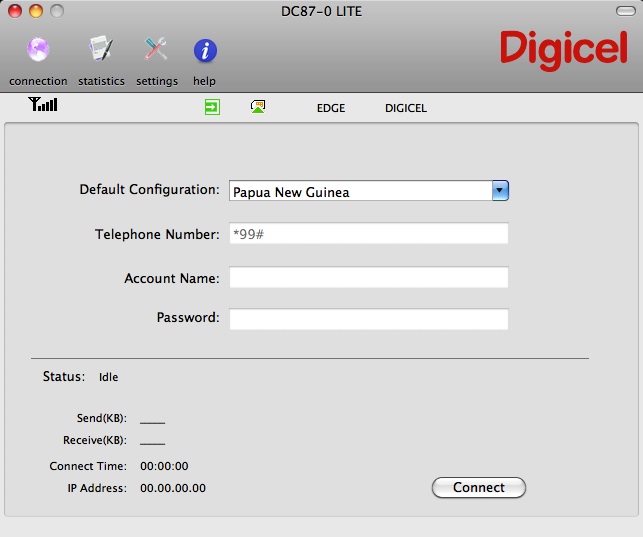
Now I know that selecting Papua New Guinea from the list of countries DOESN’T let you connect to the OSP network.
Instead, you have to choose select Edit Configuration from the drop-down list for the Default Configuration. You will see a screen something like this:
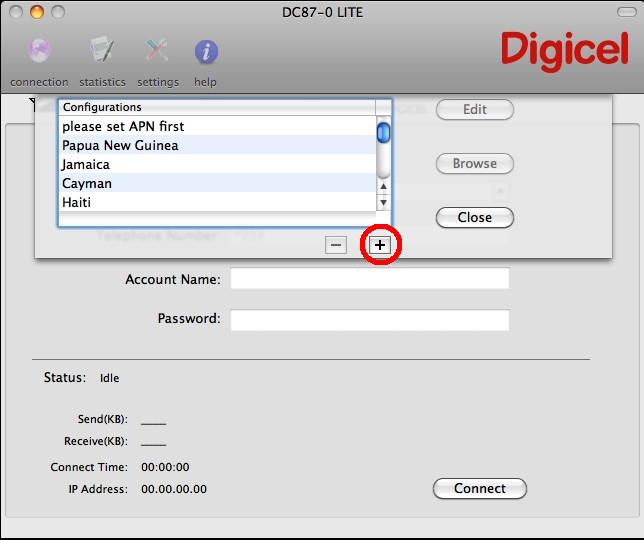
The next bit is a little tricky – you have to click the + button as indicated above – but nothing happens!!!!
Well, actually something does happen, and if you scroll to the bottom of the list, you will see a configuration profile called New1 (or in my case, New1, New2 & New3 because I’d clicked the + button 3 times!)
Select the New1 configuration and click Edit
Give your Profile an appropriate name, such as OSP Inet Mobile, enter the telephone number of *99#, and enter an APN name of time.digicelpng.com, ond of course, click OK.
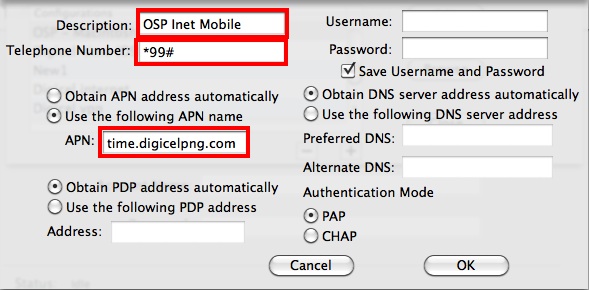
When you get back to the main screen, you will have to select your newly created configuration, and click Connect
Now when you browse to a web page, you will be presented with the page where you can enter your timecode and you are away browsing!
 RedNectar's Blog