
GNS3 WorkBench 8.6 8.7 is out

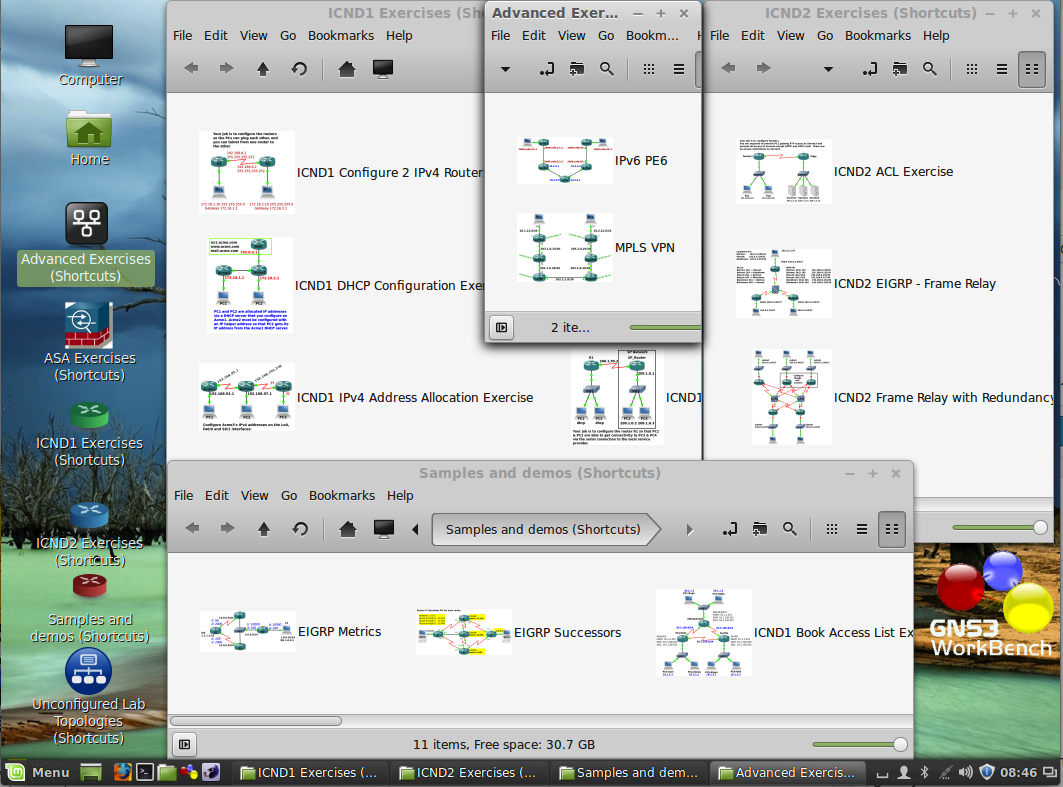 The next version of GNS3 WorkBench is out. You can download it several forms:
- An entire Virtual Machine as a single blob (although split into two files 2.5G-3G in size)
- The same Virtual Machine as individual files (in case you can’t get the big files)
- A “self-serve” script to allow you to install everything you need to create your own Appliance on whatever flavour of Linux you like (so long it is Mint
16.017.0 32bit or Ubuntu 14.04 32bit. Mint 16.0 won’t upgrade to GNS3 0.8.7) - Just the WorkBench labs and exercises along with their instruction files. These can be added to your existing Windows or OS X install of GNS3 to give you the essential elements of the WorkBench in the comfort of your own favourite Operating System. This version is only possible because of the great work Jeremy did in fixing the Snapshot function and Instructions features in GNS3 v8.6.
The Latest Features in a Nutshell
-
V8.7 New Features
- New ICND1 Readiness Test lab
- Improved Instructions – relates better to the GNS3 snapshot system
- Rewritten the script file that allows you to change the image that is used in the WorkBench and GNS3 Vault exercises. (/home/user/GNS3/WorkBench/Scripts/changeFirmwareImage.sh). The new script gives you a menu of images you can use to replace the one used in the WorkBench exercises. The menu is created from the list of images you have already added via Edit | IOS images and hypervisors
-
Existing V8.6 Features
- Labs are now based on GNS3 Snapshots – so you don’t need to run a script to load the appropriate exercise, you can open exercises/labs from within GNS3
- The help system is now html based, and is integrated into the Help | Instructions feature that was introduced into GNS3 v0.8.5
- Since GNS3 now has VPCS incorporated into the Tools | VPCS menu, there is no need to load VPCS via a startup script to run labs/exercises.
- The above three features have removed now make it possible to deliver a Windows/OS X version of GNS3 WorkBench.
- Labs have been updated to more closely reflect the September 2013 changes to the CCNA exams.
- Over 20 new labs/extensions to labs. Mostly troubleshooting exercises added to tried and true labs.
- Total of 50 different Labs/Scenarios
- Total of approx 140 different exercises/solutions (Snapshots) shared between these labs.
- Ability to add your own exercises – just save your own snapshots and add your own instructions.
So what is GNS3 WorkBench anyway?
GNS3 WorkBench is a VMware image Appliance running Linux Mint with (almost) everything you need to make GNS3 run already installed, including: GNS3; Wireshark; Qemu; Oracle VirtualBox; Virtual PC Simulator (VPCS); Konsole; Putty and Xterm. It also has a collection of public domain images (Microcore Linux and Vyatta routers) installed and ready to go. As well as a comprehensive collection of over 140 exercises/labs. (The Winows/OS X version is just the collection of exercises and public domain images).
To run the Appliance, you will to add VMware and a Cisco IOS for an instant GNS3 WorkBench environment.
To run GNS3 WorkBench Windows/OS X version, you will need GNS3 already installed on your Windows/OS X computer, and you will need to supply your own Cisco IOS Image.
Lean more about GNS3 at http://www.gns3.net
You can download VMware Player at http://vmware.com/download/player
Download GNS3 WorkBench – from sourceforge.net. The latest version is version 8.6, uploaded on 2014-04-10.
Read this blog post for more details about GNS3 WorkBench v8.6
Read this page for details about installing the “Self-Serve” version
Want to say “Thanks”?
Well – the best way of course is to buy my book!
I used to ask people to sign up for DropBox – so they would get more space and so would I. Thanks to all those who clicked my link and signed up I’m maxed out – but if you sign up to DropBox by clicking this link, that you will get an additional 500MB of free storage.
 RedNectar's Blog
Pingback: CCNA IPV4 Configuration Test GNS3 Workbench Lab Walkthrough (Tutorial / Solution) - Summary networks
Pingback: CCNA IPV4 Address Assignment GNS3 Workbench Lab Walkthrough (Tutorial / Solution) • Summary networks
Pingback: CCNA IPV4 Configuration Test GNS3 Workbench Lab Walkthrough (Tutorial / Solution) > BENISNOUS
Any plans of getting workbench to work with GNS3 2.0 ??
Sorry I missed this – but to answer your question… No, I’ve kind of moved on from GNS3, these days I seem to be up to my neck in ACI related stuff, and I don’t have the need to run GNS3 very often.
Really appreciate your work!! Good Job !!
Pingback: CCIE Lab Equipment to practice for R&S Exam
Is it me or do the exercise snapshots no longer work with Windows Version of GNS3-1.4.6?
I just get a blank screen.
You may be right. TBH I haven’t had the time to update the exercise for about a year now. I’ll try and take a look before the end of the week.
Thanks Chris. Find anything useful or shall I spin up a VM and take a look that way?
Hi Chris – Its been awhile but I’m finally jumping back into GNS3. I have to say the new version of GNS3 and your new version of Workbench are a vast improvement over the previous iterations! Thanks for all your hard work in providing this invaluable resource to the masses interested in learning networking!
Now on to the problem I’m having..lol always a catch. –
I don’t have access to, nor can I locate a copy of the desirable 3725 image..anywhere. I’ve even checked with colleges that have support contracts and they can’t locate it? What I do have access to seems to be any other 3725 image imaginable. I’m exaggerating of course, but that seems like the situation. Anyway I’m not going to ask for the image because I know you’ll tell me to go get a support contact with Cisco. What I am going to ask is when I load up a c3725-adventerprisek9-mz.124-15.T8.image and try to do the ICND I configure 2 IPv4 Routers exercise I can’t get OSPF to seem to work properly. In addition when I load up snapshot 8 which already has it configured it doesn’t seem to work properly either. It works between the serial connections on the two routers but it doesn’t work to route the traffic between the client interfaces. Same for when I load up the snapshot with static routes configured. Is this because I’m using a different IOS image?
Is this a known issue? If so what can I try to resolve it? I’m as anxious as ever to get into networking but these constant hangups with all available educational resources are a real bummer.
Again thanks for all your hard work, the new workbench is amazingly easy to get up and running compared to previous versions where I had to spend days troubleshooting before I could get started on any kind of network learning.
Keith
P.S. – Actually I take back the part about the snapshots working over the serial interface. It appears that no OSPF settings are configured on the snapshots. When I do show ip ospf neighbor it shows no results, When I do show ip ospf database it displays just the local serial interface. All the IP’s seem to be properly configured on all the interfaces on the routers and the VPC’s. Just no routing or OSPF configurations.
Hi Keith,
Not sure what the OSPF problem is, but you can use the file browser to check inside the snapshots to see if OSPF is configured for a particular snapshot. Of course some exercises will NOT have any configuration if that is the point of the config!
Chris
Hi Chris, I was able to get OSPF working properly. The Snapshot with the completed config for OSPF still had OSPF disabled on the serial 0/0 interface on R2. Once I enabled it there the Adjacency linked up and I was able to ping from one VPC to the other. Knowing this works I’ll now go back to snapshot 0 and perform the full config!
Thanks again for all your help and excellent work on this product!
Keith
I download vm gns3 but I don’t have password for linuxmint
http://lmgtfy.com/?q=gns3+workbench+password#
I cant run ASA in 12.3a ver, still fixing?
and how to use changefirmwareimage.sh, i need to change image globaly since i cant download the proper image
Nice work bythway
Pingback: GNS ASA 9.15 with ASDM how to - Missing something?
Am I missing something in regards to the 12.3a image? I see the “Virtual Disk-s001.vmdk” file but there is no vxm to go along with it so VMware will not allow this to open.
Nevermind, stupid me never opened the 3rd file…
🙂
there is a 8.7 and 12.3a.. which one is the latest?
thank you
First of all understand that there was a major change in the way GNS3 worked between GNS3 v0.8.7 and GNS3v1.x.x
My GNS3 WorkBench v8.7 is based on the old v0.8.7 GNS3. But it is stable. GNS# WorkBench v12.3a is based on GNS3 v1.23 – which has since evolved into v1.3.10 and soon to be 1.4.x (which will be different again to v1.3.x). Confusing isn’t it?
So – in plain English. The old GNS3 WorkBench (v8.7) works, but is stuck with the “old” version of GNS3. You WILL have problems if you then upgrade the version of GNS3 – the WorkBench exercises will no longer work.
The newer GNS3 WorkBench (v12.3 or 12.3a) is at least using the newer version of GNS3, but not the latest, and you may have problems if upgrade the version of GNS3.
HTH
RedNectar
Thanks for an awesome setup, appreciate all the work you must have done for this.
I seem to have one issue, I can’t get the ASA labs to run. It complains (both in vmware and ESXi):
Server error from 127.0.0.1:8000: Central-ASA: Invalid JSON: None is not of type ‘string’ in schema: {“description”: “Path to QEMU”, “type”: “string”, “minLength”: 1},
apparently it means that the QEMU path is unresolved.
The ASA device works fine when I add it manually from the menu.
Thanks for the tip Jan-Erik. There is definately something wrong there, but I’m finding it difficult to get time to get the next version out!
Pingback: VPCS and VPCS multi-host | RedNectar's Blog
What area should I submit trouble request to for the Workbench?
Hi James,
You can submit it here, or https://community.gns3.com/community/software/download/appliances/blog/2014/10/03/gns3-workbench is also a popular place
Thank you for the prompt response. I manged to fix it by copying the files again to the GNS3 directory; I think 🙂
R1 issue resolved: Didn’t like the [c3725-adventerprisek9-mz.124-15.T14.bin] and wanted the c3725-adventerprisek9-mz.124-15.T10.bin]
Now I’m getting path to VPC not found error [VPCS program ‘/home/user/vpcs/’ is not accessible]
I’ve tried pointing to [/home/user/GNS3/WorkBench/projects/ICND1 Exercises/ICND1 Configure 2 IPv4 Routers/ICND1 Configure 2 IPv4 Routers-files/vpcs/startup.vpc] but that didn’t work either.
The
error sounds like something has changed in GNS3 Preferences. Try Edit | Preferences < VPCS and check the Path to VPCS: – it should be /usr/bin/vpcs
…at least I think that’s it (from memory). YOu can double-check by typing which vpcs at a command prompt.
That resolved the issue.
Pingback: “Do Said Skills Pay The Bills?” by Tony Bourke CCSI | Cherry's Tech Jottings
Hey Chris
GNS3 works perfectly for re-designing our network.
I think you are doing great job with WorkBench appliance.
But as you know, there is already new generation of GNS3 1.2(1).
Do you have any plan to integrate to WB ???
Thx.
Already spent about 50hrs trying to convert. See https://community.gns3.com/ideas/1395 and https://community.gns3.com/message/14004#14004
Hi Chris any update on this?
Yep. I’ve been really slack at announcing GNS3 WB v12.3. Now available at https://sourceforge.net/projects/gns3workbench/files/
Pingback: Work Bench | Amazon Supply
Hi Chris,
I’m having some trouble with the setup script for WB 8.7 on Ubuntu 14.04 32-bit running on VirtualBox. I’ve ran the script using both methods listed in the script and both result in me being unable to login to Ubuntu using the GUI. I’ve tried methods of correcting this including deleting .profile however nothing I’ve tried has corrected this issue. I read in a another forum with GNS3 someone having the same issue but no fix was ever posted.
Can you offer any suggestions?
Thanks
Kieth,
I’d love to try and help – I haven’t tried running the script from a VM running on VB, but I can’t see why it would be any different. At the moment I’m desperately trying to find time to convert to GNS3 v1.x and having enough problems with that. Sadly, I’m going to say that it probably easier for you to try using VMware Player than it is for me to troubleshoot Virtual Box given my workload at the moment.
Chris
Hi Chris,
Thanks for taking the time to respond. I tried to run the script on Mint 17×32 as you showed that was the highly recommended version to use and I had the same issue however Mint was kind enough to give me an error message that clued me into what was going wrong.
$HOME/.dmrc file is being ignored.
I assume this is due to some of the permissions being changed from the setup script. I was able to correct it by doing the following:
sudo chmod 644 ~/.dmrc
sudo chown /home//.dmrc
sudo chmod 700 /home
Some things still don’t seem quite right but this allowed me to login via the GUI again. I haven’t tried this on Ubuntu but I think it will correct the problem there as well.
I’ve been naming my user “gns3” is this the cause?
Thanks,
Keith
Pingback: How To Fix Clonezilla Cannot Allocate Memory Errors - Windows Vista, Windows 7 & 8
Sorry for the questions, but normally with the older version of WB, there was a separate window that would open when you launch each project\lab, where you can use the VPCs and test your routing configs.
This new WB8.7, when I launch the project\lab, it opens a web browser with the lab instructions but I do not see a separate window for the VPCs.
I am sure I am doing something wrong or looking in the wrong place.
Can someone point me in the right direct?
Thanks!
GNS3 v0.8.7 integrated the VPCS in to the application to some extent. Once you have your exercise started, click Tools | VPCS and your VPCS window should open and load any startup script if it has one. Sorry I didn’t get to your question earlier. And don’t stop asking if you have any problem, it is just that sometimes I don’t get time to answer them immediately.
Hi! Running workbench on windows. the Tools dropdown menu doesn’t work for me (no drop down appears) and the vpcs appear to actually be loading as cloud nodes. Thoughts?
Matt,
What version of GNS3 are you using? – I haven’t updated the exercises for GNS3 v1.x yet – hope to soon though – so far has been proving too difficult to do a simple “upgrade” – think I’ll have to just produce a new set.
Thank you so much Chris!! I was able to get to the VPCs. Question though, the ACL exercise, requires VPC1 not to be able to ftp to server1, I think. How am I able to test these ACLs within the VPCs to the servers? The VPCs cannot do “ftp” or “telnet”.
Is there a special way to get the VPCs to ftp, and telnet test?
Thanks again Chris. When you have a moment, you can let me know what i am doing wrong.
To test ftp access use the command in VPCS:
the -P 6 says to do the ping using protocol 6 (which you already knew is TCP) and the -p 21 says to do the ping on port 21 (which of course you also knew is ftp)
See my updated VPCS tutorial for more examples.
RedNectar
Hello,
I am trying to do the ACL exercise project, and is there a way to get a console to the PC icons, so I can do ping\telnet tests?
Can anyone help?
Thanks!
Hello all,
I just downloaded WB8.7. Everything is fine, but when it launches it opens as the user “user”.
The root account password is unknown. I tried using the root/root but to no avail. I cannot sudo su as user because the user account has no privilege to change anything.
Any help?
There is no root account. You do not need it, you can use sudo for whatever you need. But if you must – do
then you are logged in as root.(note the “-” if you do sudo su you are still logged in as user.)
C
I am sorry but when I typed what you suggested, here is what I get:
user@GNS3WB87 ~$ sudo su –
[sudo] password for user:
Sorry, try again.
[sudo] password for user:
Sorry, try again.
[sudo] password for user:
Sorry, try again.
sudo: 3 incorrect password attempts
I think I am doing something wrong. Please help.
In my rush to reply yesterday I missed telling you that the secret password is… password
Good luck C
Mr. Welsh,
Perhaps I’ve missed a step or perhaps I’m just too new to OSX but I can’t seem to get GNS3 Workbench 8.7 working on OSX Mavericks 10.9.5.
I’ve installed the latest GNS3 and it loads just fine. I’ve added the IOS images to GNS3 per instructions given on the GNS3 site. Into Mac HD/Users/me/GNS3 folder I created /Images where the IOS, ASA and Junos images live as well as where the “extracttouserGNS3folder.zip” has been extracted and the image folder from that .zip added to the one I made. After reading the Readme.html I can’t seem to repack the ASA image and I’ve run the Junos.sh image by changing the extension to .command but it doesn’t do anything.
On top of those two issues none of the .net files in the vault or workbench projects will open in GNS3. I can send screenshots if you’d like.
I was hoping you could help or maybe if others have had this issue. Can anyone suggest a fix (thoroughly explained though, I’m newish to OSX).
Thanks.
Terry – I replied a couple of days ago – somehow didn’t get posted :(.
The short answer is that I haven’t migrated the exercises to the new GNS3v1 format. Am working on trying to do that and get an updated GNS3v1WorkBench going, but its taking time.
Thank you so much 🙂
I have a question regarding your ready-made shortcut folders and exercises…
I can’t seem to ping the gateway once I followed your instructions for example snapshot 0 of ICND 1. I have configured the ip address and the gateway, unshut the gw interfaces, making sure they are on the same subnet… How come eventhough I changed the IP address of the VPCS it doesn’t seem to reach the GW? my firewall is off, I have restarted my PC to make sure udp 20000 and 30000 is not used.
Please let me know what I need to do?
I followed your troubleshooting guide here:
But it doesn’t even seem to ping it’s on gateway first…. can you point me on what I am doing wrong here?
R1#sh ip int brie
Interface IP-Address OK? Method Status Protocol
FastEthernet0/0 unassigned YES unset administratively down down
Serial0/0 192.168.8.1 YES manual administratively down down
FastEthernet0/1 172.16.1.1 YES manual up up
R1#sh run int f0/1
Building configuration…
Current configuration : 95 bytes
!
interface FastEthernet0/1
ip address 172.16.1.1 255.255.255.0
duplex auto
speed auto
end
Welcome to Virtual PC Simulator, version 0.5b2
Dedicated to Daling.
Build time: Jul 18 2014 10:26:40
Copyright (c) 2007-2014, Paul Meng (mirnshi@gmail.com)
All rights reserved.
VPCS is free software, distributed under the terms of the “BSD” licence.
Source code and license can be found at vpcs.sf.net.
For more information, please visit wiki.freecode.com.cn.
Press ‘?’ to get help.
Executing the startup file
Checking for duplicate address…
PC1 : 172.16.1.10 255.255.255.0 gateway 172.16.1.1
Checking for duplicate address…
PC2 : 172.16.2.10 255.255.255.0 gateway 172.16.2.1
NAME IP/MASK GATEWAY MAC LPORT RHOST:PORT
VPCS1 172.16.1.10/24 172.16.1.1 00:50:79:66:68:00 20000 127.0.0.1:30000
fe80::250:79ff:fe66:6800/64
VPCS2 172.16.2.10/24 172.16.2.1 00:50:79:66:68:01 20001 127.0.0.1:30001
fe80::250:79ff:fe66:6801/64
VPCS3 0.0.0.0/0 0.0.0.0 00:50:79:66:68:02 20002 127.0.0.1:30002
fe80::250:79ff:fe66:6802/64
VPCS4 0.0.0.0/0 0.0.0.0 00:50:79:66:68:03 20003 127.0.0.1:30003
fe80::250:79ff:fe66:6803/64
VPCS5 0.0.0.0/0 0.0.0.0 00:50:79:66:68:04 20004 127.0.0.1:30004
fe80::250:79ff:fe66:6804/64
VPCS6 0.0.0.0/0 0.0.0.0 00:50:79:66:68:05 20005 127.0.0.1:30005
fe80::250:79ff:fe66:6805/64
VPCS7 0.0.0.0/0 0.0.0.0 00:50:79:66:68:06 20006 127.0.0.1:30006
fe80::250:79ff:fe66:6806/64
VPCS8 0.0.0.0/0 0.0.0.0 00:50:79:66:68:07 20007 127.0.0.1:30007
fe80::250:79ff:fe66:6807/64
VPCS9 0.0.0.0/0 0.0.0.0 00:50:79:66:68:08 20008 127.0.0.1:30008
fe80::250:79ff:fe66:6808/64
VPCS[1]> show ip
NAME : VPCS[1]
IP/MASK : 172.16.1.10/24
GATEWAY : 172.16.1.1
DNS :
MAC : 00:50:79:66:68:00
LPORT : 20000
RHOST:PORT : 127.0.0.1:30000
MTU: : 1500
VPCS[1]> ping 172.16.1.1
host (172.16.1.1) not reachable
VPCS[1]>
never mind… wrong fe port lol!!!
hi Please see the logs as well…
http://txt.do/o4fn
Hi,
I was able to uncompress archive 1 and 2 but they uncompressed on 2 separate folders, so I manually move it.
I double clicked the icon with the vmx file extension and was able to run the linux mint desktop. I can’t seem to share my folders, so I tried to install vmware tools but now I can’t seem to see the shared folder, If I go back to vmware machine library, it says there cancel vmware tools installation…
How can I successfully install it so I can run the shared folders since my iOS is in my USB drive… or in my OSX folder…
thanks,
Shared folders is a long standing vmWare issue. Sometimes they work. Sometimes they don’t! I have had some help from the vmWare forum in the past: e.g.
https://communities.vmware.com/message/2317681
And in particular, look at the answers given by WoodyZ
Hi there, had bad luck with both 8.6 and 8.7 appliances.
I have ESXi 5.5.0 installed.
Tried the steps in this thread, to merge the vdkm files into single and to ” convert ” into ESXi format but was getting error 18 “Failed to start virtual machine”.
Wonder if you can recommend next steps?
use converter Standalone Client
Looking for the “user” user account password on the 8.7 appliance. Thanks!
password
Hi Rednectar
Thanks for making the workbench available but I seem to be having some problem.
Running Vmware 9.0 every time I power the vm i get this error “unable to open file full path of virtual disk.vdmx
system cannot find file specified”
Can’t access the workbench.
Hi Harrison,
I suggest that you check the MD5 of every file that you downloaded against the list of MD5s at Source forge (https://sourceforge.net/projects/gns3workbench/files/v8.7_Appliance/ if you did the main download, https://sourceforge.net/projects/gns3workbench/files/v8.7_Appliance/SmallerFiles/ if you did the “Smaller Files” download)
C
I have check, the 23 files have the exact MD5 hash as the ones on the site.
Harrison – I have a suspicion that you need VMware Workstation10 at least (or VMware Player 6)
Hi there was able to get the workbench working. Seem that during the extraction something when wrong. Deleted the files and re-extracted the files it work.
Great news!
Also had to change the version number of workstation to 9. Now Can I use the intructions from https://rednectar.net/2014/08/18/how-to-install-gns3-v1-0-beta-on-ubuntulinux-mintdebian/ to update my version
Thanks
I am running GNS3 workbench 8.7
ASA is missing gig interfaces in GNS3 workbench, I ran the installGNS3WB.sh so all the components work. Go into the firewall and there are no gig interfaces at all listed in the running configuration. I do get an error message saying that the firewall cannot find nics, nic creation fails but the firewall still boots up. Any help would be useful.
Seems to be a problem with the repack script.
Hello Rednectar,
Thanks for your work. I got an issue putting up interfaces on ASA 8.4.
I always receive cannot get channel so my interfaces are down.
Thanks.
Pingback: VPCS Tutorial-updated | RedNectar's Blog
Pingback: GNS3 WorkBench v8.7 is ready for download | RedNectar's Blog
Pingback: ICND1 Readiness Test | RedNectar's Blog
Pingback: daily 06/24/2014 | qwerdiigo
So, I have Ubuntu 14.04 LTS (x64), and have downloaded the large files twice (thinking I got a bad download). When I run the terminal commands to unzip, I get the following errors:
Archive: GNS3WB86.zip
warning [GNS3WB86.zip]: zipfile claims to be last disk of a multi-part archive;
attempting to process anyway, assuming all parts have been concatenated
together in order. Expect “errors” and warnings…true multi-part support
doesn’t exist yet (coming soon).
file #1: bad zipfile offset (local header sig): 4
file #2: bad zipfile offset (local header sig): 80
file #3: bad zipfile offset (local header sig): 2056
file #4: bad zipfile offset (local header sig): 737395
file #5: bad zipfile offset (local header sig): 737495
file #6: bad zipfile offset (local header sig): 738886
file #7: bad zipfile offset (local header sig): 739611
file #8: bad zipfile offset (local header sig): 739706
file #9: bad zipfile offset (local header sig): 951205447
file #10: bad zipfile offset (local header sig): 1366168097
file #11: bad zipfile offset (local header sig): 1366169571
file #12: bad zipfile offset (local header sig): 1626924332
file #13: bad zipfile offset (local header sig): 1744054643
file #14: bad zipfile offset (local header sig): 1789837846
file #15: bad zipfile offset (local header sig): 1856419506
file #16: bad zipfile offset (local header sig): 1892386554
file #17: bad zipfile offset (local header sig): 1925861730
file #18: bad zipfile offset (local header sig): 2031213892
file #19: bad zipfile offset (local header sig): 2031214120
file #20: bad zipfile offset (local header sig): 2187600315
file #21: bad zipfile offset (local header sig): 2298785063
file #22: bad zipfile offset (local header sig): 2321421111
file #23: bad zipfile offset (lseek): 3079651328
inflating: GNS3WB86.vmwarevm/Virtual Disk-s017.vmdk
inflating: GNS3WB86.vmwarevm/Virtual Disk-s018.vmdk
inflating: GNS3WB86.vmwarevm/Virtual Disk-s019.vmdk
inflating: GNS3WB86.vmwarevm/Virtual Disk-s020.vmdk
inflating: GNS3WB86.vmwarevm/Virtual Disk-s021.vmdk
inflating: GNS3WB86.vmwarevm/Virtual Disk-s022.vmdk
inflating: GNS3WB86.vmwarevm/Virtual Disk.vmdk
I do not know a lot about unzip, but it looks like maybe it doesn’t support multi-part files? Has anyone else had an issue with this?
I tried installing 7zip to see if this would take care of it, but then it wouldn’t even open the archive at all.
The above pulls out all of the .vmdk files, but leaves all of the actual machine info (LinuxMint15Cinnamon) files alone.
Ideas?
Who would have thought that multi-part zip would be so hard? But it seems both Linux and OS X have problems! I found a couple of answers for OS X, but haven’t looked for Linux until now.
I found that the Unarchiver worked for OS X, so why not give it a go?
sudo apt-get install unar
From http://unarchiver.c3.cx/commandline
That worked like a champ. And for anyone else running Ubuntu (or I’m assuming other Ubuntu-variants such as Mint, Kubuntu, etc.) – make sure you install unar. It is a command-line only tool.
Navigate to the directory you have the two files (hopefully the directory they will be staying), then run the command. Easy-peasy, done.
Thanks Chris – unar worked.
Pingback: Q&A on GNS3 WorkBench v8.6 | RedNectar's Blog
Hi! First of all, thank you so much for putting this together! I’ve been dabbling with Cisco and GNS3 for a couple of years now, but I’ve decided to do it properly now and aim for the certs, and GNS3 Workbench looks absolutely perfect!
I already have the latest version of GNS3 installed on my Windows Laptop (Core i5, 6GB Ram), so I’ve downloaded the Windows version of Workbench and integrated it (hopefully, correctly!). I have a couple of issues though..
Firstly, I thought I’d start with the ICND – Simple Switching Exercise. I completed the first couple of steps, and got the Etherswitches and VPCs pinging each other no problem. However, when I do a show mac-address table on the switches, the CAM table either show up as completely empty or with just the last couple of MAC addresses. Repeated show mac-address-table show that the table gradually removes the entries until it’s empty, normally within 30 seconds.
I’ve checked the ageing time of the CAM table is set to 300s, and also tried various values between 300s and 1200s, but nothing helps.
I’m using the recommended IOS for the c3725 (T10), but I’ve also tried with the T14 release and observed the same behaviour. I’ve been Googling for a couple of days, but can’t find anything that really relates, so I think I’m a bit stuck on this one!
Secondly, just a quick question about VPCS. When I load the exercises, am I right in thinking that I have to manually configure the IP addresses on the individual VPCs? I’ve done it no problem, and saved the config so I can quickly load it, but I’m just checking that I’m not doing anything wrong!
Sorry, just thought of another quick one too.. When I load a snapshot for a topology, I get a message saying that the IOS image can’t be found. I get an option to choose the correct image, which is invariably the same file. The only difference that I can see is the path. The images that I can use have the full paths (C:\Users\Rob\GNS3\Images\imageName.image) to the image listed in the dialog , even though it’s in my specified “Images” folder. I can fix this by editing the toplogy file to point to the full path, so again, it’s not a massive issue. Just wondering if I’m doing something wrong!
So, that’s all! Sorry to bother you with all of this, and thank you again for all your work. Just show me where to donate!
Thanks so much for your detailed feedback. This is too good for a simple reply, so I’m going to take your questions and turn them into my next blog post.
Hello Rednectar
First thanks so much for the reply!
Now the link for the file GNS3WB86.zip appears over and over with I click to download the GNS3WB86.z01 so, am not able to download the second file to run the md5checksum and verify
that I got both files 😦
Both http://sourceforge.net/projects/gns3workbench/files/v8.6_Appliance/GNS3WB86.z01/download and http://sourceforge.net/projects/gns3workbench/files/v8.6_Appliance/GNS3WB86.zip/download should still work
Hello, I have downloaded the large files from version 8.6 call .zip and .z01 at the end but I can’t figure out how to unpack on my computer. I work with OSX Maverics and have tried the incuded archiver, KeKa and Zipeg utils, all give an error or only extract the first file to an .zip.cpgz file.
To be sure, I also tried WIndows 7 archiver and 7-Zip at a windows computer, but it fails.
Then I tried the small files, but the same problem with the single vmdk.zip and .z01 file pair. Plain .zip is going well, no problem, but a split zip gives me headache 🙂
Wrong files? Or wrong methode by me?
Thanks in advance,
Marco
This on is curious, because the zip files were actually created on OS X using the zip command.
But when I tested the archive on OS X all i did was locate the .zip file using Path Finder and double-click on it – and it expanded perfectly!
However, for some reason Apple’s own Finder.app is too stupid to know how to do this. What’s more the OS X version of unzip doesn’t know how to do multi-part archives either.
So until I find a better way, I’ll have to suggest that you use Path Finder – you can get a trial version for free, but you may find that it’s worth buying (one of the best programs I have purchased – see https://rednectar.net/2012/01/10/application-gems/).
I haven’t tested, but I have heard that stuffit is a good free zip expander for OS X.Edit: Sorry Stuffit is only a free trail – best to use The Unarchiver – also free from the Apple store. Once installed, just right-click on the .zip file and open with…The UnarchiverCW
I think I know. I always use the free KeKa for OSX to create spanned zip files, and have KeKa as default archiving program in finder. Curiously is that Zipeg and KeKa both don’t know how to extract a spanned zip file which is created with the default archive program (zip?).
Best: is to make the OS X archiver again the default uncompress program, the unzip with finder works fine now.
My methode: with finder first unzip the filename.zip file, it gives a filename.zip.cpgz file, then unzip this one also, and it will unzip the filename.z01 also and I got finally the full uncompressed file.
Marco. Thanks for the tips about KeKa and Zipeg. Pity they don’t work. I’m sorry, but I didn’t get any success by “first unzip the filename.zip file, it gives a filename.zip.cpgz file, then unzip this one also” – all I got was a filename 2.zip
However, I have found that the free The Unarchiver utility works just fine. After installing The Unarchiver, simply right-click on GNS3WB86.zip and choose Open with… | The Unarchiver to get a successful decompression. The Unarchiver is also available free from the App Store.
Why don’t Apple provide this as part of the the OS? It beggars belief!
hello Rednectar I downloaded the 3.2 Gb file twice from sourceforge and getting GNS3WB86.zip The archive is either in unknown format or damaged error
Hi Milan,
Run an md5 check on the files you downloaded (BOTH GNS3WB86.zip AND GNS3WB86.z01). If they match these numbers:
MD5 (GNS3WB86.z01) = ad1c245107850a8370a78b3321797f6d
MD5 (GNS3WB86.zip) = 7e4eacebe931e12c9c61bb2381535515
Then *I* have a problem that needs fixing. If your MD5 calculation does NOT match these numbers for either file, try and download it again, of if that doesn’t work, try the “SmallerFiles” option.
Note: WinMD5Free (http://www.winmd5.com/) is a free app that you can use to calculate MD5 checksums on WIndows. On OS X, just issue the command
in the directory where you downloaded the files.
Hi there,
Just to follow up. The download link for the 8.6 appliance file GNS3Wb86.Z01 is in fact the same file as GNS3Wb86.ZIP. Both MD5 hashes are the same. Could you check the download links please? Thanks very much.
Just to follow up on this, the Z01 download link does not work as a few people have mentioned above. It dl’s the zip file. Verified by MD5 app you posted. I am unable to download the Z01 appliance file. could you check the dl links please?
@tarkonis. As you can imagine, all I do is upload the files – Sourceforge.net calculate the MD5s for the files I upload and publish them – and they match the MD5s I calculated. So as best I can tell, the files on SourceForge are the same as the original. I’m not in a position to download them again my self and test them at the moment, and before I will have a chance to do that, I am hoping to have uploaded v8.7, at which point I’ll probably abandon v8.6 anyway!
CW
Rednectar,
I downloaded and installed the v8.6_Appliance. It works great!!
I have not been able the find the username/password of the VM you integrated in /home/user/VirtualBox VMs, for instance for the vyatta VM. Is it possible to have this infos?
Thanks again for the work!
user: vyatta
password: vyatta123
Sorry about that!
Thanks,
Can you also provide the root password to access Debian.
There is no root password. If you want root to have a password, you’ll have to set it yourself. Better to use sudo command and use the password password than set the root password.
I found the solution:
configure
set system login user root authentication plaintext-password topsecret
commit
save
rgds
Rednectar
buddy when we expect new gns3 benchmark out we are waiting for big release
Check out https://sourceforge.net/projects/gns3workbench/. I’ve put the Appliance VM up. Working on the other versions
Rednectar
how bro Gns3 benchmark is your best work for us but have onee request could you please rebuild it with new gns3 and qemu installed so that we can emulate ASA as well…i am not good in Linux box coz i only work on windows so pls help us and build another gns3 benchmark with pre installed and configured gns3 for ASA 8.4.2 ….hope you will release soon
I hope it will be soon too……. and it will have Qemu installed and so long as you have your own copy of ASA8.4.2.bin, it will get it ready for use.
Check out https://sourceforge.net/projects/gns3workbench/. I’ve put the Appliance VM up – with qemu and VirtualBox installed. Working on the other versions
I d/led file Virtual Disk-s016.vmdk.zip twice – the zip completed d/l successfully @1.7GB but winrar reports ‘unexpected end of archive’. Any chance the upload was corrupt on this file? Also the larger complete file unavailable – I don’t know if it was due to traffic.
Thanks for your hard work. We all really appreciate it.
At the moment (Apr 2 2014) GNS3 WorkBench is being updated. I have uploaded a single image of v8.6 that no-one seems to be able to download. I have been (almost continuously) being uploading the same image, but as a collection of smaller files hopefully that will be finished in about 24hrs – I had staged that folder so no one could get to it, but that expires after 3 days, which means you have access to it. I’ll leave it open so you can start downloading – but at this instant in time don’t bother downloading the following:
Virtual Disk-s001.vmdk.zip 950,014,837 when complete
Virtual Disk-s004.vmdk.zip 260,691,373 when complete
Virtual Disk-s015.vmdk.zip 758,288,665 when complete
Virtual Disk-s016.vmdk.zip 1,904,553,448 when complete
Virtual Disk-s017.vmdk.zip 720,738,589 when complete
Virtual Disk-s019.vmdk.zip 91,811 when complete
The other files should be OK
CW
I fought with getting this running with ESX. Just an fyi – Use VMware converter to move it onto an ESX host. This will convert the 2GB vmdk files into a single vmdk.
Thanks Ed
Ed,
I was able to use the latest WorkBench VM image and imported it to get it working with ESX. This was with an old ESX version (4.1) but I also used the converter to get it to our new 5.5 ESX server. However, I’m having trouble getting virtual routers to talk through a cloud to my network. The odd thing is that the virtual routers are getting IP addresses assigned by the DHCP server on the network that the Host VM is connected to but they can’t ping the Host VM or the default gateway on that network. What’s even more wierd is that the default gateway router gets notifications if the duplex is mismatched but still can’t ping it. It seems that broadcasts are making it out (which is why dhcp works) but no pings or other tcp traffic. Any ideas? I would appreciate any ideas since it’s been frustrating to be so close but still not have GNS3 routers be able to interact with real machines.
Glen Sonnenberg
Packet Design
Pingback: How to add Instructions to GNS3 | RedNectar's Blog
Pingback: Fresh starter questions!
A bit more info also, I am following Mikes instructions
How to fix qemu on WorkBench V5.8
1) Create directory to store files
– cd /opt/GNS3
– mkdir qemu
– cd qemu
2) Download qemu source for V0.11.0
– wget http://download/savannah.gnu.org/releases/qemu/qemu-0.11.0.tar.gz
3) unpack the qemu source archive
– tar -zxvf qemu-0.11.0.tar.gz
4) set working directory to qemu source directory
– cd qemu-0.11.0
5) download olive patch
– wget -O qemu-0.11.0-olive.patch http://sourceforge.net/projects/gns-3/files/Qemu/qemu-0.11.0-olive.patch/download
6) install patch command on Workbench
– apt-get install patch
7) apply the olive patch to qemu
– patch -pl -i qemu-0.11.0-olive.patch
8) install libraries need to compile qemu
– apt-get install libncurses5-dev zliblg-dev libsdl-dev libpcap-dev
9) configure the make command for WorkBench
– ./configure –target-list=i386-softmmu
10) Compile the qemu source
– make
11) Install the new qemu program
– make install
12) Change the parameters for qemu in GNS3 to the /usr/local/bin directory using the GUI.
13) Test should now work.
I get to step 7 to install the patch and I get the following
user@GNS3WB:qemu$ sudo patch -p1 -i qemu-0.11.0-olive.patch
patching file Makefile.target
Hunk #1 FAILED at 619.
1 out of 1 hunk FAILED — saving rejects to file Makefile.target.rej
patching file configure
Hunk #1 FAILED at 203.
Hunk #2 FAILED at 505.
Hunk #3 FAILED at 652.
Hunk #4 FAILED at 1373.
Hunk #5 FAILED at 1381.
Hunk #6 FAILED at 1390.
Hunk #7 FAILED at 1453.
Hunk #8 FAILED at 1495.
Hunk #9 FAILED at 1738.
9 out of 9 hunks FAILED — saving rejects to file configure.rej
patching file hw/e1000.c
Hunk #1 FAILED at 550.
1 out of 1 hunk FAILED — saving rejects to file hw/e1000.c.rej
patching file hw/eepro100.c
Hunk #1 FAILED at 1484.
1 out of 1 hunk FAILED — saving rejects to file hw/eepro100.c.rej
patching file net.c
Hunk #1 FAILED at 101.
Hunk #2 FAILED at 2238.
Hunk #3 FAILED at 2800.
3 out of 3 hunks FAILED — saving rejects to file net.c.rej
patching file qemu-options.hx
Hunk #1 FAILED at 782.
1 out of 1 hunk FAILED — saving rejects to file qemu-options.hx.rej
user@GNS3WB:qemu$
And then if I try to process to step 8 for the apt-get stuff, here is the output.
user@GNS3WB:qemu$ sudo apt-get install libncurses5-dev zliblg-dev libsdl-dev libpcap-dev
Reading package lists… Done
Building dependency tree
Reading state information… Done
Package libncurses5-dev is not available, but is referred to by another package.
This may mean that the package is missing, has been obsoleted, or
is only available from another source
Package libpcap-dev is not available, but is referred to by another package.
This may mean that the package is missing, has been obsoleted, or
is only available from another source
Package libsdl-dev is not available, but is referred to by another package.
This may mean that the package is missing, has been obsoleted, or
is only available from another source
E: Package ‘libncurses5-dev’ has no installation candidate
E: Unable to locate package zliblg-dev
E: Package ‘libsdl-dev’ has no installation candidate
E: Package ‘libpcap-dev’ has no installation candidate
user@GNS3WB:qemu$
Any help would be greatly received.
Many thx indeed
Ken
Ken, did you try installing Qemu as per these instructions? http://forum.gns3.net/topic6557.html
Hi There, many thanks indeed for the reply.
I must admit, I have been at this for 3 day (but Im not giving up).
So I am trying to run Titanium and need to get Qemu working on GNS3 workbench. Just to say wow, what a great distribution, so fast and straight to the point so many thanks goes to everyone who has participated in this.
So Qemu is not working, so I am going to install Qemu from source and apply the olive patch. The problem is, that when I use apt-get, it does not find any software what so ever, ie, try to get the patch program so I can patch and I get the no software found.
I try to look for know applications like vlc, and I get the same, so I assume (not being the best linux person in the world) that I have an issue with the apt-get and potentially the sources.list file. I am using the default one that comes with the GNS workbench distro as I have changed nothing on it.
So hopefully by the end of the day, I will have QEMU working on GNS workbench and the apt-get working, and then run an n7k with Titanium 5.1.2. I can get the n7k working just fine under a normal vm instance without GNS3 with no system crashes, but I need to be able to run a pair. Will also try and fine a download for the new update 6 version (hard to find currently)
I have also tried Titanium under windows, and GNS and keep on getting system crashes, and now I have GNS3 on fedora and got qemu working, but now I keep on getting system crashing on the n7k when I bring this up.
I AM NOT GIVING UP 🙂 Its hard not being linux gurus but I am learning and thats what it is all about in the end.
Any pointers would be very well received.
You guys are doing a fantastic job and providing a great service. Very well done,
Ken
Hai Chrish,,,
i had already add IOS version like you said in this blog but when i try run it, always show error message : 209-unable to start VM instance ‘ghost-c3725-adventerprisek9-mz.124-15.T10.image-127.0.0.1.ghost.
what should i do Chrish to make it run ?
Thank you so much
How do we go about supporting you in the new upgrade? Do you accept monetary donations? I have already done the dropbox recommendation. Thanks.
I understand your frustration – as for payment I’ve been trying to find a local charity that accepts PayPal – no luck yet.
I’m having an issue with installing Qemu on WB 5.8 I’m running VMware Fusion 6 on OSX 10.8.5.
when I try to use the “adt-get install” I get this:
**********
user@GNS3WB:Project$ sudo apt-get install libncurses5-dev zlib1g-dev libsdl-dev libpcap-dev
Reading package lists… Done
Building dependency tree
Reading state information… Done
Package zlib1g-dev is not available, but is referred to by another package.
This may mean that the package is missing, has been obsoleted, or
is only available from another source
Package libncurses5-dev is not available, but is referred to by another package.
This may mean that the package is missing, has been obsoleted, or
is only available from another source
Package libpcap-dev is not available, but is referred to by another package.
This may mean that the package is missing, has been obsoleted, or
is only available from another source
Package libsdl-dev is not available, but is referred to by another package.
This may mean that the package is missing, has been obsoleted, or
is only available from another source
E: Package ‘libncurses5-dev’ has no installation candidate
E: Package ‘zlib1g-dev’ has no installation candidate
E: Package ‘libsdl-dev’ has no installation candidate
E: Package ‘libpcap-dev’ has no installation candidate
**********
Any idea on whats wrong?
The problem is that the version of Ubuntu that I built the workbench on is no longer supported. I hope to have a new version out soon – just too busy at the moment. CW
Understood, In the mean time I will just upgrade it to 12.04 and see what kind of “fun” I can have with it. Thanks for the fast reply, and look forward to seeing the next version!
JAG
Chris,
As an educator, I find the GNS3WB super helpful. I believe that the biggest problem in networking education is the significant configuration overhead in illustrating a single concept (static routing, dynamic routing, VLANs, etc, etc..). Your “one-click” labs in GNS3WB completely sidestep this problem and have allowed me to create homeworks and labs for my students built upon your framework.
However, the current GNS3WB is totally outdated. I have been waiting since 6/2013 for the next promised version of GNS3WB. I have a feeling that, like me, there are many other beneficiaries of GNS3WB that would be willing to help you develop the program (especially now that it’s near a single script install) if you would be willing to open it up to a community development model (perhaps on github). I would personally be happy to help you polish this awesome tool (for my own selfish interests in the classroom)! Please let me know how I can help get this next version of GNS3WB, “over the hump!”
Cheers,
– Rob
Thanks for the offer Rob – most of the work is juggling the existing structure of the exercises to fit the new directory structure as per the most recent changes to GNS3 – the install script is pretty much written – but the bit that copies all of the “WorkBench” files to the new install doesn’t have the modified “WorkBench” files to copy. I’ve just had two weeks away, and am clearing up my backlog. If you are interested, I’ll send you a copy of the script as it is so far to test – but it won’t install any WorkBench features – but it will get GNS3 installed and a few other things too.
CW
Happy to help however I can. I’ll send you mail.
I am jsut dropping a quick note to tell you how I appreciate this tool.
I installed GNS3 on my W7 machine, but I wanted to do the same on something portable. I tried to put an Ubuntu install (10.04) on an USB hard disk, but I never succeeded in having everything run together. As soon as I solved one problem I ran into the next one. So I had given up when I found your Workbench. I opened a drop box using the link, I hope you got your extra space from that. I think you could use a paypal account if you would like something extra.
Thanks for your kind comments.
With all the things planned I really see forward to the new version of GNS3 Workbench 🙂
Do you have any ETA?
Working on it today – if I don’t get it done today it will be at least 2 weeks.
Then I will cross my fingers and hope for the best 🙂
Whatever happens: great blog!
Any updates on a new version? I like the tool a lot, but would rather run it in a newer OS.
Thanks for building a really handy tool.
Soon
Hello,
Could you tell when you’ll release your new version. I do want to stress you I just want to know if it’s in the coming days. If it’s the case I can wait for it otherwise I’ll play with the older one.
Thanks
I had planned to release when GNS3 0.8.4 was released, but 0.8.4 has a pretty serious bug which hopefully will be fixed around the end of the month so I’ll hold off till then.
However, I can tell you that the next release will come in a couple of formats – one of these will be a script that will assume that you have already got a VM of Linux Mint 15.0 Cinnamon, and that will probably be the first release. The VM version will be built on Linux Mint 15 “Olivia” – Cinnamon no-codecs (32-bit) since 32 bit is more global. However, there is a problem with shared folders with Linux Mint 15 (both on VMware and Parallels. Haven’t tested VirtualBox)
So my advice right now would be to stick with 5.8 release – the next version is at least 2 weeks away.
Hey mate,
I had started using the 5.6 version and apart from performance issues on my laptop it worked really well. I downloaded the 5.8 version tonight gave it a go and had all sorts of issues. The scripts to update the images don’t seem to work and can’t be executed as in the older version. Some of the examples don’t work either ??
Of course this could all just be just me but the older version didn’t seem to have any issues.
Cheers and really like this concept and idea
Sorry to hear you had problems. There will be a new version out soon, probably in a couple of formats. I’ll check out those scripts again before I release.
Pingback: interesting blogs | Our CCNA study Notes
Hi RedNectar, with the next version of workbench for GNS3 0.8.4, will you also be updating the version of Ubuntu? Is it also possible to have Qemu so ASAs can function? Is it easy to add on VirtualBox or is there an easy way to emulate a PC with GNS3? Great product otherwise.
Qemu & VirtualBox will be installed. I’m 99% decided on Linux Mint (MATE) v14.1 as the base OS – Mint is an offshoot from Ubuntu.
LM15 has been released and is much faster and more stable. Maybe be a better option potentially.
You betcha. I’m on to it – as I type this, I am running a script on a LM15 VM doing the install – I’m hoping to release the next GNS3WB as a script as well as a VM – but it may get too hard. But in any case, I’m writing the script so I can redo the install any time I want, and it will be on the release VM.
Thanks for the interest. CW
Chris, having GNS3WB as an install script as well as a VM would be a very welcome addition to me. Any idea when you’ll be releasing this new version (with or without the install script)? Thanks for all your hard work!
It will either be by the end of this week (have no paid work this week – but lots of other jobs) or not for a month or so (I get busy again next week!)
I have a question to you all
I been trying to get the GNS3 to work with multiple frame-relay’s
you have FR1 and FR2 connected and then FR2 to FR3
When you Router’s
R1 and R2 is connected to FR1
R3 and R4 is connected to FR2
R5 and R6 is connected to FR3
Each router has it’s own network , example R1 is 192.168.10.x
R2 is 192.168.20.x and so on
S1 on R1 uses DLCI 101 port 1
S1 on R2 uses DLCI 102 Port 1
S1 on R3 uses DLCI 201 Port 1
S1 on R4 uses DLCI 202 Port 1
S1 on R5 uses DLCI 301 Port 1
S1 on R6 uses DLCI 302 Port 1
FR1 to FR2 port 12 to port 21
FR2 to FR3 port 23 to port 32
I can get the link’s up and i can ping from router 1/2 to 3/4 but not to 5/6 from R1/2
I can ping from R5/6 to R3/4 but not to R1/2
I can ping from R2/4 to R1/2 and R/5/6
So
Please if anyone has an example share please
It is driving me insaine
Per
Hi,
Despite my english is poor (I’am french man), big congratulations for you job. I begin with GNS3 in order to play with ASA and I have an error with “qemu”. When I have perform “Test setting” in qemu tab (preference), I have the error “failed to start qemu”. Where are located “qemu” and “qemu-img”?
Thanks, Constant
Hi Constant,
When I created GNS3 workbench, I aimed it at CCNA level exercises, so I did not include and Qemu options. Sorry. I’ll try and get back to you with the steps you would need to take, but it might take a few days. Very bust testing GNS3 0.8.4 RC2 right now.
CW
Hi! ASA would be really very helpful! 🙂
When GNS3 0.8.4 is finally release, I’ll do another WB with ASA on it
CW
SIr, If possible, kindly develop the GNS3 workbench from torrent mode.
Thank you.
I have tried before, but it didn’t seem to get taken up. This is why I have tried to make the files smaller and have them on http://sourceforge.net/projects/gns3workbench/files/v5.8/
If anyone else has downloaded the package and wants to put it on a torrent, please do.
CW
I tried to put the files on torrent once, but it seemed that there wasn’t enough demand to make it work. This is why I split the last version into smaller files that can be downloaded from http://sourceforge.net/projects/gns3workbench/files/v5.8/
If anyone has a copy and wants to put it on a torrent, please do.
CW
Does it work with VirtualBox?
I believe GNS3 WorkBench works fine with Virtual Box – from memory, I think you have to convert the files to .ova format first.
CW
Red,
I was curious to know if you or someone is actively working on another updated release of your fantastic GNS3 Workbench not that 0.8.3.1 is out and 0.8.4 is on the way? Thanks.
Waiting for 0.8.4 to be officially released.
Fantastic!! Love the Workbench. Keep it up:-)
Firstly Wow! thanks for all this….., gotta love Aussie ingenuity!!!
Just wondered if for some exercises/labs that contain 2 or more routers, should all the routers be accessible? e.g. “/ICND2 Exercises/ACL Exercise”. Here I don’t have access to the “Edge” router, (login/password??) & for the purpose of the exercise probably don’t need it. Is this by design?
Again thanks
Chris
Probably the errors are to do with the dodgy way I did some of the scripting for parts that needed to be run as “sudo” – what I’ve done for the next version (and should have done in the beginning) is edit the sudoers file and add the line “%admin ALL=NOPASSWD: ALL”
HTH
Chris
Unfortunately I tried that and it didn’t work. From what I read they no longer use the admin group, its sudo now. so I used sudo instead but also tried creating admin group and no luck.
Right now I have a freshly created vm of Ubuntu 12.04LTS x64
with everything properly installed and working
But the scripts only work if I right click and open folder as root
then start the scripts…or log into root.
Example:
right click on Standard layouts on desktop
open as administrator (had to add a nautilus extension to do that)
input password
then click on “1 Router (reset lab)” and GNS3 and the konsole window with vpcs and instructions work.
*Had to reinstall vpcs
Thanks again for all the hard work… now I can work on getting my CCNA
Bill
OH I cant get the vlans to work yet… I input the info from /etc/network/interfaces and Ubuntu takes forever to boot and eventually gives a message about not using full network. Cant figure that out yet.
First I see:
Waiting for network configuration…
Then I see:
Waiting up to 60 more seconds for network configuration…
And then it displays the following:
Booting system without full network configuration…
Then eventually boots
Pingback: How to enlarge a virtual hard disk, on a virtual machine. « It seems g(r)eek to me!
I started using this and thank you very much but was wondering if there was a way to convert/move this stuff to a windows pc? I already have gns3 configured and working but have had trouble trying to copy the various tutorials/exercises, etc
Again thank you for all the hard work
Bill
It would certainly be possible to copy the .net files and .cfg directories to windows, but you may have to edit the .net files to point to the correct directories. But a lot of the “ease” of the workbench is having vpcs start automatically, and have some instructions displayed automatically. To do that in windows would mean translating all the Linux script files to Windows .bat or .cmd files. And that may well be impossible. But if you want to try….. Good luck!
Chris (RedNectar)
Thanks for answering, I will try that later, I like how you set it all up.
One question I do have is I tried to update the workbench image to 11.04 but get parse errors on the scripts that u setup (i.e startup.continue)
I was wondering if you have tried to run workbench on new version of ubuntu.
And thank you for all the hard work
Dear Chris,
I have installed GNS3 WB 5.8 and I m getting the below error when i test the qemu.
“Failed to start qemu”
What could be the problem?
Adam
Adam, I don’t think I installed qemu when I installed GNS3 on WB because I was aiming at CCNA level. But if you look you should be able to find help on how to install qemu. (Currenly I’m on holidays with just an ipad, so I can’t help you much)
Hi rednectar!Great Job,thanks for our gns3 workbench,i studying for cert ccna and it is great!…
So i have a macbook pro with VMWARE Fusion and when i try to connect cloud with interface of vmware(vmnet 1) gns3 appears this message:
206 unable to create generic ethernet NIO
so i search on google and is a frequently problem but i’m not able to resolve this error…
How you do?I saw that you have a macbook with vmware..
Thnaks a lot!
Hi Max,
I have tried to recreate your problem but all goes well for me – check this video and tell me if you are doing anything different [You will probably need to watch the video in 720p to be able to read the screen]
Chris
Chris,
I came across your post in the GNS3 forum concerning “lost icons”. I too have noticed the icons are lost if I use the user account to start GNS3. If I start GNS3 with the root account the icons appear. Did you ever receive any feedback on this issue? Thanks!
-Mike
Mike,
That problem did get fixed, I just can’t remember exactly what the solution was. I think it was something to do with rights to the working directory (or temp directory or something like that). This is why I need a memory backup – wish I had have posted the answer when I found it!
Anybody any idea how to enable remote desktop connectivity to the GNS3 server?
I have it running on an ESXi host and can ping it no problem, I can remotely connect to routers running on it no problem, however when I try to VNC I get connection refused?
I have enabled the Remote Desktop
Any Ideas?
Have tested this on a remote server running vmware fusion and had no problem, but haven’t tried on ESXi.
A very strange thing….
When I’m running the GNS3 WorkBench image with VMWare player running on my pc (windows)
I’m able to connect GNS3 routers to the local lan….
BUT when I run the GNS3 WorkBench image on a ESXi server, It’s not possible to connect any GNS3 router to the local lan…..same config is used a the previous test…
Does anyone know how to fix that?
regards
Geo
I personally haven’t run GNS3 WB on an ESXi server, but others have. Hopefully someone will be able to help.
Hey Geo, yeah ESXi, especially when managed with a vCenter server utilizing VDS (vDistributed Switchs) greatly complicates things. But even at the most basic level (VSS, vStandard Switches) ESXi abstracts the physical nic’s away making it tricky to know what pnic is really doing what plus esxi inserts a lot of odd but useful layer 2 manipulation. With VDS it goes from tricky to downright insane but equally as useful. But it’s absolutely doable. Unfortunately the configuration of VSS vs VDS is completely different in every possible way, the only thing they share is the nomenclature of the nics vmnic and vmk. Cisco’s nexus 1000v which replaces all of VMwares layer 2 services greatly simplifies things but it’s expensive and not widely used outside of the BIG boy’s. Without knowing more about your setup I can say is that regardless of what switching your using (VSS or VDS), vlan tagging is by far the most common thing that trips people up. VMware’s switching has no concept of the native or untagged/mgt vlan (outside of not setting a vlan or leaving it at None (0). While the default native vlan on all cisco stuff is vlan 1 which I change to 4094 immediately. It’s more complex to change it from 1 but it greatly simplifies things when things get really complex with vmware integration. On the bright side, if you don’t have your arms around vlan tagging this is a perfect scenario to lay a solid foundational understanding of it. Then it’s probably VLAN encapsulation, the older cisco IOS’s mainly used in GNS3 default to ISL (cisco’s proprietary tagging) so just be sure to always explicitly use dot1q.(example #int gi0/10; #switchport trunk encapsulation dot1q). After that and if your using VDS, if frames aren’t making it through the GNS3 cloud to the real hardware go into the properties of the distributed port group you’ve assigned the gns3 cloud nic to and change “promiscuous mode” and “mac address changes” (found in the Policies -> Security section) from reject to accept. And lastly, if you’re proficent with VDS and have tried the above to no avail there’s a 99.999999% it’s a bug in ESXi’s networking that’s been addressed in a minor patch you can apply. That’s happened to me 3 or 4 times in the last 3 – 4 months.
Feel free to post more details about your setup and we’ll see what we can do.
How to fix qemu on WorkBench V5.8
1) Create directory to store files
– cd /opt/GNS3
– mkdir qemu
– cd qemu
2) Download qemu source for V0.11.0
– wget http://download/savannah.gnu.org/releases/qemu/qemu-0.11.0.tar.gz
3) unpack the qemu source archive
– tar -zxvf qemu-0.11.0.tar.gz
4) set working directory to qemu source directory
– cd qemu-0.11.0
5) download olive patch
– wget -O qemu-0.11.0-olive.patch http://sourceforge.net/projects/gns-3/files/Qemu/qemu-0.11.0-olive.patch/download
6) install patch command on Workbench
– apt-get install patch
7) apply the olive patch to qemu
– patch -pl -i qemu-0.11.0-olive.patch
8) install libraries need to compile qemu
– apt-get install libncurses5-dev zliblg-dev libsdl-dev libpcap-dev
9) configure the make command for WorkBench
– ./configure –target-list=i386-softmmu
10) Compile the qemu source
– make
11) Install the new qemu program
– make install
12) Change the parameters for qemu in GNS3 to the /usr/local/bin directory using the GUI.
13) Test should now work.
Thanks Mike. I’ll turn this into a post later (with due credit to you) so it will be easier for others to find
I cant install patch? I have been trying for 3 hours now 😦 can you provide any help please?
Do you mean the olive patch? Try these instructions http://forum.gns3.net/topic6557.html
hi
I have server hp dl380 g5 and have 3 hp nic quad port nic cards and in that server I install esxi 5.1 ,
I have also 4 switches 3560 and what to connect gns3 inside esxi to the reall switches through the nics . I install window 7 inside the esxi as a host with gns3 but till now I couldnt manage to make a connection between gns3 routers and the switches
any help will be appreciated
Hey Kadhim, that’s a tricky setup and while it works it’s not straight forward and it behaves oddly, especially on the gns3 host. Are you wanting to extend layer 2 and all of CIsco’s yummy layer 2 services (cdp/lldp, vtp, etc) or do you want a layer 3 boundary between gns3 and ur physical architecture?
How to convert GNS3WB to ESXi from ESXi command line:
Get the WorkBench to your esxi storage via scp or vsphere client
ssh into esxi server or access the console with Alt-F1 over ipmi1.5/2 or from local keyboard and cd into the WB folder
If they’re still zipped do:
for i in *;do unzip “$i”;done
1. Convert and consolidate VMDK’s from Workstation to thin provisioning (in this example)
/vmfs/volumes/OpenFiler/GNS3WB58 # vmkfstools -i ‘GNS3 WorkBench.vmdk’ -d thin ‘GNS3 WorkBenchC.vmdk’
2. Edit vmxf file to reflect the new consolidated vmdk name
/vmfs/volumes/OpenFiler/GNS3WB58 # sed -i s/WorkBench.vmdk/WorkBenchC.vmdk/ ‘GNS3 WorkBench.vmx’
2.1 (Optional) You can delete all the uneeded vmdk files now if you want
/vmfs/volumes/OpenFiler/GNS3WB58 # rm GNS3\ WorkBench-f* GNS3\ WorkBench.vmdk
3. Through vSphere client delete all 3 nics
4. Through vSphere client add 3 “VMXNET 3” nics
Then start up the vm and enjoy
You can probably copy and paste below:
vmkfstools -i ‘GNS3 WorkBench.vmdk’ -d thin ‘GNS3 WorkBenchC.vmdk’
sed -i s/WorkBench.vmdk/WorkBenchC.vmdk/ ‘GNS3 WorkBench.vmx’
rm GNS3\ WorkBench-f* GNS3\ WorkBench.vmdk
Thanks for the info. Haven’t tested it yet, but this is too good for a mere comment, I’ll publish it as a post to make it easier to find.
Chris
With esx 5.1 it disnt work for me i had to do a workaround … create a virtual machine with esx 5.0 and then use the vmware conversion tools 🙂 and then copy it back to esx 5.1 … just so you know 🙂
Hey Patrick, I did the conversion on 5.1-799733 and the vmkfstools hasn’t changed in years so it’d be interesting to know where things fell apart for you.
question ! with 5.8 i have 16gig of ram but in ubuntu 10.10 it ‘s shows only 3gig … tried to install the PAE soft.. wont work .. if i upgrade to 11.10 all the software doesnt work ( gns , wireshark ) is that because its 32 bit ? or what r my option ?
I think you hit the nail on the head – 32 bit! Someone else has done a conversion to 64 bit – let me see if I can get him to tell us how he did it.
Thks Body ! i love your work !!!!!!! by the way !!!! many thks !!!!!
Thanks for the tip!
Another Note , i have upgrade to 11.10 ( 32 bit ) and then i was able to install PAE so i was able to use the 16 gig of ram …. but GNS , Wireshark doesnt work anymore ? is there any workaround for this .. i am not a pro with linux !!!! thks !!!
Hi
nice work but it seems that su password did work
I downloaded the GNS WB 5.6
regards
Jeff
su password is:
password
Hello Rednectar,
thx for your replied
but I tried again: su password not working 😦
Another issue is that I’m not able to link the router to my local LAN.
You replied to Titex that it ‘s a bug on linux….I confirm that on XP, GNS3 is able to connect to the local LAN, but with GNS3 WorkBench 5.6, It wouldn’t..Do you know if it’s corrected in the new version?
For your information, I converted your vmx image to run in ESXi 5.1 and it works fine
regards
Geoffroy.
Hello again Chris ,
There is a typo in [b]/opt/GNS3/Project/ICND2 Exercises/ACL Exercise/check-answer.vpc[/b]
line 35
echo PC1 and PC2 should be able to gain SMTP and POP3 access to Server4
1
echo smtp test from PC1 – should work
ping 209.1.5.13 -P 6 -c 3 -p 25
echo pop3 test from PC1 – should work
ping 209.1.5.13 -P 6 -c 3 -p 110
2
echo smtp test from PC2 – should work
ping 209.1.5.13 -P 6 -c 3 -p 25
echo pop3 test from PC2 – should work
ping 209.1.5.13 -P 6 -c 3 -p 110
should be [b]209.1.5.14[/b]
LE: or use Java Runtime Environment 1.6.0.3 , this version of java will work with SDM and/or CCP 🙂
don’t forget to uninstall if you have other versions installed
Well done. Thanks for sharing!.
Chris
Hi Chris (or maybe somebody else can help me out)
I’ve done some of the ICND1 execises but now i’m stuck at the “SDM DHCP & NAPT” , the problem is that i have to configure eth0 with an ip address 10.10.10.x/29 , i did that (10.10.10.2/255.255.255.248) but i’m unable to ping or connect to the router using 10.10.10.x network from the vm , or i don’t understand which of the NIC’s i have to configure with 10.10.10.x/29
i’ve tried the other interfaces as well but no luck
my vm interfaces are eth0 – bridged , eth1 – NAT , eth2 – Host Only
here http://pastebin.com/M7yKVM67 is my ifconfig output
TiTex,
You need to configure the IP address of your HOST PC (ie your Windows or Macintosh PC) with a 10.10.10.2 IP address. Actually, there is a quirk with Linux that doesn’t allow you to ping from your Linux to your Routers (don’t know why – see http://forum.gns3.net/topic18.html – under the heading :On Linux / Unix / OS X, when I bridge a router or switch interface to my local host I can’t ping it from my host. But this works on Windows? What gives?
I think I’ll rewrite this lab before the next release.
Ok , i’ve done it … however i had some trouble with SDM , so maybe this will help somebody else.
First install a loopback interface on your host (windows , or whatever)
http://www.windowsnetworking.com/articles_tutorials/install-microsoft-loopback-adapter-windows-xp.html
Configure the loopback interface with 10.10.10.0/29 (just don’t pick 10.10.10.1)
i’ve used 10.10.10.2 for the host (windows) and 10.10.10.3 for the guest (ubuntu gns3 workbench)
I don’t know if this is a must , but i’ve done it… edited vmware workstation networks and added a new bridged interface and selected the windows loopback interface to bridge with
I’ve edited the workbench proprieties and removed all NIC’s , then added one NIC , the one bridged with the loopback.
Started the VM , configured eth0 with 10.10.10.3/29 , started the exercise and routers , this time worked.
From my host pc , i could ping 10.10.10.1 (router’s fa0/0) , 10.10.10.3 (linux guest eth0)
As far as i know SDM it’s not installed on the router when you start it up, so i installed it on my host pc , i could connect with it to the router but some futures are not working i.e. clicking on some buttons , i’ve searched around and it looks like it’s a java incompatibility.
After this i’ve uninstalled SDM and installed CCP http://www.cisco.com/cisco/software/release.html?mdfid=281795035&softwareid=282159854&release=2.6&relind=AVAILABLE&rellifecycle=&reltype=latest , CCP worked with jre 7 and i finished the exercise 🙂
Any chance this could be converted or made available for Parallels users?
Parallels should be able to read a vmware image – I did a trial of Parallels 8 recently, and I’m sure all I did was point it to the VM I wanted opened and it converted it for me. But I did find that Parallels did screw up the display of my Ubuntu VM when I went from dual-display to single display – so I stuck with VMWare 5.
Pingback: GSN3 virtualized or Saas?
Hello,
thanks for such an awesome program.
i got a quesition:
ubuntu 10.10 is out of life, should i upgrade workbench image to newer version of just wiat for mint to come out.
all i want is to change the screen resolution. i am not that familiar with ubuntu,
thanks for help
As far as changing the screen resolution is concerned, the VM *SHOULD* resize itself to whatever screen you run it on. If you are running on VMware Player, you may have to update VMWare tools (which is a bit of a process- see this link).
Updating Ubuntu is a royal pain – maybe I should just tidy up the Lime version and release it (don’t know how much longer GNS3 0.8.4 will be) and give you a shot at that.
hey SGX
in the README file Chris is suggesting:
“This program requires a copy of a Cisco IOS image – preferably c3725-adventerprisek9-mz.124-15.T10.bin”
so that might be a hint that he used it and knows to work 🙂
P.S. you can add interfaces to any router (i think) from the configure page (right click -> configure)
have fun
Firstly, thank you for putting the effort into maintaining this fantastic resource!!
As someone currently doing my CCNA, and unfamiliar with the Cisco world, I found the biggest hurdle with GNS3 is trying to figure out working combinations of IOS images and virtual hardware in GNS3.
I dare say, other newcomers to GNS3 are also in the same boat. Any chance you could include inside your workbench/appliance a list of known working SW/HW combinations including:
(a) IOS image name
(b) Configuration parameters for the GNS3 virtual device hardware
I must have wasted half a day yesterday blundering along in the dark until I happened to find a working combination.
*** I am NOT asking for the actual IOS images, just to know what virtual GNS3 hardware is needed for, say 3 different models, with serial and ethernet interfaces.
SGX,
I feel your pain!!!!!!!!! In fact, it was this kind of difficulty that I wrote GNS3-WorkBench to try and overcome as best as I could. Unfortunately, I had to stop just short of supplying the IOS image!!!
The battle of trying to match IOS versions to hardware capabilities has been a problem for a long time. The BEST place (not a good place, but still the BEST place) to work out which image works with which hardware is the cisco website: specifically http://tools.cisco.com/ITDIT/CFN/jsp/index.jsp (you probably have to register first)
As for the configuration parameters – again – that takes a bit of learning, and again the idea of the WorkBench is to get you started before you have to know that stuff – and when you are ready, you’ll have to read the documentation pages on the GNS3 website.
And finally – my advice is to not worry about 3 different models – just work on learning how one model works, and you’ll be able to transfer that knowledge to 90% of the remaining models. I have written the WB exercises specifically for the C3725 and ideally using c3725-adventerprisek9-mz.124-15.T10.bin – but if you can’t get this particular image, another 3725 will probably do
Thanks!
thank you very much for your work
also used the link to sing up for dropbox if you still need the storage space , i wanned to sing up before but i was using google drive , so now i used the signing up so i can give something back
Hope you find it useful – and thanks for the support!
Well how about that….I guess it just needed a good assblasting…
First attempt:
root@GNS3WB:~# tunctl
The program ‘tunctl’ is currently not installed. You can install it by typing:
apt-get install uml-utilities
You will have to enable the component called ‘universe’
After adding universe
root@GNS3WB:~# tunctl
The program ‘tunctl’ is currently not installed. You can install it by typing:
apt-get install uml-utilities
root@GNS3WB:~# apt-get install uml-utilities
Reading package lists… Done
Building dependency tree
Reading state information… Done
Package uml-utilities is not available, but is referred to by another package.
This may mean that the package is missing, has been obsoleted, or
is only available from another source
E: Package ‘uml-utilities’ has no installation candidate
After my initial post ~90 seconds later
root@GNS3WB:~# apt-get install uml-utilities
Reading package lists… Done
Building dependency tree
Reading state information… Done
Suggested packages:
user-mode-linux
The following NEW packages will be installed:
uml-utilities
0 upgraded, 1 newly installed, 0 to remove and 7 not upgraded.
Need to get 58.5kB of archives.
After this operation, 336kB of additional disk space will be used.
Get:1 http://archive.ubuntu.com/ubuntu/ maverick/universe uml-utilities i386 20070815-1.1ubuntu2 [58.5kB]
Fetched 58.5kB in 0s (65.3kB/s)
Selecting previously deselected package uml-utilities.
(Reading database … 129725 files and directories currently installed.)
Unpacking uml-utilities (from …/uml-utilities_20070815-1.1ubuntu2_i386.deb) …
Processing triggers for man-db …
Processing triggers for ureadahead …
Setting up uml-utilities (20070815-1.1ubuntu2) …
* Starting User-mode networking switch uml_switch
…done.
root@GNS3WB:~# tunctl
Set ‘tap0’ persistent and owned by uid 0
root@GNS3WB:~#
I still HATE ubuntu
Well done….but im here to vent
I HATE UBUNTU!!!!!!!!!!!!!!!!!!! Well, in all honesty I’m not sure…no, actually I’m absolutly sure HATE is nowhere nearly a strong enough word. It’s a steaming pile, they’ve gone back on EVERYTHING that got them where they are. It’s the biggest charlie foxtrot ive ever seen.
UML-UTILITIES IS NOT AVAILABLE FOR THIS OTHERWISE WONDERFUL APPLIANCE…even though apt SAYS it is.
UBUNTU go schtup yourself with a whitehot poker, over and over and over….and over.
hello rednectar
First excellent work congratulations…
you have developed a level CCNP WorkBench
Muchas gracias…
thank you very much….
The next version will have more exercises, not necessarily CCNP but some will be. And some will be CCIE level.
is there any way qemu can work???
I had same problem with installing GNS3 on Ubuntu but couldn’t make it working,….
It has been a while since I played with Qemu, I know I got it working at one stage, but it wasn’t easy. Are you using qemu to emulate an ASA or another device?
Now that Ubuntu 10.10 is end of life, any plan to upgrade this to a more recent release?
Working on a new version that uses LinuxMint (couldn’t handle Ubuntu’s new interface). Hope to release it soon after GNS3 0.8.4 is done.
C
Does anyone know if this can be installed on esxi 4?
Regards
I have had someone comment saying that they have installed it on ESX https://rednectar.net/gns3-workbench/gns3-workbench-install/
Also another user (stefan) in a comment above says:
Hello everyone! I am studying for Network Admin and I would love to get this up and running. I downloaded “GNS3 WorkBench-f002.vmdk.zip” and followed the installation instructions. The install instruction states:
* From that folder, open the .vmx file (double click – or open from VMWare)
The .zip didn’t come with a .vmx file, only “GNS3 WorkBench-f002.vmdk” which I cannot open in VMWare. I am using VMWare Workstation 8.
Thanks in advance for any help you can give.
Steve
Unfortunately, SourceForge only puts up one of the last files uploaded as the “latest version” – your little adventure has caused me to rewrite the README.txt on the front page!
The new README.txt says:
So if you go back to https://sourceforge.net/projects/gns3workbench/files/ – you can find the other files you need!
c3725-adventerprisek9-mz.124-15.T10.image :
[Link removed to protect Cisco’s copyright]
I’d love to be able to give copies of Cisco IOS to users of GNS3 WorkBench – but I can’t take that risk
I am unable to uncompress a cisco image. Please help me.
My output error:
[c3620-j1s3-mz.123-26_unZ.BIN]
End-of-central-directory signature not found. Either this file is not a zip file, or it constitutes one disk of a multi-part archive. In the latter case the central directory and zipfile comment will be found on the last disk(s) of this archive.
It is not unusual to get a message about extra byte at the beginning of a file, but what you see sounds like it is a corrupted image. I would suggest trying another image.
but that same image is easily unzipped when i just run them in GNS3, with specific routers??
Then it is probably already unzipped then!
My bad on my last, I guess the latest Ubuntu rev is 12.04LTS:-\
I am not sure if there is a limitation on your blog, but I tried to send you a message that didn’t post twice so excuse me, but I had put this reply in several sections as follows…
Sect 1.
First of all I would like to thank you for all of your efforts:-) I was able to install and use your GNS3 Workbench very easily. However, shortly after loading the unpacked IOS images that you recommended, I got an “out of hard disk space” message from Ubuntu. I researched this a bit and found the following two steps to try to remedy this by increasing the partition size, but it didn’t work for the Workbench distribution. These steps were found on the VMWare and Ubuntu websites:
Sect 2.
1) I shut down the Workbench and increased the partition size in the VMWare Virtual Machine Setting>Hard Disk (SCSI)>Utilities>Expand window. When I changed the size and clicked OK, it popped up a message saying to the effect that “you may have to increase the partition size from within the OS itself.” This was correct because I set the partition to 12Gb, but when I ran the Workbench the original 6Gb remained, but with of 6Gb free space (according to the Ubuntu Disk Utility).
Sect 3.
Any advice on how to increase the space would be greatly appreciated since I am not a Linux wizard:( If not, could you please create a new distribution with a larger partition to be able to accommodate for the IOS files and projects? I do realize and appreciate your wanting to keep this distribution small. There are other alternatives to using ZIP that you may already know about. I recommend using RAR. RAR allows you to reduce the larger files and folders into smaller chunks (in some cases it allows for file compression). Most people that download from the Internet already use it and it is supported by most programs that works with ZIP (i.e. WinZIP, WinRAR, Total Commander, etc…)
The larger distribution will add to the initial download time, but will increase the capabilities to your GNS3 Workbench for future growth.
Respectfully,
Greg P.
Howdy.. I’m downloading the code again, my first attempt to bring it into my VMware esxi5 cluster didn’t work. Do you know if it will run under vCenter?
If anyone is finding my comment about ESXi 5, search this page for comments about the “converter.” That will solve the problem. It runs, very well.
Thank you Chris for your quick reply and the link.Everything is working fine now and I must say the inclusion of gns3vault labs works just like cherry on the icing.Great Work.
Thanks
Aashish
Chris I’ve tried to download gns3 workbench and all the files listed in the 5.8 folder have downloaded without any problem but GNS3 WorkBench-f001.vmdk.zip downloads only 703 mb opposed to 737 mb as listed although the download finishes without any errors but when I try to extract the zip it fails on 99% with a CRC error.I’ve download it with opera,chrome&IE and also with download manager but its the same story every time.I really need it to prepare for my CCNA.So could you please see into the matter as soon as possible.
Thanks
Aashish
AAshish, Not much I can do about sourceforge, but I have uploaded a copy to http://www.4shared.com/zip/k7uSLuQY/GNS3_WorkBench-f001vmdk.html. You might have more luck downloading from there.
Thanks Chris.I’m downloading it now will reply when it completes.
Thanks
Aashish
Can’t get it to open. Right after I double click the vmdk file, I get a “line 1: Syntax error.”
Windows 7 Home Premium, 64-bit 6.1.7601, Service Pack 1
VMWare Player version 4.0.3 build-703057
Error while opening the virtual machine: File “C:\…\GNS3 WorkBench-f002.vmdk” line 1: Syntax error.
There are 6 zip files you have to copy and expand – it just so happens that the GNS3 WorkBench-f002.vmdk was the last one uploaded and so shows are “THE” file to download on sourceforge.
To install successfully, you will need to download and expand:
GNS3 WorkBench-f001.vmdk.zip
GNS3 WorkBench-f002.vmdk.zip
GNS3 WorkBench-f003.vmdk.zip
GNS3 WorkBench-f004.vmdk.zip
GNS3 WorkBench-f005.vmdk.zip
GNS3 WorkBench.vm-.zip
The good news is you have downloaded the biggest file already, the others are at least a little smaller.
More details at http://sourceforge.net/projects/gns3workbench/files/v5.8/ (Read the Steps below the files)
Thanks for this great software, it has helped me a lot. Ik have one question, is it possible to use pagent IOS in the workbench. Would be nice if we were able to generate some traffic on the network.
Thanks!
I haven’t tried, but this link may help http://alloytm.com/2011/07/07/install-cisco-pagent-ios-tgn-traffic-generator-on-gns3/
Link to V2P Rednectar’s GNS-3 Workbench to run it directly from Hardware
http://want2beaccie.blogspot.in/2012/05/how-to-v2p-rednectars-gns3-workbench.html
Thanks
Malaya Manas
I should add that Mint is based on Ubuntu minus Unity.
I see you went with Ubuntu 10.10. I am guessing you do not like the Unity interface on the newer versions of Ubuntu. Have you considered going with Mint since it uses the native Gnome windowing system?
First impression of Unity interface = sucks However, I’ve just downloaded 12.04 and am determined to have another look at it, but in light of your suggestion I might check Mint first. I’m also going to have a look at a couple of other distros (Suggestions welcome) C
is password
Hello,
First I would like to thank rednectar for all he has already done until now, I know that you already been thanked a lot but I guess it’s in order for all of your efforts.
Am trying to use GNS3 without the scenarios but it’s asking me for a password to access the application. can you tell me what is it?
A google search for “gns3 workbench password” should lead you to this page: https://rednectar.net/gns3-workbench/gns3-workbench-default-password/
Which tells you the only password you need is…
password
Thankyou Rednectar, I have learned how to fix afew things already. I think it would be best instead of having a user, everything is done via the root user, I read that the 209 error is caused because I am not logged in as root.
Hello, I really like gns3 on linux, runs better in a vm than on windows itself. Also having it all pre setup is wonderful apart from having to supply your own IOS’s. Before you release 5.8, I would like you to include some more features.
Install a flash player for firefox.
Provide the root password, every time I tried to su, I get authentication error.
Setup some of the qemu’s like linux tinycore etc, I have been unable to get any working I get 209 error.
include some other software like ftp’s, subnet calculators etc etc.
Also have firefox setup with a alot of good networking links.
Also have routers setup with more modules rather than just fa0/0 & fa0/1, I have been unable to work out how to add modules to routers.
Run a compressed file system. Also do not have the vmdk drive span, most people use filesystems that can support 2gb+ files. Not a big issue but it is nicer.
Thankyou
Thanks for your suggestions John. I’ll do my best! But I can help you out with the root password. It is simply the word password. Use the command sudo su – to log in as root.
Unfortunately, being a network engineer myself — Im totally lost in linux and wouldn’t be able to give you a hand on that one :(. One of the reasons I like so much your distro is that you don’t have to have any linux understanding and still be able to just focus on the cisco simulation. Thanks anyway and happy holidays, Chris!
Thank you very much, sir! Workbench rocks! And you must be the real deal, for sharing all this with us, the mortals!
I had only one problem – couldn’t get QEMU running; under the qemu pref – second line (below the qemuwrapper) – where it says ‘qemu’, and the third line with the qemu image are both missing from the distro. The path points to nowhere and the linux cannot locate them anywhere. Not a big deal, just wont be able to use ASA, still would be nice if somebody knows a solution. Unfortunately, I’m totally lost in Linux and cannot have QUEMU recompiled or the like.
Keep up the great work!
When I did GNS3WB I concentrated on the tools that would be needed for CCNA. I’m actually going through the same pain now trying to get the next release ready – that is, trying to get QEMU to work on the rather old 10.10 Ubuntu. Right now I’m not able to work on GNS3WB for a couple of weeks – if you happen to fins a solution before then, please let me know! (sorry for the totally non-helpful answer)
Chris
Your work …Excellent…
The service and opportunity you’ve provide …outstanding…
Your intelligent and timely response to your users and the clean, well designed web interface…
…isn’t it just a bit sad that Cisco doesn’t see the value in promoting the use of GNS3 and providing an “educational” set of IOS’s…so that aspiring, (potential) future advocates/representatives of their Market Share Industry, (the true promoters of Cisco’s product line and services) have a better tool, and thus a better understanding to carry into their careers… sorry…I almost digressed into a rant…
As I was saying….
Well done…
…and I ain’t easy…I can count the comments I’ve left on websites on one hand…(now, one hand and a finger of the other).
MPH
Student
Montana USA
I’d love to be able to add the IOS to complete the package, but I guess I better not push the boundaries!
Thanks for your kind comments.
Dear Mr. rednectar. I apologize my behavior earlier, it is maybe due to the frustration I have encountered while downloading your software and due to my passion of learning new things relevant to what your software offer. I would like to request the removal of my post and my name on this website so that I can forget all the disappointment I have encountered while trying to posses your software. Thanks for your consideration.
Rednectar: any updates to workbench?
I am busily getting the GNS3 0.8.2 update installed, plus a bunch of new labs. Hope to have it up within a week
cool, any ccnp labs in the pipeline?
I cant seem to open the console for the router within gns3 have I done something wrong?
and youve done an awesome job! incredible!
Sammy, this is a fairly common problem so I posted an answer here. https://rednectar.net/2012/03/08/problem-cant-get-console-to-open-in-gns3-workbench/
Hi,
I can boot this into VMware player: 4.0.2 build-591240 no problems. This host OS is 64bit Ubuntu 11.x
Will GNS Workbench be released in a Virtualbox compatible version by chance?
Hello Mr. rednectar. You have already told about making download on torrent basis. Just like some of the guys who was dying to grab the workbench… I was also one of them. I’m having problem downloading it at sourceforge. Using Free Download Manager I got stuck at 99% download and all it needs was around 20 mb of files left. Until all my prepaid connection was consumed still I was waiting for that 20 mb to fire up and got no result. I also tried Kget, Uget, DownThemAll and flashgot but all was a failure. Even the Firefox download manager didn’t succeed. Can you imagine the frustration that I have after consuming 24 hours trying to get that file while I can download the same amount of file around three hours on a torrent site? Can you please do something about it? Tell Mr. Cris to upload it to a dedicated torrent site?
I did have a torrent running once before – I’ll give it another shot – although I won’t get a chance to try until next week.
Hello rednectar. A pleasant day to you. You know what? I forgot to tell you last time that I have successfully download GNS3 Workbench at 4shared and I am soooo happy about it even though it was a rar files. It was dissected so anybody who has a low bandwidth internet can download it slowly piece by piece. Unfortunately to my surprise it was encrypted. It was asking for a password. Damn… my heart broke because I am still halfway to my goal. I don’t know why you have upload that workbench to sourceforge where it cannot support low bandwidth download connection. I tried to please the guy who upload it and begged for the password but until now he was not responding. Probably wanting some compensation to his upload where I cannot provide. Well I think I have come to the point where I must gave up hoping to download your workbench. I guess it is only intended for the rich fellows in your circle. Best regards.
Hello the persistent rezolt is back for another alternative download. Anybody here can point me to GNS3 download site that can support low bandwidth connection or can support DownThemAll or Free Download Manager. This tool I mention is a solution software for those who have low bandwidth connection. The problem though is that if you use it to sourceforge.net the server will definitely times out after some time.
Try http://www.4shared.com/zip/smMAEVbR/gns3_workbench_56.html
Thank you very much Mr. Chris for the upload to 4shared. Since last night I was trying to download it using DownThemAll, flashgot using Firefox built-in browser and Wget as well as the Firefox’s direct “save at” button but to no success. The problem is the server suddenly times out and it stops sending file fragments. I really don’t know why. I also tried Transmission last night but it only start this morning around 6 or 7 +8 UTC. The torrent works but I was connected to only 2 peers which is quite very slow. Now that we are in the 4shared website does Mr. Chris knows about the guy who upload the same application in rar files? I believe he was using odin69 as his pen name. The creator of GNS3 workbench created it for free but he was making fortune out of it. Anyway my download is around 70 % now, I hope it’ll end before my 24 hour prepaid load runs out. More power to you Mr. Chris and Mr. rednectar. I just hope you could split the file in 4 and upload it again so it can be downloaded easily and without a password.
Red,
Great work here! One problem, I need to know how to get the IOS images I need?
I get this message when I click on the ICND1 or 2 labs:
…before you can enjoy using GNS3, you have to have an IOS image for a Cisco 3725, 2600 or 2691 Router stored in the /opt/GNS3/IOS directory.
Can anyone link me to an FTP site where I can get these images?
HELP!!! I already scheduled my ICND1 test for next month and really need the practice!
Sorry Big AL – there’s no way I can legally give anyone Cisco IOS images. There may be others who have less to loose than I do who may be able to help. All I can say is that to date I have never heard of anyone being sued by Cisco for using IOS on GNS3.
Hi Chris,
Ignore my last post – apart from the bit that says how impressed I am with the appliance – I appear to have been suffering from a combination of stupidity and laziness. Both of which have now been resolved through judicious application of caffeine.
Keep up the good work,
Dave.
No worries. And thanks for the accolades.
OK Chris,
Actually, one more item and I should be all set! I’m trying to use the Qemu Appliances with WB5.6 — but it looks like qemu is not included in this release? “Failed to start qemu” when I run the test button. Anything I’m overlooking? I searched around and I see some of your older posts indicating that it’s not bundled in to some versions? Is it supposed to be in this latest one?
I have the qemu appliances working great on my Host (Win7) and on a VMware Server2K8 R2 install — this is pretty cool stuff — especially the Linux TinyCore which comes up in a graphical screen! (Perfect for a Linux noob like myself ;o) I also have the VirtualBox appliances running on my Host machine.
I went into Qemu prefs, but I can’t find a path for qemu and qemu-img. So, how would I go about getting this to work? Am I just missing the path?
Jerry
You are correct – I did not install qemu on the WB5.6 release – it was aimed at just things you’d need for CCNA.
When GNS3 0.8.2 is released, I’ll release a new version of WB with qemu and virtualbox pre-installed
CW
Turns out it’s not necessary to do any bridging from vmnetcfg! Finally sorted everything out, and it’s working perfectly. What confused me (and ultimately helped me!) was configuring 3 variations of GNS3. Maybe this will help others out there. The MS Loopback stuff is tricky.
On my Host PC (Win7), I added the Microsoft Loopback adapter. Running GNS3 here, a Cloud sees ALL of the Host’s interfaces — LAC, LAC2, plus the VMware adapters, and VBox adapter! I configure LAC2 Loopback as: 192.168.254.10 /24 PLUS gateway 192.168.254.1 There is plenty of conflicting info on whether a gateway should be specified, but I found the only way to work is to add the gateway setting. I connect this as a Cloud /MSloopback interface to a router port at 192.168.254.1 in GNS3.
Next case, I have a VM running Server2K8 R2, installed a Loopback (LAC2) here also, and when running GNS3 here, the Cloud ONLY sees this VM’s virtual adapters LAC and LAC2! I configured it as 192.168.254.100 /24 PLUS gateway 192.168.254.1 This VM doesn’t see the original Host PC Loopback, nor the VMware adapters. I connect this Cloud loopback the same way, to a router port at 192,168.254.1 in this GNS3.
Now — the trick — in both cases you have to go the PC Command prompt as Administrator, and add in a route back to the other ports of the router you’re connected to! For example, if the other port is 192.168.2.1, on your console,
>route add 192.168.2.0 mask 255.255.255.0 192.168.254.1 -p
This tip came from some excellent videos from Keith Barker at
His video doesn’t use a gateway setting, but again, in my case it would not work unless I have the gateway specified. You can now ping from your console, through the GNS3 virtual router network in either one of these Microsoft environments.
Lastly, with the Ubuntu Workbench 5.6 VM, it finally dawned on me…. duh! Linux doesn’t see the MS loopback at all, nor does it need to! I went back and followed your 3 part series step by step, and everything worked perfectly, once I used the correct address. I changed eth0 to be a NAT config, instead of bridged, and received an IP of 192.168.80.138. In your “1 Router (reset Lab)” dhcp assigned the router port to 192.168.80.143 That’s what I was missing! Now, from my Host PC (Win7) console, I can ping, telnet, and SDM to 192.168.80.143, and Life is Good!
Jerry
Well done. Thanks for the fine explanation which may help others.
CW
Great! Option 2 does work as you explained. If I set the 3 VMware adapters to NAT, NAT, Host-Only, I do get an Internet connection with Firefox. But very strangely, it doesn’t work right after the bootup! I found that if I go to Konsole and “sudo dhclient eth0” —- it then works immediately. I would have thought that doing a startup would have reset all the IP settings, but something stays stuck. Anyway, I then tried the Cloud configured to eth0, setup a router with a dhcp interface, and a default route, and voila! I’m pinging public Internet addresses. I can capture these packets with WireShark (although I had to change the default Capture launch preferences to ( tail –bytes=+0 -f %c | wireshark -k -i – ) I also bumped the RAM to 2GB for the VM, and removed the Shared Folder link that pointed to your user account ;o)
Now, the last bit to figure out…… getting the Loopback to work. I’m probably missing something here. I configure a Cloud with lo interface. Connect it to a router, but what address to use to connect back to the Host? lo shows as 127.0.0.1
Here’s my setup: Host PC runs Win7 x64, Q6700, 8GB RAM. Network has 1 Ethernet card as L.A.C, and Microsoft Loopback adapter on L.A.C.2, and the VM adapters. Cable modem connects directly to LAC, only 1 IP address. I configured the Microsoft Loopback as 192.168.254.10 /24 + G.W. 192.168.254.1 Soooooo, I should be able to use a GNS router address of 192.168.254.1, right? From Konsole, I can ping 192.168.254.10. But from the GNS router, nothing comes back when I ping 192.168.254.10, and likewise nothing on the Host PC when I ping 192.168.254.1 On Win7, I turned the FW off, no difference. I’m stuck here.
I have another VM running Server2K8 R2, and installed the “All in one beta 0.8.2 GNS” on it, and added a Loopback Adapter to it. (The equivalent of your lo ?) But I didn’t use 127.0.0.1 for the address, I used 192.168.254.100, and it works great! From within GNS, routers set as 192.168.254.1 can ping back to 192.168.254.100. What do you make of it Chris, do I need some address other than 127.0.0.1 on lo, or something I’m missing? Thanks again, Jerry
I’m not much help here – I’ve never played with the loopback interface – I know you need it for some Windows things, but I’ve always used Linux or OS X so haven’t bothered.
However, if I understand you correctly, you want your GNS3 Router (running in the Guest VM) to be able to connect to the loopback adapter of your Host PC – which is Local Area Connection 2.
What you will need to do is set up a bridged connection between your LAC2 and one of the virtual interfaces on the Guest OS – using the vmnetcfg.exe program you already know about.
The bridged connection will (probably) end up being eth1 or eth2 in Ubuntu, and in GNS3 you will need to link your cloud to the correct ethx
HTH
Chris,
Thanks for an outstanding project, I’m sure everyone understands and appreciates the time and work that went into creating Workbench. Your explanation and examples about VMnetcfg and the VMware adapters are the best I’ve seen — I think I’ve finally got it right now!
I do have an issue, and I’ll try to be succinct here — I don’t have a wireless router, I connect directly to a cable modem. It only hands out one IP address, so I think you can see where this is going….. eth0 never gets an address, and ifconfig shows eth0:avahi as 169.254.x.y Now, at first I thought I had all the network settings messed up, but I’m using your standard build with VMware player using the 3 adapters as Bridged, NAT, Host-only. Through lots of trial and error, I found that I can ping public Internet addresses immediately after booting up, but Firefox will not connect to any websites. However, after about 20 minutes or so, Firefox works perfectly! Must be using the NAT adapter, but I don’t know why it takes so long to start working. DNS issues?
I can see that your entire setup is dependent on having a separate router that hands out an IP to the host machine and to the Bridged eth0 interface. Can you suggest a way to get this to work with just a cable modem? eth0 affects the Internet connection, Wireshark captures, and GNS3 connecting to the Host PC. It would no doubt work fine if I had a wireless router, but there must be a lot of others out there that give this a try and run into the same problem with cable modems!
Thanks for any advice, Jerry
Thanks for the kind words Jerry.
You seem to have worked out that when the VM finally worked, it must have been using the NAT adapter. Why it took 20 mins is another issue. It could be that your Guest OS (Ubuntu/GNS3 WorkBench I assume) had the primary adapter set to “Auto Bridged” – I have seen this cause a few similar problems, but without the setup in front of me I can’t come up with anything better.
In my explanation of the adapters, I did indeed assume that you would be using an external router rather than using a USB connected modem. Now I’ve never used a cable modem that didn’t have an Ethernet interface, so I’m not entirely sure how the cable modem interfaces with the PC, but I’m going to take a stab and assume it is like a 3G modem, which gives you an additional interface on your (Host) PC – “Local Area Connection 2” or something similar. The problem is that if you bridge this interface to the Guest, then you’ll need to get another IP address from your service provider – which of course they are not going to give you!
As for getting it to work, I need to know exactly what you are trying to achieve.
1. Do you just want your VM to have access to web pages and the internet in general?
2. Do you want to have GNS3 routers running on the Guest (GNS3 WB) accessing the internet interface of the host PC?
If you only want (1) then set your first Virtual interface on the Guest (GNS3 WB) to be NAT rather than Bridged. To do this in VMWare Player, go to the VMWare Player menu->Removable Devices->Adapters->[1st adapter]->NAT
Your eth0 interface of your Guest (GNS3 WB) should get allocated an IP address something like 192.168.x.x and a default gateway of 192.168.x.2 and your Host PC is now acting as a NAT router between your Guest OS and the internet.
If you want (2) as well, probably the easiest way is to create clouds in GNS3 WorkBench that link to eth0 of your Ubuntu. Connect the cloud interface to a GNS3 router – say f0/0 on R1. Now for an IP address for f0/0 on R1 – use ip address dhcp and it should pick up an ip address from your Host PC. Also on R1 you will want to add a default route to 192.168.x.2, the same as your Guest OS.
I know this is a bit sketchy – I’m a bit pushed for time at the moment, but let me know if you need more detail.
I know version 5.6 is using 10.10, but can we do a distro upgrade to 11.10 without breaking anything?
Also, excellent work Red. Really appreciate the time you have put into this product. Keep up the great work.
In theory there should be no problem. Make a copy of the VM before you start so that if it all fails you can go back. I don’t like 11.10 personally (maybe I haven’t tried hard enough) but am looking at it for the next release which will be after GNS3 0.8.2 is released.
UPDATE: I was NOT able to update to 11.04 per the update tool. The VM does not have enough disk space to update. I attempted to extend one of the partitions, but Gparted would not allow it and I didn’t want to create another separate partition. ah well….least I tried.
Fixed size disk seems to be causing a few problems. GNS3 v0.8.2 is in beta testing now, when it is released I’ll release a new GNS3 WorkBench, but probably still on Ubuntu 10.10, but with an expandable disk size.
Looks like I solved my own issue. I forgot the ‘>’ in my syntax. All is well now;-)
lol! I made exactly the same mistake myself yesterday! That little redirect symbol makes all the difference.
unzip -p c2691-adventerprisek9-mz.124-15.T14.bin > c2691-adventerprisek9-mz.124-15.T14.image
Has anyone else has an issue unzipping a IOS file in 5.6? I just attempted to unzip an IOS image for the 2691 router and it does not complete. It states that the file names do not match. the command I used was:
unzip -p c2691-adventerprisek9-mz.124-15.T14.bin c2691-adventerprisek9-mz.124-15.T14.image
I followed the syntax per the instructions.
Hi,
I love to see this come together with JUNOS router… I hope to see one. Anyway thank you and this is very good effort. Good Job.
Maybe one day when I get a spare hour or two…….
Brilliant work Chris, Thanks for sharing this excellent tool with us. BTW, I was able to load the PIX image and it seems working fine with no issue.
Joe
Thanks Joel. Good luck with your studies. I’ve returned the link
CW
Excellent work Chris. I’ve linked your site on my Cisco study blog under the downloads sections as it was a great help during my CCNA studies. I hope others can benefit from it as well.
–Joel
Hi Thank you for an absolute outstanding CCNA Setup, GNS3 WorkBench is a god send for sure.
I have a question about one of your ICND2 exercise/labs which is accessed from the desktop ICND2 icon (ICND2 Configuration Test), your solution lists ip address not even in the configuration of the router, Am I missing something???
MYPOOL 198.18.32.65 198.18.32.70 netmask 255.255.255.248
AGAIN Thanks for the WorkBench
I’ll check it out tonight!
OK – finally got round to checking this out (sorry for the delay)
First, lets start with the question – perhaps not worded very elegantly, but:
“The Router ISP has given you six public IP addresses in the
198.18.32.65 – 198.18.32.70/29 range.”
These are public addresses, and are the addresses that must be put into the pool – and a 29 bit mask equates to 255.255.255.248; hence the solution says:
MYPOOL 198.18.32.65 198.18.32.70 netmask 255.255.255.248
So long as the service provider believes that the 198.18.32.64/29 address range on router 1, there is no necessity for router 1 to have any interfaces configured with IPs in that range – the NAT will still work just fine.
All clear now?
FYI – The gns3.net link is misspelt on your last post 😉
Thanks for the tip! I think that mistake has been there since I first put the page up nearly a year ago! I’ve fixed it now!
Guys
I have gns3 workbench installed on ESXI 4.1, I need to be able VNC directly to workbench, usually if I need to connect remotely I either enable VNC within ubuntu or I install xinetd and install VNC as a service. I have tried to enable VNC with workbench but to set a password it needs root privileges
however the password password does not work. Any ideas what the work around is?
Thanks
Matt
I had thought that vnc remote desktop (vino) had already been enabled, but alas, as you found out, this is not the case. All the options are turned on (System->Preferences->Remote Desktop) but it sadly doesn’t work. I’ve just played with it for an hour, no luck either. Here’s a call to anyone else out there who may be able to help – please post your method.
Hi,
have you solved the VCN issue? I am running your GNS WB on an ESX 4.1 server. I would like to connect via VNC to this machine but it is not working. Under the remote desktop config is says: “Your network is reachable only over the local network. Others can access your computer using the address LOCALHOST”.
Why only localhost? How can I edit this?
I’m not sure what the problem is. I don’t have ESX, so haven’t been able to test, but I know other have done so. I’ve passed your problem on to someone who HAS got WB working under ESX4.1, hopefully they can help.
can someone please forward the link to the GNS3 workbench on skd.dks@gmail.com,
if its can be in multipart that will be much beneficial as single link can lead to errors.
Please do send me.
Thanks,
Dave
Dave,
The link (as shown on the top of this page) is http://sourceforge.net/projects/gns3workbench/files/v5.6/GNS3%20WorkBench%205.6.zip/download but it is a BIG file, and I appreciate that if you have limited bandwidth or an intermittent connection it might be difficult to download. I’ve thought about putting up a torrent, so if you’d like me to do that let me know – via gmail. (ie send it to rednectar.chris)
Hi Devinder ,
I have faced this issue three times before , then I used this free software to let the Workbench gets download . You may install it and then try to download the workbench from Chris link again .
hxxp://www.orbitdownloader.com/
Good luck
Waleed
Pingback: Linking your Virtual Machine’s adapters to your Host PC using GNS3-WorkBench | RedNectar's Blog
Yesterday I finished the first half of the article that I promised to write, (https://rednectar.net/2011/07/20/vmware-interfaces-tutorial/). I’m about to start the bit that tells you how to link your Ubuntu adapters to a) your Host PC and b) the GNS3 topology.
hi,
one more problem is that when i suppose to ping router from topology of gns3 in ubutu to the eth0 of this OS i couldn’t be able to communicate and got a reply the address is unreachable i have already ask this question bt this time i have explain my problem clearly .so do u have any solution for this ????
saksham – I’ve added a second installment – this may be the key to understanding your problem – I’ve still got more to do though! Check out my latest post.
i have i problem i couldn’t be able to ping router with the gns3 workbench o.s eth0 ?
saksham,
I actually started writing an article last night about how VMWare and all the interfaces work together (with an aim to making it easier to get the SDM labs working more easily) – it will also be helpful to you. Keep watching these pages, I should finish it this week.
CW (RedNectar)
Pingback: “Do Said Skills Pay The Bills?” « The Data Center Overlords
hi Chris,
it worked
can u tell watz d max numbers of routers which can be started in workbench
after applying the idle value
regards
Rishi
Hi Rishi
The maximum number of routers will be determined by the processing power of the host PC, and the memory allocated to the Virtual Machine.
If you shutdown the virtual machine, and edit the Virtual Machine Settings, you can allocate more RAM if you wish (but not more than what you can spare from the host PC)
I have run up to 15 routers happily on GNS3 WorkBench with 4GB RAM running on a MacBook Pro host with 8GB RAM and a 2.8GHz Intel Core Duo.
Chris
wen i drag a router 3700 or 7200
i get this error msg
baseconfig.txt:no such file name or directory
also d router starts but wen i telnet into them i can see login banner of cisco ios
cant input anythin
image file name is c3725-adventerprisek9-mz.124-15.T10.bin
C7200-AD.BIN
C2600-AD.BIN
the above files r in ios directory in workbench
hav tried changin ios exten from bin to image but dint help
can sombdy help
thanks in advance
regards
Rishi
http://www.gns3.net/phpBB/topic3016.html
GREAT WORK!
Truly fantastic Chris.
Many thanks.
Rish,
I’ve never actually tried ASA inside the WorkBench – If any other readers can help please contact me.
Chris (RedNectar)
hey Chris
how do i cnfigure ASA inside gns workbench
plzz guide
coz one way is working on windows pc but inside workbench it gives
209-unable to start instance of ASA1
regards
Rish
apologies if i am asking for 2 much
m preparing for ccnp
does any know if there are any pre made labs which i can fire in gns workbench
coz to configure each scenario everytime takes a lot of time
and hone my skills
thankss a ton in advance…
Hi Chris,
I installed Ubuntu 10.10
1. removed unwanted packages and Updated the remaining packages
2. Installed GNS3 0.7.4 with Dynamips 0.2.8 RC3 community version
3. Used VPCS 0.21a
4. Installed Konsole
5. Set the new IdlePC values
6. I will set up ASA and Pemu
Now i can start upto 8 routers with 1024 RAM allocated for the VM, Everything works fine GNS3+Routers+VPCS+Konsole, I tried your script (run.vpcs) to start VPCS it is not working for me changed trying the path to VPCS without
need your help to run VPCS, using script
Hi Sathya,
The first thing that springs to mind is that after you have copied the scripts to the new install, you will have to make them executable again.
cd /opt/GNS3/READMEs\ \&\ Scripts/WorkBench\ scripts/
chmod 755 run.vpcs
OR
In a File Browser Window, right click on the file run.vpcs and Select Properties->[Permissions]Tab->Check Execute
Repeat for all other script files
compare.configs
display.instructions
startup
And also in /opt/GNS3/READMEs & Scripts Make the following files executable
script to change firmware image
script to create version information
script to delete work-temp-backup-config files
script to kill all running dynamips instances
script to restore eth0 next reboot
And also every startup.xxxxx script in all of the directories of the /opt/GNS3/Project folder will need to be made executable. I’ve found the easiest way to do this is to navigate to the /opt/GNS3/Project folder in the File Browser, click the search icon (the magnifying glass in the top right hand corner), type startup as the search and hit enter. Now select all the files that appear (Ctrl+a should do it) then right-click on one of the files and Select Properties->[Permissions]Tab->Check Execute.
This has the effect of also marking all copies of startup.vpc and startup.1.vpc etc as executable as well, but that doesn’t matter. If you are picky, you can exclude these when you select all and before you change permissions, or you can enter a new search criteria for .vpc and mark these as non-executable in the same way. If that doesn’t help, let me know.
Chris (RedNectar)
hi,
I tried your software, It worked superb for me but i can start only 5 routers using my hardware, if you explain me how to install and set up Konsole in ubuntu 10.10. I ll set up my own and try
Hi Sathya,
I did a document called diary of tweaks made since install – or the full path is:
/opt/GNS3/READMEs & Scripts/diary of tweaks made since install
In this I describe how I installed Konsole. It is as simple as:
The whole idea of this file was to allow someone like yourself to try and repeat the install. Many of the scripts depend on the superuser password being password, so if you are doing your own install, I suggest that you stick with that. I created a user called user with the password of password.
Once you have it all installed, you should be able to copy everything from /opt/* (including subdirectories) and /home/user/Desktop and pretty much get it going.
If you’d like to record your progress, I’d love to put it here as a feature article.
Chris (RedNectar)
Hi,
This link wold be helpful in making a bootable workbench
http://vmwstudio.blogspot.com/2010/06/create-bootable-iso-installer-from-your.html
I just ran across this. GNS Workbench is FANTASTIC! Thank you so much for building this.
Thanks. Enjoy.
chris
can u provide ur email address
mine is hkshirsagar@gmail.com
Rishi,
I too have a gmail account, but am reluctant to share it too publicly where it can be picked up by scanners.
However, if you realise that I’ve just given you half the address, and I tell you that my username for my gmail account is rednectar.chris, then hopefully you’ll be able to work it out and but the scanners won’t. 😉
Chris
hey Chris,
after gns workbech wat next r u workin on
ru plaannin somethin new in gns workbench
any thin to emulate switches wud be gre8
i hav heard switches use ASIC hardware coz of which they cant b emulated
wat r d exact scoop thrr
regards
Rish
Rish,
The guys at gns3.net do all the hard work, I just get it installed on a Virtual Machine and put a few script files around it to make it easy for people to get started. Once you get into it, you will probably create your own topologies and problems, and won’t need the WorkBench format.
So to answer your questions:
1. After GNS3 WorkBench ….? I don’t have anything specific yet. Maybe do some more certs 😉
2. Emulating switches isn’t going to happen on gns3 as far as I know – you are right, the ASCIC hardware can’t be emulated in software (without reverse engineering). If you want switching emulation, you’ll have to go for IOU (IOS on Unix), or more specifically L2IOU, which is now operational in the CCIE exam.
The first thing you should do about the lack of L2 support is sign Greg Ferro’s petition – and to be fair Cisco have made some progress in this area with the announcement of their new learning labs which use IOU and L2IOU.
Beyond that, who knows what the future will bring? Will OpenFlow and Software-Defined Networking change the whole ballgame as far as switching/routing is concerned, especially if Google gets behind it? Will the Open vSwitch mean that we no longer need vendors like Cisco? I think not!
Enough rambling for now,
Chris (RedNectar)
i did google for L2IOU but cudnt find it newhrr
can u provide d link for it
Cheers
R
Sorry Rish – this one got lost and I didn’t notice it.
L2 IOS is internal Cisco – the best bet to get to use it is via the Cisco Learning Labs https://learningnetwork.cisco.com/thread/28739?tstart=0
Read more at: http://evilrouters.net/2011/01/14/cisco-adding-switching-to-iou-on-lab-exam/
hi RN
u hav done a gr8 job this image is totally awsom
even though im a novoice in ubuntu and linux can operate this with ease
thanxx a ton bro
i hav 1 issue whenever i click any labs in icnd1,2 or from som other directories
it just opens firefox page and says that gns is started and now u need to download the ios
i hav already put the ios into the directory
can open gns fine from applications
but im unable to open any labs
kindly help
regards
Rishi
Rishi,
When you start a lab, the script looks for an uncompressed image following the convention that the uncompressed filename ends with .image – as recommended by Greg Anuzelli in his dynagen tutorial.. If you have put an IOS in the IOS directory, AND decompressed it AND named it xxxxxxxxxxx.image then the labs should attempt to start. Be aware that the labs all assume that the image you are using is c3725-adventerprisek9-mz.124-15.T10.image. If you are using another image, you will have to run the script /opt/GNS3/IOS/script to change firmware image.
More detailed instructions are in the GNS3 WorkBench Install article.
Good luck, hope you get it working soon.
Chris (RedNectar)
thanks a ton Chris for ur prompt response
the name of my ios was not correct i just changed it d 1 suggested by u and all labs r workin now
i just need one more help if u
hav done ccna and ccnp
i’m a novice in linux but i want to make a career in security and networks and want to learn it
i;m so much used to windows that i find linux command line lil bit difficult but i want to learn it
kindly suggest some books or videos tuts which will help me out and
which linux distro shud i start with considering my beginner stage (started with ubuntu and also tried backtrack 4 but finding it difficult )
tk care & GOD Bless
Rishi
Rishi,
I’m a bit of a Linux amateur myself, but I found Ubuntu easy to install, so have spent more time with that than any other. I had a lot of experience writing DOS batch files many years ago, so managed to work my way fairly clumsily through writing a few shell scripts for Linux to get the GNS3 WorkBench operational.
But to answer your questions: 1. Which Linux distro? – Ubuntu is a good as any other I guess. 2. Which book? – None, just Google for Linux tutorial
HTH
Chris (RedNectar)
First let me say this is a great tool and I really appreciate everything you have done here. Now I have a question, because for the life of me I cannot get the cloud setup to work. I have the box running on esxi 4.0 and everything works great, but no matter what I do I cannot seem to access the SDM lab or even get ping working to gns3. Can anyone what exactly I should need to do here because from all the digging I have done it should be as simple as setting the interface in the cloud configuration.
Hi,
i’m a member of the openSUSE community, i like what you are doing and i believe we can improve it making it perfect..
i wonder if i can use your work into my future image (thinking to use susestudio) to make a preview and show you what we can do.. eventually we can continue this discussion by mail to go a little more in depth..
regards
Andrea
Hello,
1)Please advise how to increase disk space to 5GB.
2)Can you add special labs, for example, CCIE labs from ipxpert.com or ine.com labs
Hi,
1) I’m not sure of the process to increase the disk size on a Windows machine, but I believe that this article will tell you.
For Macintosh (VM Fusion), you simply follow these steps.
i) Make sure the Virtual Machine is shut down
ii) Make sure you have a backup of the VM
iii) Go to VMware Fusion -> Virtual Machine Library and select the VM
iv) Click settings
v) Click Hard Disks
vi) Move the slider or type in the new value for the size of the hard disk you want.
vii) Click Apply
2) I can’t add special labs like CCIE labs from ipexpert or ine because these labs are copyrighted.
However, if you have purchased these labs, then it would be theoretically possible to integrate these labs to GNS3 Workbench.
If someone wants to submit a network design that they’d like included (for CCIE or any other purpose) I’ll consider adding it to the next update. It would have to be an original design and guaranteed to be original.
thx for the answer
tnx for project
1)to solve problem with disk space i added another disk to virtual pc (vmware configuration). mount it and use.
Hi Dmitriy ,
Could you share the steps you used to increase the size ( adding new desk and mount the desk ) . I never done that before .
Much appreciated
Waleed
Hello Chris, I saw a comment from Scott on March 10, 2011 at 08:40 stating that JunOS olive image is working fine for him, can you take help from him explaining me how this can be installed in GNS3? any link describing this process would be helpful to me
Thanks in advance
Jigar
Hi out there.
I’ve some problems with ASA and IDS – maybe someone can help me?
http://www.gns3.net/phpBB/topic3339.html
All information is in the topic – good help, gets good paid
Regards
Hi Mate,
Fantastic work!!!!!
I have made the following changes to the package;
Converted the vmdk disc from Thick(pre-allocated) to Thin and grew it to 20Gb.
Added an Olive Image for Junos, still tinkering with this got it functioning in windows GNS3 so know the olive is good
Got Pix working fine
I am now looking to upgrade the GNS version to latest so you can save mutiple ASA and JunOS builds.
Awesome work on the lab setup scripts!!! i am hoping to use your format to build some security based labs.
Thanks again
Scott
Scott,
can you please help me. I am looking for a link to get junos working with GNS3 in using windows 7
THANK YOU for such an awesome tool! One question: are we able to make this a bootable image to burn onto a CD or a USB drive? I dont have the hardware to run a vmplayer, and I’d like to be able to run my labs anywhere (starbux?) on my laptop on the weekends or when Im traveling. Would be cool if I could boot up from USB. Any plan to make this available, or a way to modify the current image to make it bootable? Thanks again for all your help!!
Great idea Pauly, and you may have just given me a solution to a problem I have where I have some PCs that don’t really have the grunt to run VMWare. I’m going to start looking at making it boot from USB right away (no guarantees). I’ll tweet when (if) its done. @readnectarchris
Red: you da man. Thanks for considering the idea. I think this distro will take off if the magic to make it USB/CD bootable can be done. Users could use 4, 8GB USB sticks with extra space to save their projects, and become even better network engineers in the process by being able to boot into it anywhere/anytime (@ the coffee shop?!). THANKS AGAIN for your miraculous efforts!!
Pauly
hehe – that’s when I get the chance – I did get as far as getting a USB bootable, but haven’t been able to move the VM to the USB. Might have to start from scratch on the USB. If you have any ideas, happy to listen.
Just found this: http://community.spiceworks.com/topic/94632 maybe I can do it with clonezilla. Have a couple of other more important things at the moment, so will have to get back to it.
I was able to perform this….Thank You!!!
Got it!
One thing I am not clear about is, within the lab don’t I need to configure the routers to allow Telnet sessions? and not just withing GNS3 but also from outside GNS3…..for example if I configure a Router with an IP of 10.x.x.x and Telnet is enabled, How Can I remote to that Router?
Excuse my ignorance…..I am really learning here!! 😀
No – the way dynamips (the actual emulator that drives GNS3) works is that when it starts a router emulation it allocates a port to the console access – GNS3 arranges this so that port 2000 is used for the first router you add, then 2001 etc.
If you want to control access so that a password is required, do this:
line con 0
login
password Secret
Hi, Rednectar
First of all I would like to thank you for the excellent work. As a CCNA student this has become my main learning source.
Now, I have a request and would be thankful if you can assist with this.
I am trying to access my Lab from outside my home network. I know it is possible but I am not sure on how to do it.
I am using VMWare workstation 7. my host OS is Win 7 Pro but at the same time I am running Win 2008, 2003, XP on VMs. I can use whichever is easier.
Thanks in advance!!
Frank,
Good luck with your studies! There are a couple of ways of accessing your lab remotely – the one I have had most success with is where the PC running GNS3 Workbench VM is a Windows PC that can be accessed remotely using MS Remote Desktop connection – so in your case you’d have to access your host OS Win 7 Pro. Now setting up your home network to do that could be tricky, but (assuming you have a public IP address on a router that does PAT for your internal network) if you can forward traffic to port 3389 to your Win 7 Pro PC (and of course make sure your Win 7 Pro PC can accept RDP connections) then you should be able to do it. I have seen this work very successfully with one of my customers who run entire remote workshops like this using a classroom of PCs at their central office.
To elaborate – let’s assume your Win7 Pro PC has an IP address of 192.168.0.4, and your public IP address of your home ADSL/Wireless/??? router is x.x.x.x
Firstly, set up your windows PC to accept incoming Remote Desktop connections. Control Panel->System & Security-> System->Allow remote access
Next, you’d have to set up your router to forward incoming connections for TCP port 3389 to 192.168.0.4 – just how you do this will vary from router to router, and this is a skill any CCNA candidate should be able to master.
Now (from home) visit whatismyip.com to find out your public address – x.x.x.x
Finally, from your remote site, use MS RDP application (Accessories- Remote Desktop Connection) to access x.x.x.x – this should take you straight to your home Win 7 Pro PC.
An alternative option is to allow VNC access to the GNS3 Workbench desktop VM (From VMWare Workstation: VM->Settings->Options Tab->Remote Display)
Now forward TCP port 5900 on your home router to 192.168.0.4, and use some VNC viewer to access x.x.x.x – it will take you straight to the VMware Ubuntu desktop
The third alternative is to assign an IP address to the Ubuntu VM – say 192.168.0.5 (sudo ifconfig eth0 192.168.0.5 – pasword is password) .
Now configure your router to forward TCP ports 2000-2020 to 192.168.0.5.
To use this method, you’ll have to get the lab setup and started (but NO console sessions) and telnet from your remote site to x.x.x.x:2000 or x.x.x.x:2001 etc to access the console of each router. This method is best used in conjunction with one of the above.
Tip:Right click on a router ont he GNS3 window and select Change Console port to see what the current console port is!
Hey,
Thanks for the thorough explanation. Sorry I didn’t explained myself better. I am able to remote to my machine, and also I am familiar with port forwarding. Basically, I would like to Telnet to my GNS3 Labs from outside the network. Since you mentioned that I need to forward port 2000 or 2001 my question would be, Is there anything that I need to do within the GNS3 Lab for this to work…basically this is what I would do, please tell me what I am missing
1. open ports 2000 or 2001 on my router
2. assign a static 192.168.x.x to my VM Ubuntu image (I usually do bridge with a second physical NIC)
3. Configure a Lab in GNS3 and keep all my routers up and running (Live)
Now from outside the network I would Telnet to my Home GNS3 Lab using my external IP plus the open port, right?
example: 140.16.x.x:2000 ??
That’s about it Frank – and the long reply was not just for your benefit – it may help others too.
One thing to be careful of – you can’t have any console sessions active on you home GNS3 when you access remotely, otherwise the single console connection that you get with each router will have been taken by that session.
I just installed this and love how its all in one. I do however have an issue. I tried to open just the single router example but it tells me that dynamips failed. I went into the preferences and tested dynamips and it says its okay so not sure what the problem is or how to fix it. Also it shows qemu as not working if I test that.
Can anyone point me to a place to look as to how to resolve these two issues on this virtual appliance?
Hi Joshua,
This is not good news if you see that dynamips has failed. Have you tried any other labs/exercises? I’ll try and work through this with you, and of course check out the gns3.net/forum as well for tips (best way to search the forum: http://www.google.com/search?q=site:gns3.net+dynamips+failed ). I also admit that I didn’t get qemu installed on this distribution – when I built this, I was focussing on getting enough functionality for ICND1 & ICND2 candidates, so qemu wasn’t required. Maybe next version 😉
Hi all,
The link to download the gns3 is broken, can some one fix it?
Thanks in advance.
Hmm. Worked for me just now. Here it is again – see if this works: http://sourceforge.net/projects/gns3workbench/files/v5.5/GNS3%20WorkBench.zip/download or google gns3 workbench download
Hi,
Chris Welsh
Thanks for the reply, I myself using ubuntu 10.10 with Gns30.7.3 Downloaded VPCS 20a, used ./vpcs.linux to start the vpcs and set the Lport and Rport values but i was not able to reach the other end, same problem with the linux microcore and tinycore images downloaded from GNS3 website. If you can post some info on howto use VPCS and Qemu host with GNS30.7.3 under Ubuntu. Please do it, if you can
Hi,
Chris Welsh
First of all your idea of VMware image with all the things included along with ubuntu is a best thing, but to run a VMware image along with ASA/PIX/IDS and routers qemu host, needs a high end hardware which many people cannot afford so please do some documentation work Under linux/windows on some howto’s like Qemu Host (MicroCore, TinyCore), VPCS, Junos and all if it is possible please do that for me.
Kishore – I do hope to add some ASA examples, and maybe a microcore host when I get a chance. I’m working closely with mirshni (VPCS developer) to get a new improved version of VPCs. However, I’m not intending to get into Junos just yet. My main objective in creating this VM is to help CCNA students, and in an image that I can still fit on a single DVD.
However, there is no reason why anyone else can’t add these things themselves. There are many “How To” articles and other advice on the GNS3 forum at gns3.net (do a google search for site:gns3.net howto asa). If anyone can update the image and send me the details, I’d be happy to include it.
Definitely a great package. I wouldn’t complain about the size if you were able to bundle in the ASA & PIX stuff too. 🙂
Anyway, in part 5 of the installation section, there’s a little warning about adding/changing the IOS image. Just wanted to share that I unzipped a 7200 image & put it in /opt/GNS3/IOS and it has booted up fine.
Even used Wireshark to capture a few packets running between the 7200 & 3725 just to verify that as well. Didn’t do anything fancy, just like I ripped off the shrink wrap from a SW program, installed it, and everything just worked.
Again, real nice work Chris. Regards,
KH.
Kenny – there is no reason that you can’t load any of the supported IOS images into the /opt/GNS3/IOS directory and then use them in GNS3 – the bit in part 5 “I don’t have the recommended C3725 image, but have another c3725 image or and image for a 2600 or 2691” is about getting another image to work with all of the prepared Labs and Exercises – if you have JUST a 7200 image installed, the Labs/Exercises won’t work without modification. You need a c3725, 2600 or 2691 image because the Labs/Exercises all assume that there is are f0/0 and f0/1 interfaces, and in some cases an NM-16ESW module installed in slot 1 – which can’t be done on a 7200! Re the ASA and PIX stuff – I’d love to find the time to add some more, but like the 7200, there is no reason why you couldn’t add an ASA image and get it to work (you might need to follow a couple of the tutorials on http://www.gns3.net to get the ASA image working though.
Can ‘t connect my Ubuntu PC to GNS3 topology.
I have confugure eth0 with network 10.10.10.x ip 10.10.10.2
i ve checked cloud configuration in lab scenario. Cloud connect to etho
try to change to nio linux – nothing
a lot of trying – nothing
Can someone make small instruction how to connect virtual lab to real network for this release.
regards
I have tested this using OS X as the host OS (running VMware Fusion) and using WinXP as the host OS (using VMware Player). I have not tested using Ubuntu as the host OS.
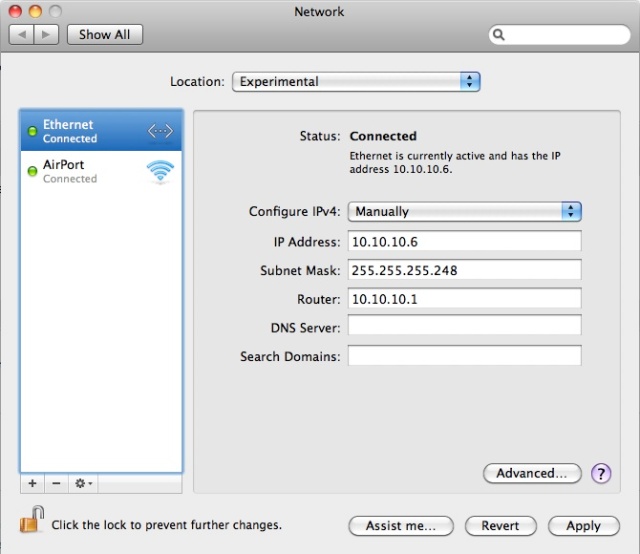


However, I have seen the problem you describe and have had to make sure that:
1. Your host OS has an active LAN connection ie eth0/en0/Local Area Connection (Linux/OS X/Windows) – this means you’ll probably have to plug it into a hub or switch. Give it an IP address of 10.10.10.6/29 and a default gateway of 10.10.10.1
2. Make sure your FIRST VMWare network adapter (GNS3 Workbench-Ubuntu) is eth0 (If not, run the script ot restore eth0 next reboot in the READMEs & Scripts folder)
3. Make sure your VMWare network adapter (GNS3 Workbench-Ubuntu) eth0 adapter is linked to your host PC’s ethernet connection (eth0/en0/Local Area Connection). To check this:
From VMware Fusion: Click Virtual Machine->Network Adapter->Network Adapter Settings
From VMWare Player: Virtual Machine->Removable Devices->Network Adapter->Settings – On Hardware Tab, Check the FIRST network Adapter is set to Bridged Mode
From VMWare Workstation: (Don’t know – can anyone help?)
I have also had problems where the host OS has multiple adapters – most notably my MacBook Pro loves to get confused about whether the VMWare adapter is linked to my Ethernet adapter or my AIrport (WiFi) adapter, and so I have to turn off my WiFI so that it really does link en0 to eth0. So in short – if you have multiple adapters in your host machine, you may need to disable some. I have also seen this problem with VMware Player – and with VMware player, if you have multiple adapters it is very hard to edit the actual adapter settings – you have to run vmnetcfg.exe (see this page for help:)
I have it running with ESXI 4.1 . You must convert the VMDK. The right tool is VMware vCenter Converter Standalone 4.3
You can Download it at https://www.vmware.com/tryvmware/index.php
Thanks for the info
i love your Projekt. I’am a Network Engineer and GNS3 works perfect for me.
Thanks for the great Projekt.
MANY Many thanks! I was just asking the same question at the bottom, when a Google search brought me back to here.. I’m converting now.. I look forward to running this and passing my CCNA.
V.
Glad you found it!
Can I install this as a VM on ESX 4.0? It is failing when I try to power it on and does not work with Converter as well. The power on fails with following message
Module DevicePowerOn power on failed.
Unable to create virtual SCSI device for scsi0:0, ‘/vmfs/volumes/49f07a2e-a9398fbd-6e3e-001b7879227a/GNS3-WORKBENCH/GNS3-WorkBench.vmdk’
Failed to open disk scsi0:0: Unsupported or invalid disk type 8. Make sure that the disk has been imported.
I’ve never tried to install on an ESX server, but I don’t see any reason why you couldn’t. This link refers to ESX 3.5, but may apply. Let me know if it works.
Actually this link may shed a bit more light – you may need to convert the disk to a “growable” type first.
In-case you can’t use the VMWare tools.. Because this is linux and the kernel will boot and detect pretty much any hardware at startup (unlike Windows, which will typically blue screen on different hardware) I’ve done the following in the past:
1. Boot GNS3-workbench VM with an Ubuntu live CD mounted
2. Use the DD command to take a bit-copy of the VM HDD, mount and copy to a network share
3. Create a new ESXi machine, boot with an Ubuntu live CD mounted
4. Mount the network share and use the DD command to restore the bit-copy VM HDD to your new VM
Hope this helps 🙂
That is so great, thank you!
Pingback: Tweets that mention GNS3 Workbench | RedNectar's Blog -- Topsy.com
Wow – this is a brilliant idea. Thanks for this great service. How much of a performance hit do you get running this in VM compared to natively on the hardware? Is it in the 1-5% range or higher? I am going to try it out – thanks 🙂
There is a performance hit, but I haven’t done too many calculations – I was more interested in getting a “complete as possible” package together. If you have the recommended IOS, the labs have a good idle-pc value and depending on the host machine’s power you can run all the labs happily. Eg – on my MacBook Pro (8 GB RAM) I can run a GNS3 WorkBench lab with 6 routers quite happily. On an XP machine with 1.5GB RAM – forget it!
Being loaded in a Virtual Machine also adds a performance hit too – again on my PC I can run GNS3 topologies with 15 routers quite happily, but I doubt it would run so well on the Ubuntu VM (although I haven’t actually tried it).
I’d just like to show some appreciation that you’ve put all this together. I’ve been thinking of doing something similar that includes PIX/ASAs and Juniper Olives.
Thanks Adam – I did have some ASA and PIX stuff as well, but it was getting tough to fit it all in a manageable sized package. I hope to develop this site into something where you can share “add-ons” in a consistent format.